- 5 - - 6 -
Two ironing modes
For the best possible steam ironing result, we offer two modes of
ironing :
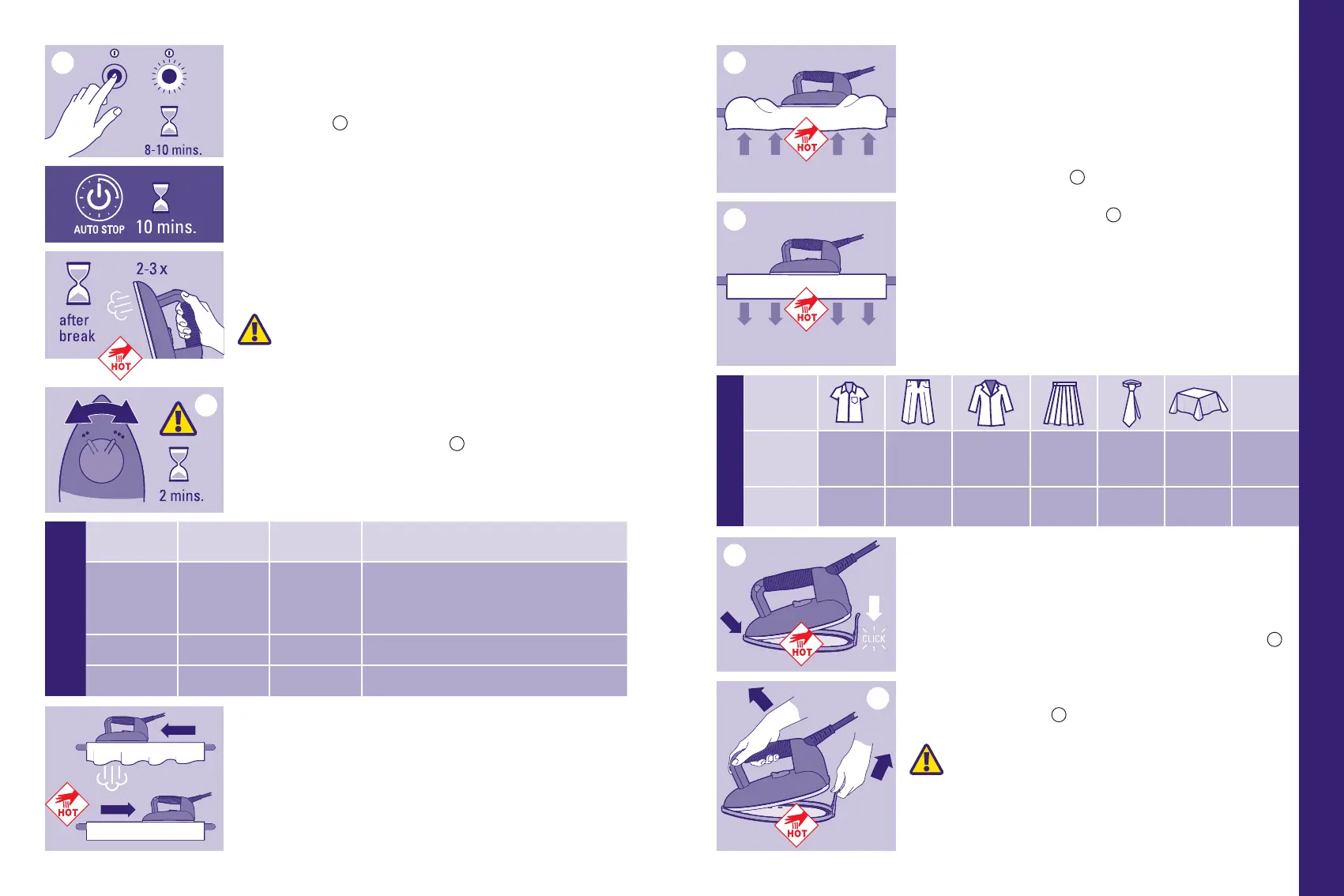
• Press the STEAM button (10) to generate steam and activate the fan
in blower mode.
• Blower mode : this blows air onto the fabric from below, helping to
reduce unwanted creases.
B
• Vacuum mode : this draws in air, holding the garment in place on the
board to facilitate perfect pleats.
C
• Press the VACUUM/BLOWER button (11) to switch from blower to
vacuum mode and vice versa.
Advice : to improve the quality of ironing and increase the autonomy of
your appliance, iron the fabric once using steam, then a second time
without steam to dry the fabric.
Protective soleplate (8)
The protective soleplate is indispensable for dark-coloured fabrics which
can become shiny and for synthetic fabrics which have a tendency to
stick to the iron.
Using the protective soleplate :
• First place the tip of the iron (2) at the front of the protective
soleplate (8) and lower the iron to x it in place in the soleplate.
D
• Wait approximately 2 minutes for the soleplate to reach the correct
temperature.
• To remove the protective soleplate (8), pull on the tab and remove the
iron while it is still hot.
E
WARNING : The protective soleplate and the iron
are hot ! Use caution when you remove the protective
soleplate.
NOTICE : ALWAYS remove the protective soleplate after use.
Switching on your appliance
• Insert the plug in the socket.
• Press the On/Off switch (15), the blue indicator light will ash for 8
to 10 minutes.
B
• When the blue indicator light stops ashing and remains on, the
appliance is ready. You can start ironing.
NOTE : For your comfort and safety, your Laurastar system will
switch off after 10 minutes of non-use.
NOTE : Before ironing, or after an extended break, press the
iron’s steam button 2 or 3 times, while pointing it away from the
clothes. This will release any condensation from the iron and
prevent water marks on the clothes.
CAUTION : Do not point the iron at people or pets while
using vertical steam.
Setting the temperature of the iron
Set the thermostat (9) to • • or • • •.
A
NOTE : After changing the temperature setting, it takes
approximately 2 minutes before the new temperature is
stabilized.
Steam principle
Perfect ironing requires diffusion of steam across the fabric, in order
to relax the bres, and drying to x them in place. Creases can only be
completely removed if these conditions are present. For best results,
rst iron the item with steam and then iron it again without steam,
thereby enabling the iron to dry the fabric.
Ironing
Setting the temperature and
using the soleplate
Indication on
the clothing
Iron setting
Protective
soleplate
Material
D
• • with
Extremely delicate man-made fabrics. E.g.
synthetic velvet, Alcantara
®
(synthetic suede),
“stretch” sports clothing, microfibre fabrics,
polyamide/polyester, viscose, polyurethane
E
• • • with Wool, silk, synthetic fabrics
F
• • • without Cotton, linen, aramide
Ironing mode
Fabric type Velvet
Blowing Back Darts
Inside and
linings,
sleeves
Top and
pleats
• • •
Vacuum
Buttons
and collar
Turn-ups
and pleats
Buttons and
collars
Pleats •
B B
C
D
E
A
EN



 To Next Page