26
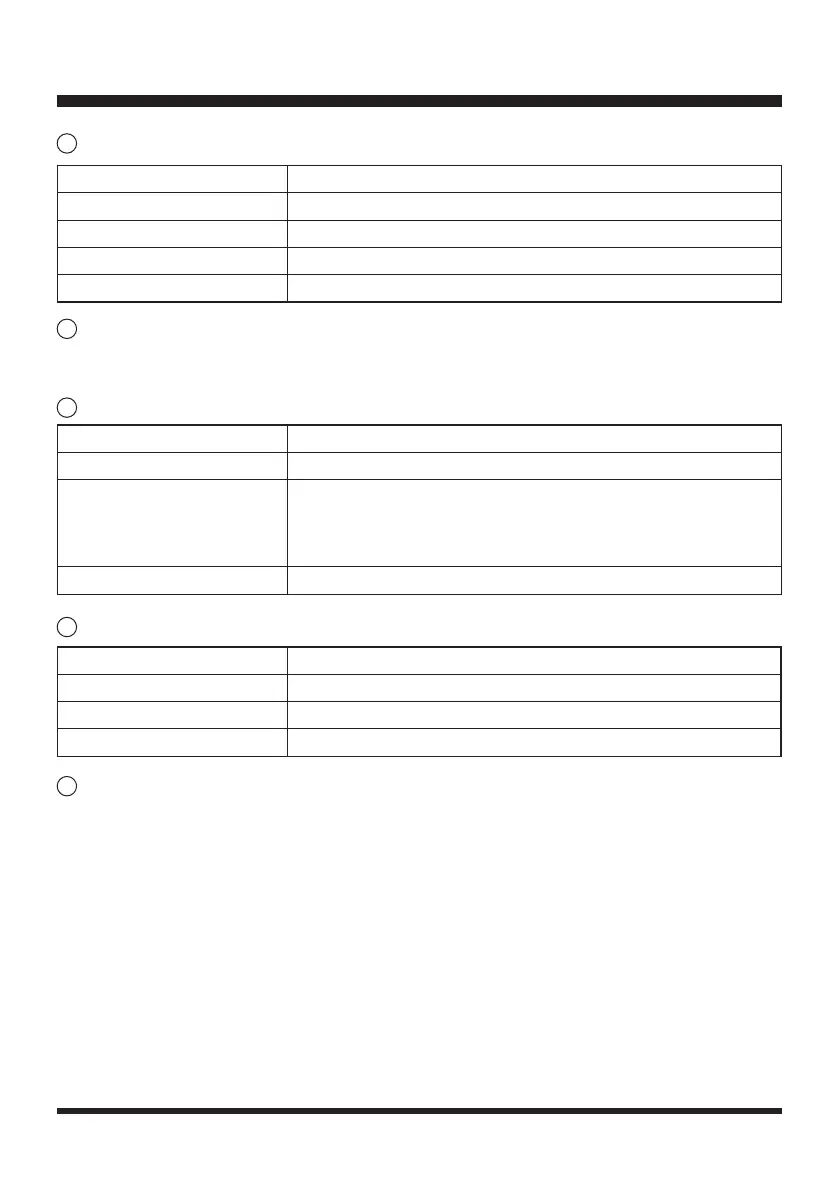
UNLOCK Indicator
Spiral Mow Button (Security Setting Button 2)
Press the Spiral mow button for 1 second to select spiral cutting mode followed by the START/ON
button.
Error Indicator
Ultrasonic Indicator
Ultrasonic On/Off Button (Security Setting Button 1)
Single press to turn off/turn on the ultrasonic function.
LOCKING THE MOWER WITH A SECURITY CODE
This mower is allowed to be locked with a security code. Once the security code is set, the mower
will be locked in the following two situations: 1) the mower is powered off; 2) the mower is in the error
state. You are required to enter the correct security code to re-start the mower.
NOTE: The mower is not set with a security code by default.
To set a security code:
1. Press and hold down the Spiral Mow Button (Security Setting Button 2) and START/ON button
(Security Setting Button 4) simultaneously for 3 seconds. You will hear two beeps and the UNLOCK
Indicator is red continuous.
OPERATION
Error Indicator Status
Off The mower is in normal operation.
Yellow, Continuous
The lift sensor is activated. / The obstruction sensor is activated. /
The mower is tilted. / The rear wheels are lifted (slipping) due to an
obstacle. / The mower has fallen over. / STOP button is pressed. /
The mower cannot see grass.
Red, Continuous Sensor error. / Motor fault. / Operation system error.
4
5
6
Ultrasonic Indicator Status
Green, Continuous The ultrasonic function is on.
Off The ultrasonic function is turned off.
Yellow, Flashing The mower has a communication issue with camera.
7
UNLOCK Indicator Status
Off The mower hasn’t been set with a security code.
Green, Continuous The mower is unlocked. The mower can be manually operated.
Red, Continuous The mower is locked.
Red, Flashing The mower is locked. Input the 4-digit security code to operate.
8










 To Next Page