38
TROUBLESHOOTING
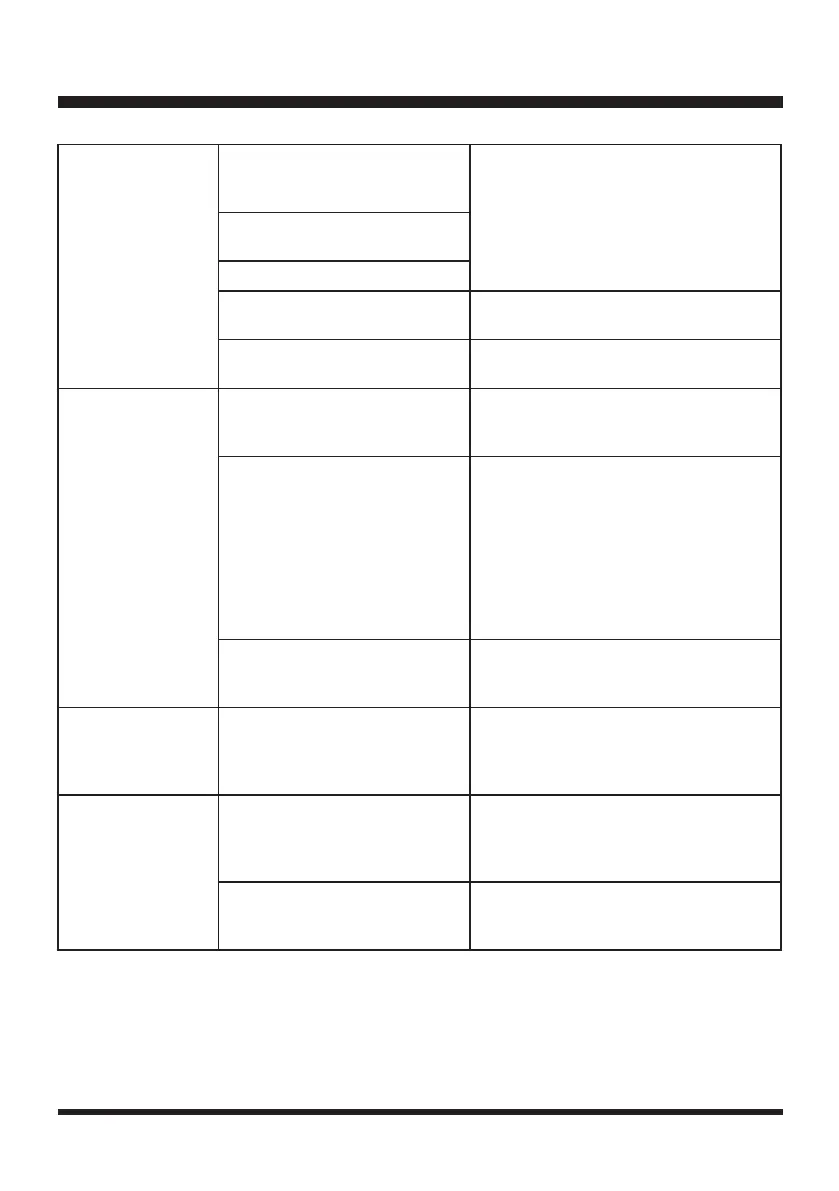
Error indicator is
yellow continuous.
The robotic mower has been
tilted for a prolonged time in one
direction.
Remove and re-insert the safety key.
Remove any obstacles. Restart the
mower.
The rear wheels have been lifted
due to an obstacle.
The mower has fallen over.
STOP button is pressed.
Remove and re-insert the safety key.
Restart the mower.
The robotic mower cannot see
grass.
Move the robotic mower to the lawn and
restart it.
Error indicator is red
continuous.
Sensor error.
Remove and re-insert the safety key.
Restart the mower. If the problem
remains, contact Customer Service.
Overcurrent in the motor or motor
fault.
Remove and re-insert the safety key.
Check for and remove any obstacles
around the rear wheels and the blade
disc. Increase the cutting height. Check
whether the grass is too tall. If necessary,
mow the grass to below 2.36'' (60 mm)
with a conventional lawn mower. Restart
the mower. If the problem remains,
contact Customer Service.
Operation system error.
Remove and re-insert the safety key.
Restart the mower. If the problem
remains, contact Customer Service.
Ultrasonic indicator
is yellow ashing.
The mower has a communication
issue with camera.
It is too dark for camera to work. Operate
the mower during daylight hours only.
Remove and re-insert the safety key.
Restart the mower.
The battery indicator
is red ashing.
The temperature of battery pack
is abnormal.
Allow the machine to cool down to reach
a normal temperature. Then restart the
mower. If the problem remains, contact
Customer Service.
Electric core fault. (The error
indicator is red continuous at the
same time.)
Remove and re-insert the safety key.
Restart the mower. If the problem
remains, contact Customer Service.







 To Next Page