Page 28
For HELP, call In-Touch at 866.461.3123
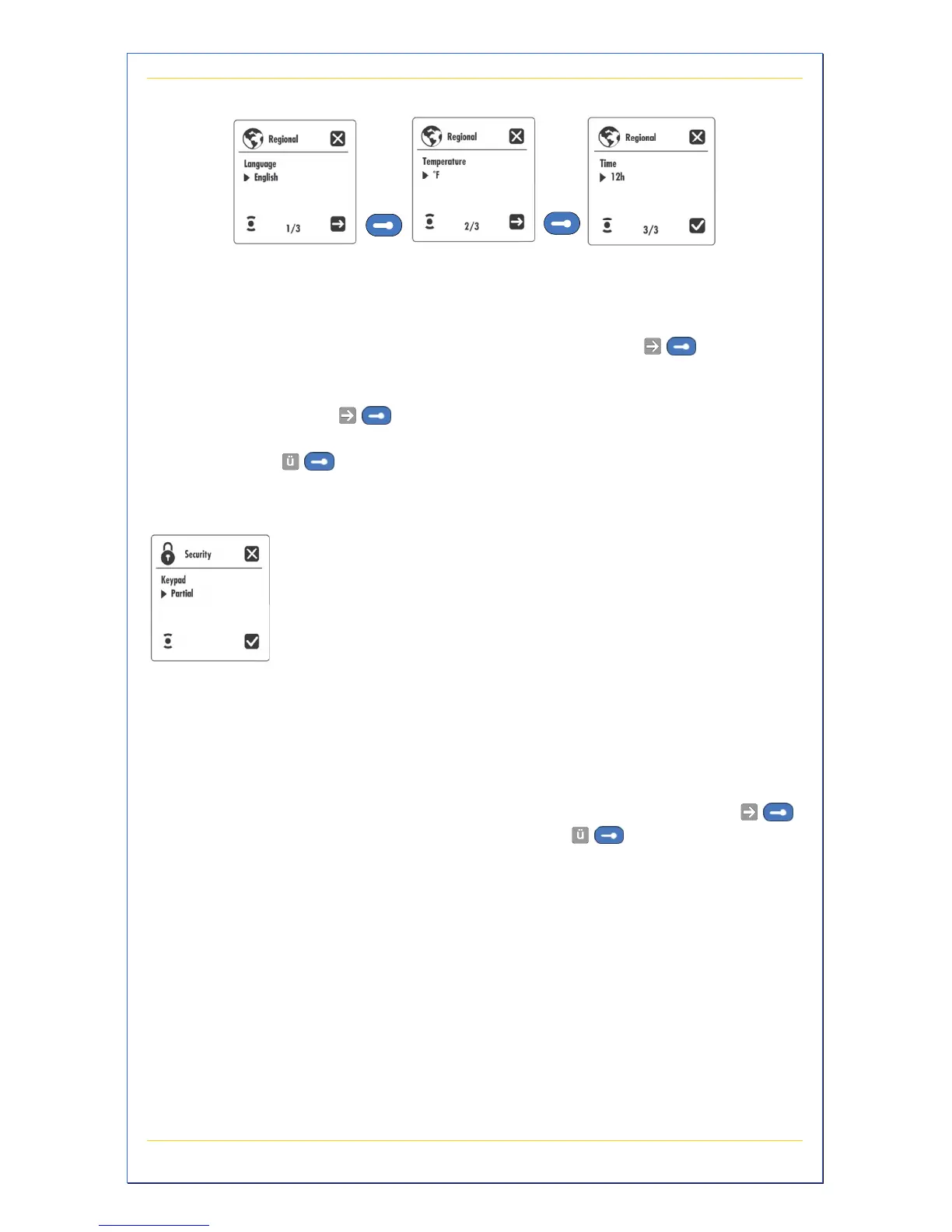
Figure 21 – Regional Screens
These setting control the language, temperature units, and time format.
Language Press +/- to select your language. Press
to go to
the next screen.
Temperature Press +/- to select a temperature reading in degrees F/C.
Press
to go to the next screen.
Time Press +/- to select a 12/24 hour clock display. Press
to save the settings.
This submenu allows you to personalize the keypad
security of your spa to prevent unauthorized changes to
the settings. When the keypad is locked the lock icon is
displayed.
A Partial keypad lock allows access to basic spa
functions (pumps, light, etc.) but blocks access to the
temperature set point and Programming mode.
A Full keypad lock is a total keypad lockout.
Press +/- to set a partial or full keypad lock. Press
to go to the next screen. Press
to save the
settings.
Note: To unlock the partial keypad, select and hold
Options menu key for 5 seconds.
Note: To unlock the full keypad, select and hold Light
menu key for 5 seconds.


 To Next Page