Page 33
For HELP, call In-Touch at 866.461.3123
S t e r e o S y s t e m
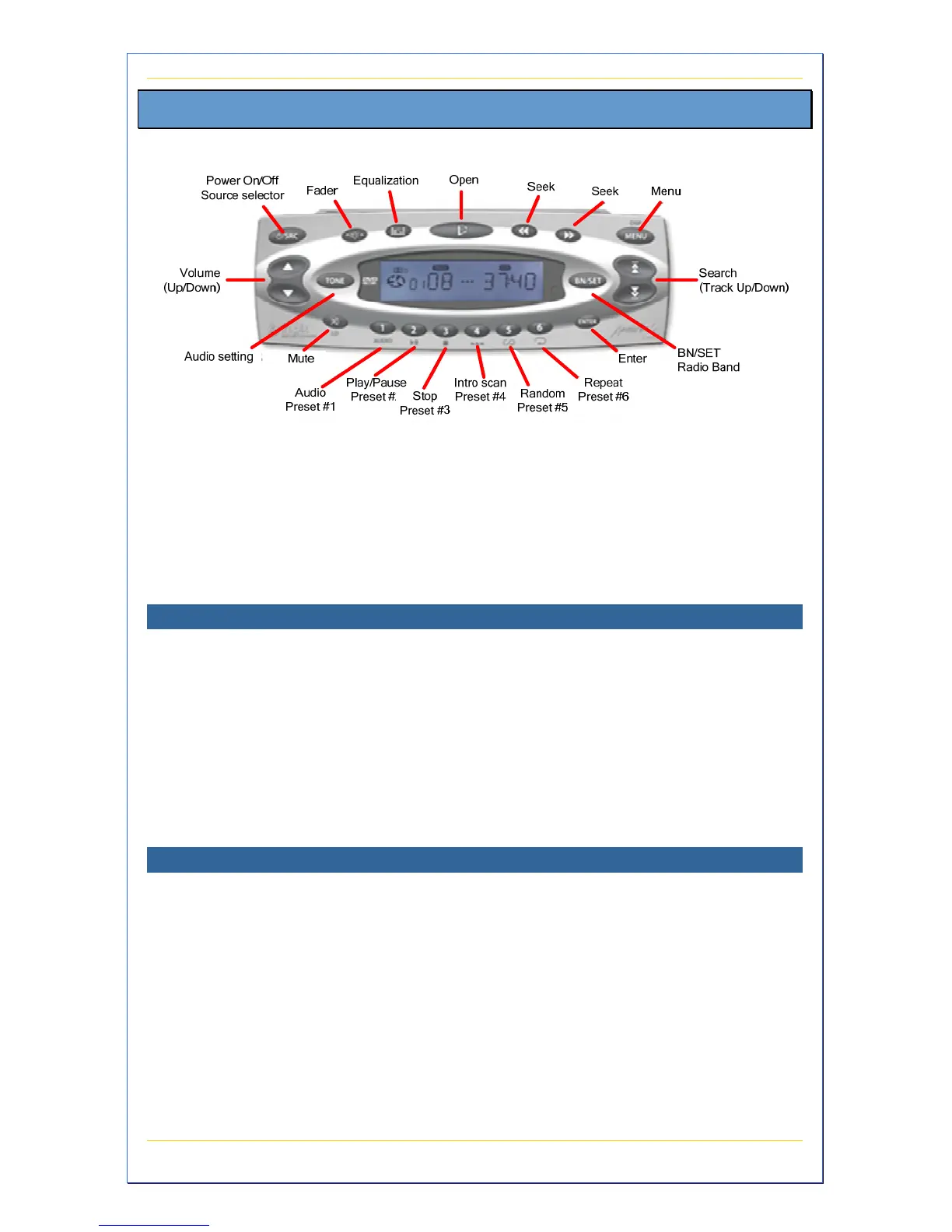
Figure 23 – Stereo Callouts
The built-in AM/FM/Weather Band stereo CD system (if equipped) plays
CDs and MP3s. Your stereo also works in conjunction with your remote
control (see page 33) to control the sound through your speakers for
whatever audio source you select.
Playing a CD
1. Press the POWER button on the stereo
2. Press the OPEN button on the top of the stereo
3. Insert a CD
4. Press the CD button on the remote control
5. Press PLAY on the remote control
6. Press the Previous/Next button on the remote control to go to the
previous/next track
Listening to the Radio
1. Press the POWER button on the stereo
2. Press the Stereo button on the top of the remote control
3. Press the Channel Up/Down button on the remote control to scan
for the next/previous station
4. Press the Previous/Next button on the remote control to go to the
previous/next pre-programmed station
For complete information on the audio/video capabilities and features,
see the manufacturer’s manuals (enclosed).


 To Next Page