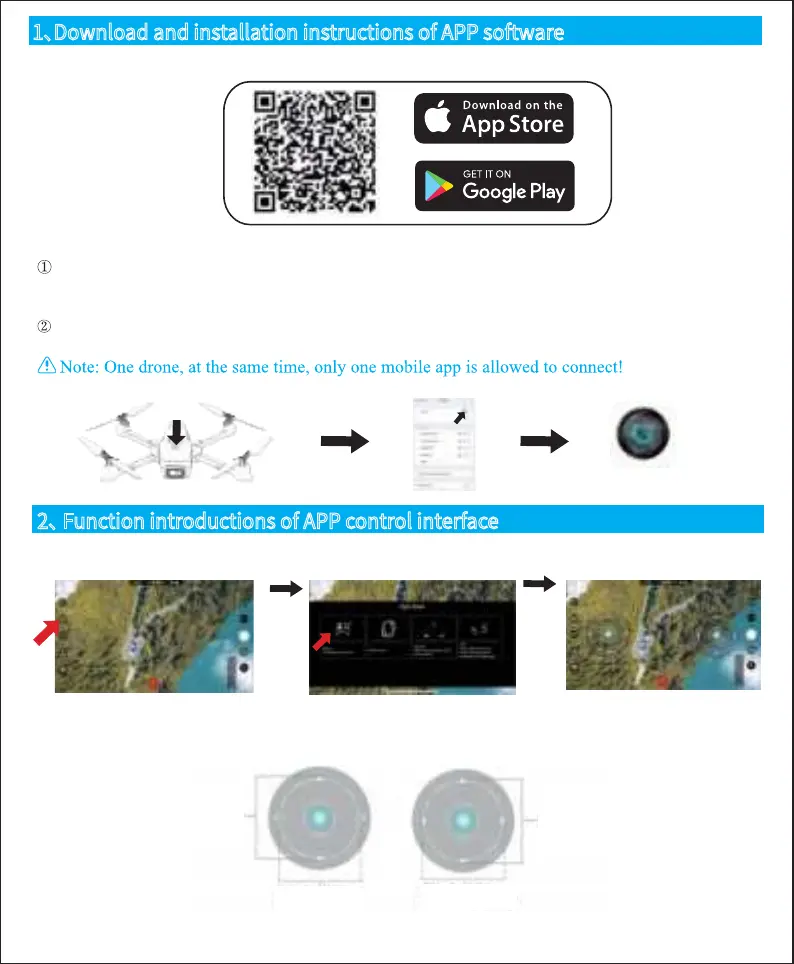
Long press 3 seconds to turn on the power, enter (Mobile or IPAD) "Settings" option, open the wireless
network, find the name of the device "WIFI-4K-*****" in the wireless network search list and
connect it. After the connection is successful, exit the setting option.
Open the “Fly Plus” software icon on your mobile phone and enter the control interface. (Try to stay
away from other signal sources when flying)
WIFI-4K-2AE371
● Rocker
Notice:
After connecting to the aircraft, turn on the control in the control mode
Throttle slide up/down
The aircraft will ascend
/descend
Steering: Swipe left/right
The aircraft will rotate left/right
Front/Back: Swipe up/down
The aircraft will go forward
/backward
Side flight: swipe left/right
The aircraft will fly left/right
1、Download and installation instructions of APP software
1.1 Download and install the software
1.2 Description of links
2、 Function introductions of APP control interface
● Control mode
-5-


 To Next Page