© 2019 LEA Professional. All Rights Reserved.
WEB APP UI | GettingStarted
CONNECTSERIES CONTROL & MONITORING
With our Web App UI, you are no more than three clicks away from anything.
First, from the broadest view, you get a clear status check of every amplifier connected to the network.
Therefore, you can see which amps are online/offline, whether they are powered on or in a standby
mode, a quick performance status to report any errors or faults and even more.
In addition, with one click, you can view the status of every channel on any given amp to quickly monitor
channel performance. Such as your output meter with a clip indicator, status indicators such as Ready,
Limiting, Thermal, and Fault, as well as a quick attenuation level view and channel mute button.
So then, with a second click, you can select an individual channel for control and monitoring. Lastly, with
a third click you are ready to start viewing and adjusting channel settings such as Input Settings, Signal
Generator, Crossover, Equalizer, Limiter, and Load Monitoring.
Amp#123
AP: Amp-123
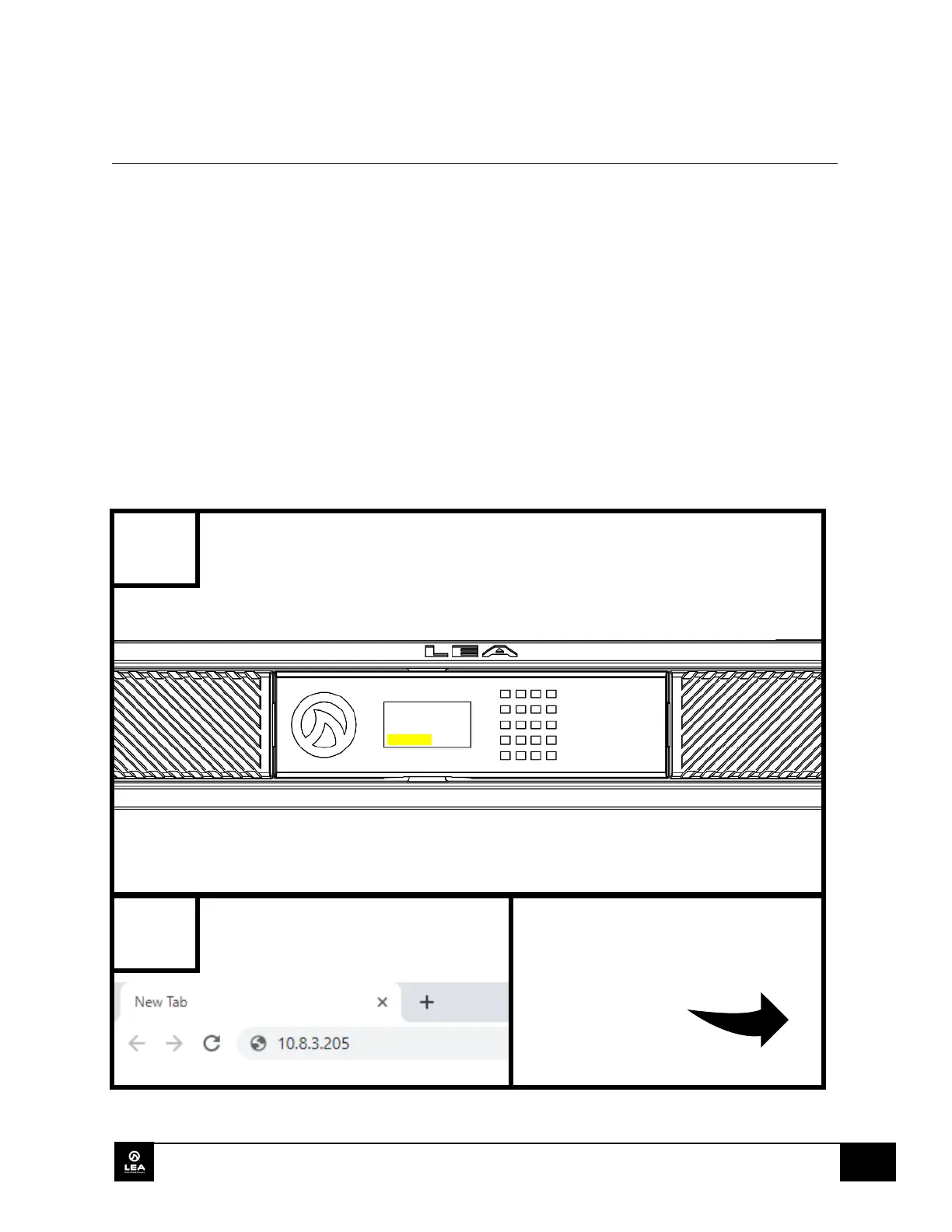
FIND THE IP ADDRESS DISPLAYED
ON THE FRONT PANEL SCREEN.
DEVICE’S WEB BROWSER SEARCH


 To Next Page