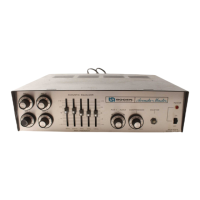
MIC VOLUME: The four individual MIC volume controls
are used to adjust the level of each microphone input
channel. The control is turned clockwise (to the higher
numbers) to increase the volume and counterclockwise to
reduce it.
AUX VOLUME: This control serves a two-fold purpose. It
selects either of the two auxiliary inputs and it controls the
volume’ of the selected auxiliary input. To select the AUX 1
input, rotate the control counterclockwise past the center
position. Turning this control counter-clockwise to the
higher numbers increases the AUX 1 volume. To select the
AUX 2 input, rotate the control clockwise past the center
position. Turn the control more clockwise to increase the
AUX 2 volume.
If the auxiliary input is not to be used, set the control to
the center position. The center position is indicated when
the triangle on the control knob coincides with the vertical
line between the AUX 1 and AUX 2 designations.
MASTER: This control is used to regulate the overall
volume of the amplifier, which may include the mixed out-
put of two or more input channels. To set this control,
rotate it to *maximum clockwise position, then set the
individual MIC and AUX controls to the highest level likely
to be used and consistent with the operation of the limiter
compressor. Adjust the MASTER control to the desired
listening level for the mixed output.
POWER: This switch applies power to the amplifier. It will
also turn on any associated equipment which may be
connected to the auxiliary power receptacle on the rear
panel. The POWER indicator lamp will go on to show that
power has been applied to the unit.
ACCESSORIES
The installation of accessory transformers re-
quires the removal of the cover, which pre-
sents an electrical shock hazard. For this
reason, these accessories must be installed
only by a qualified technician.
MIC INPUT TRANSFORMERS: Bogen
TM2OOA
and
TM5OOA
plug-in transformer accessories are designed to
convert the input impedance of the amplifier to that of a low-
impedance microphone. Model TM200A accommodates
200-
ohm mics, and the
TM5OOA
500/600-ohm microphones.
The Acousta-Master CT amplifiers are furnished ready
for use with high-impedance microphones. To convert any
of the microphone inputs to balanced low-impedance use,
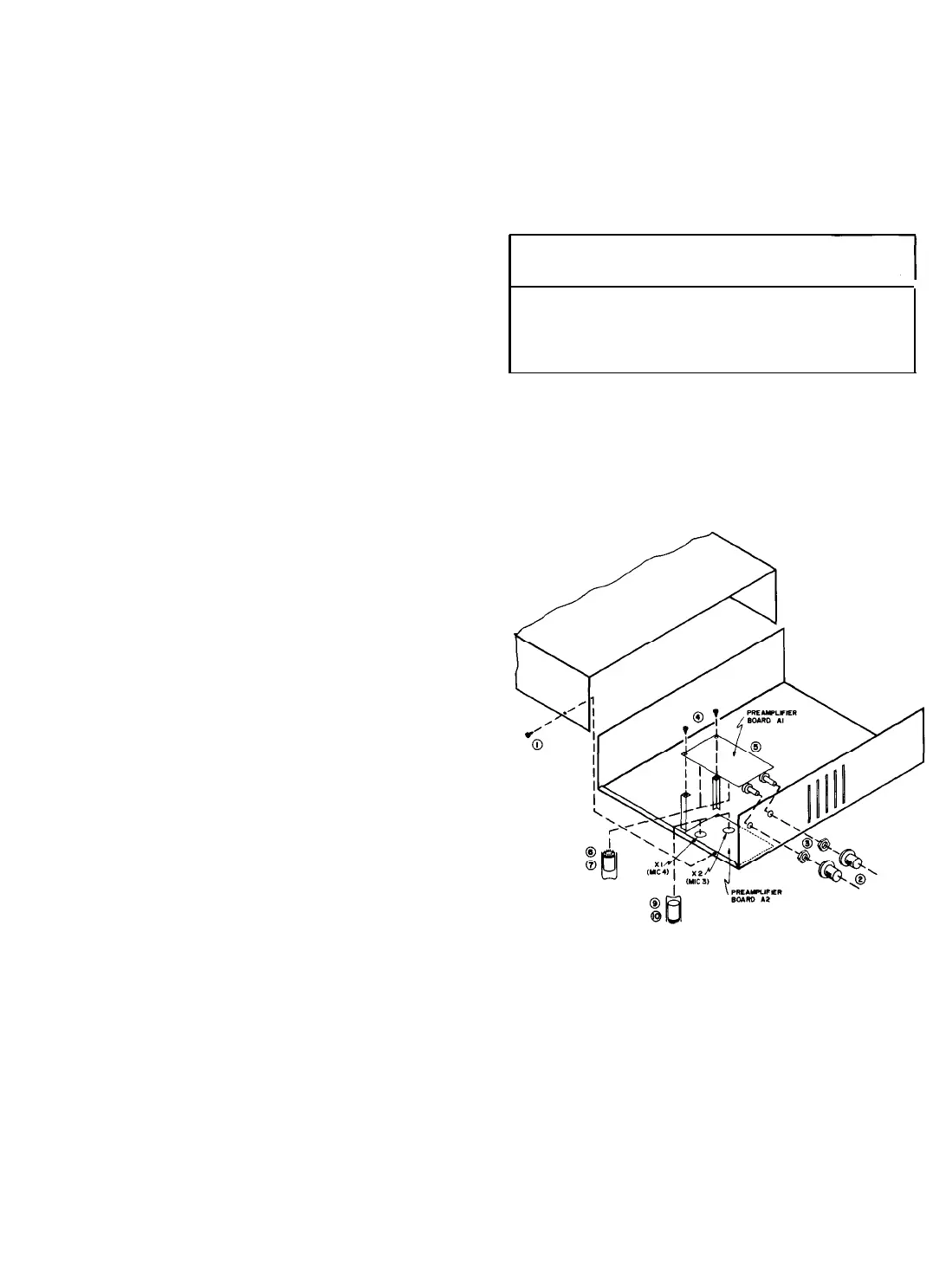
refer to figure
5
and proceed as follows:
1. Remove four screws on each side of cover and the
cover (1).
2. Remove two knobs (2).
3. Remove two nuts (3).
4. Remove two screws (4).
5. Remove preamplifier board Al. Turn board over.
6. Install low impedance transformer(s) in 9-pin
socket(s). XI is for MIC 1 input; X2 is for MIC 2 input.
7. Use spring clip(s) to secure transformer(s) in
socket(s).
8. Change jumper connections as indicated in the table
below.
9. At preamplifier board A2, install low impedance
transformer(s) in 9-pin socket(s). XI is for MIC 4 input; X2
is for MIC 3 input.
10. Use spring clip(s) to secure transformer(s) in
socket(s).
11. Change jumper connection as indicated in the table
below.
Transformer
Plugged
in for:
Remove
Reconnect
Jumper between: Jumper between
MIC 1 Conversion
Pins 8 &18
Pins7&9
MIC 2 Conversion
Pins11&19
Pinsl0&12
MIC 3 Conversion
Pins11&19
Pins
lO& 12
MIC
4 Conversion
Pins8&18
Pins7&9
12. Mount preamplifier board Al on the amplifier,
using two screws at the rear, two nuts over the control
shafts, and the two control knobs. Replace cover.
Figure
5
-
Installing Low-Impedance MIC Input Transformers
LVP-1 AND
RVC-2A
UNITS: The Bogen LVP-1 is a plug-in
accessory which provides microphone precedence over the
MIC or AUX channel to which the accessory is connected.
The LVP-1 may be used with the MIC 1, MIC 4 and AUX
channel, and a separate accessory is required for each
channel.
The LVP-1 unit is also used in conjunction with the
Model RVC-2A accessory to provide remote volume control
of these channels. The RVC-2A will control the output
level at distances up to 2000 feet from the amplifier.
-6-


 To Next Page
 Loading...