EasyManua.ls Logo

Lec BC6097K - Controller Operation

Lec BC6097K
20 pages
Print Icon
To Next Page IconTo Next Page
To Previous Page IconTo Previous Page
Loading...
www.lec-commercial.co.uk 12
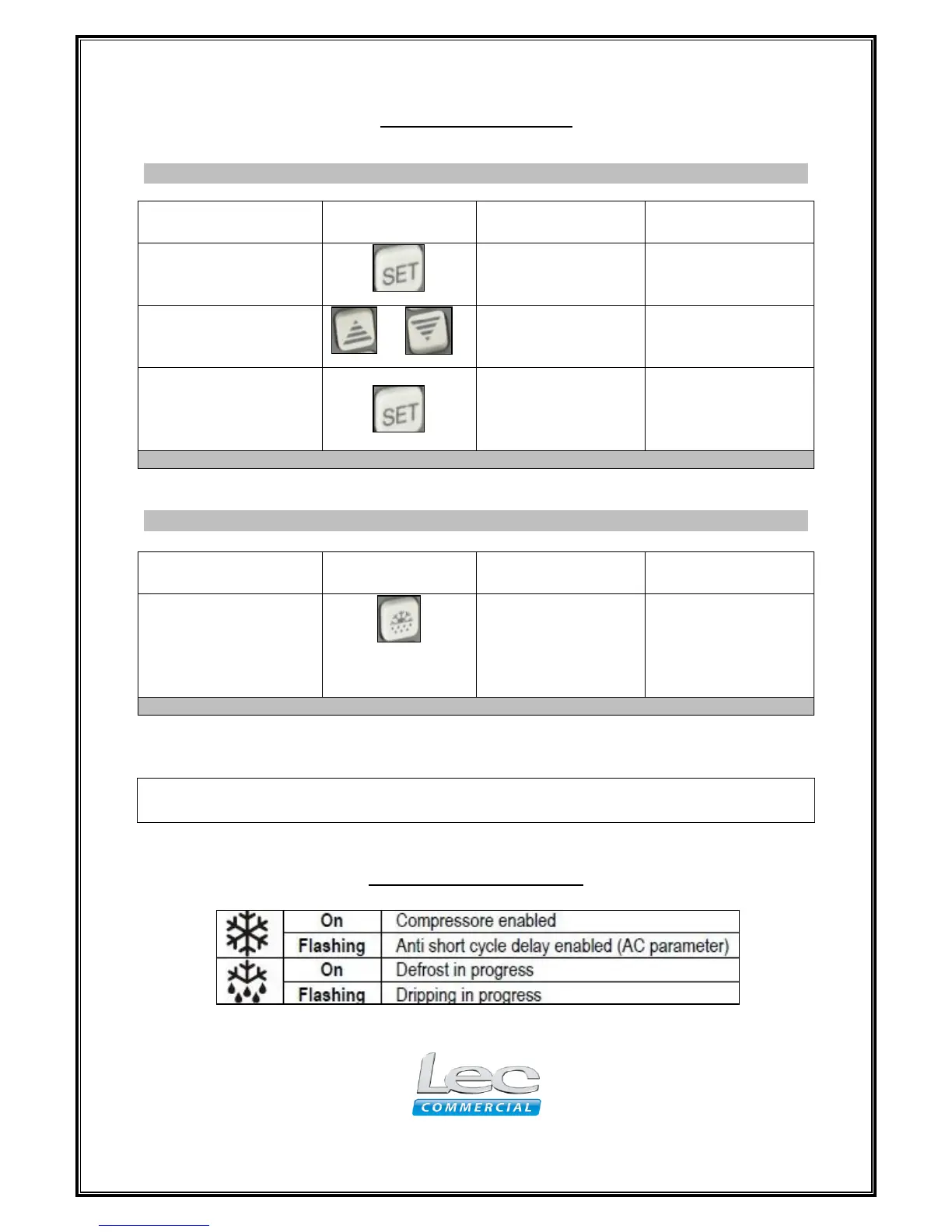
Controller Operation
View or Change the Current Set Temperature
Function
Press
Hold button(s)
down for
Result
To view/set
temperature
1 second
Displays current set
temperature
Followed by
or
Until desired
temperature is
reached
Modifies and saves
set temperature
Followed by
1 second
Exits the
adjustment and
displays internal
temperature
Note: If no more buttons are pressed within 6 seconds, the interior temperature will be displayed.
Performing a Manual Defrost cycle
Function
Press
Hold button(s)
down for
Result
Manual start / stop
Defrost
6 seconds
Starts or stops
defrost. Defrost LED
illuminates when
defrost is in
progress.
Note: If no more buttons are pressed within 6 seconds, the interior temperature will be displayed.
IMPORTANT: Ensure you Clean and dry thoroughly before switching back “ON” after
performing a manual defrost cycle.
LED indication symbols

Related product manuals