p.16 Squiggles
+
Stander User Manual
9.3 Adjusting the
push handle
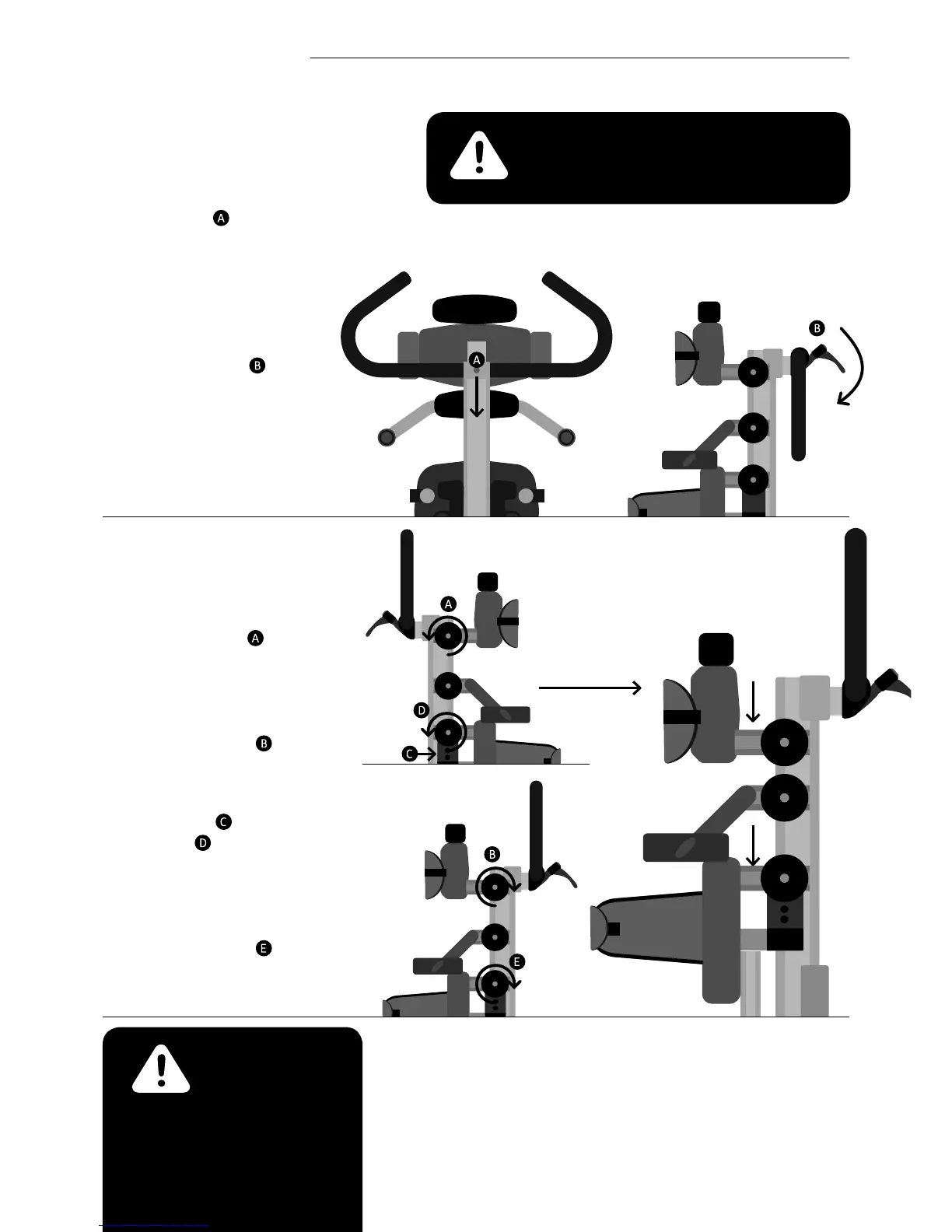
The push handle height can
be adjusted by loosening
the Allen bolt
at the
attachment point to the
stander, adjusting to the
desired height then
re-tightening the Allen
bolt. The angle of the push
handles can be adjusted
by loosening lever at
the attachment point to
the stander. Rotate the
push handle to the desired
position, then secure the
lever to original orientation.
9.4 Adjusting the chest
and hip supports
To adjust the chest support
rotate both knobs
in an
anticlockwise direction as
shown. Set to the required
position and then re-tighten
both knobs in a clockwise
direction as shown
.
To adjust the hip support
loosen the 4 locking bolts
(2 either side) . Rotate
both knobs in an
anticlockwise direction as
shown. Set to the required
position and re-tighten
both knobs in a clockwise
direction as shown .
Finally re-tighten the 4
locking bolts.
Always use caution to ensure
ngers do not become
trapped when adjusting the
chest and hip supports.
To prevent nger nipping always hold the
push handle with one hand whilst making
the adjustment with your other hand.



 To Next Page