UHF Digital Hybrid Wireless
®
Rio Rancho, NM
9
Camera Slot Adapters
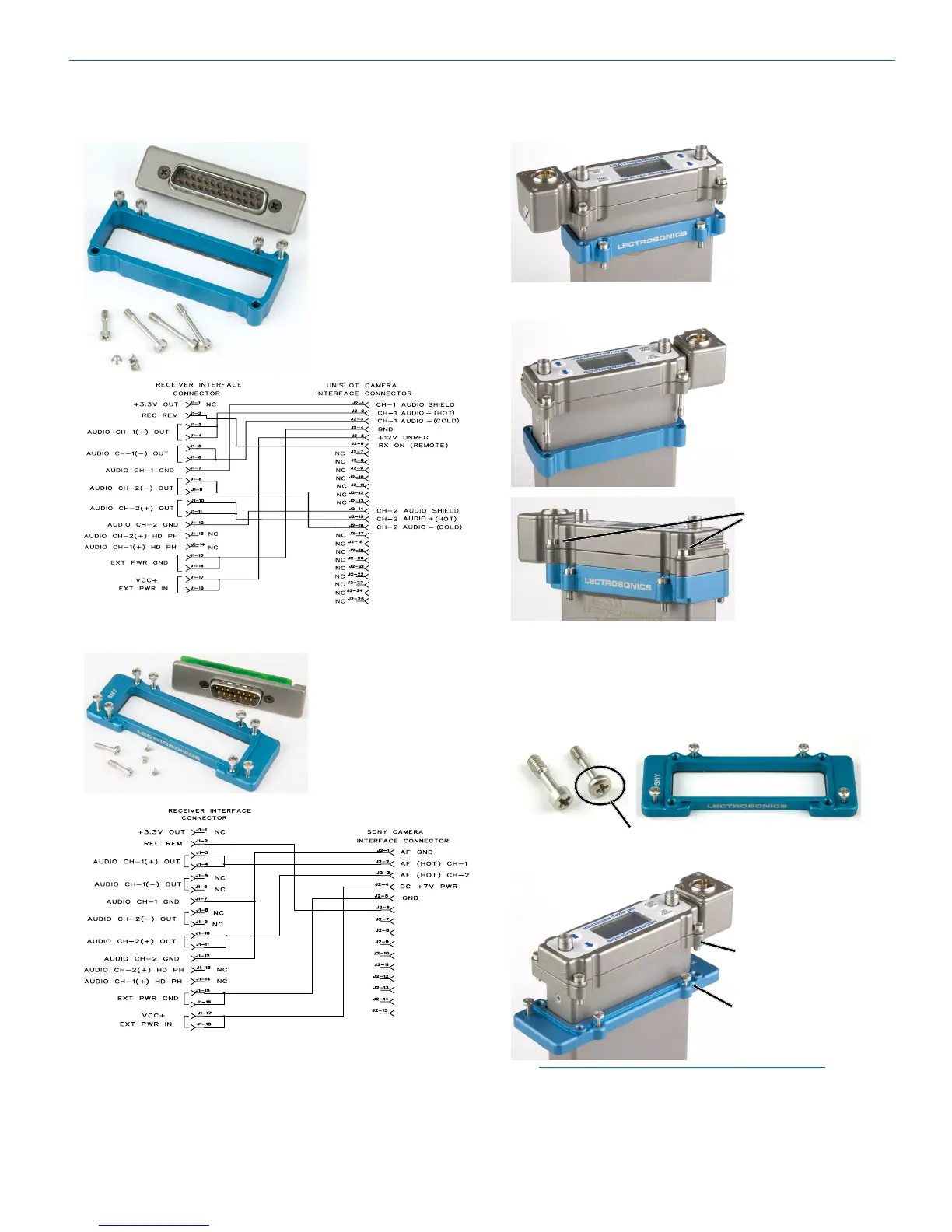
SRSUPER
Adapter kit for Un-
islot
®
camera slots
such as those pro-
vided on Ikegami
®
and Panasonic
®
cameras.* Includes
bezel, hardware
and rear panel
DB25 connector
wired for power
and audio connec-
tions.
SRSNY
Adapter kit for
Sony
®
camera
slots,* includes be-
zel, hardware and
rear panel DB15
connector wired for
power and audio
connections.
Installing Camera Slot Adapters
SRSUPER Adapter
Thread two short
screws through the
recessed tabs on the
adapter and slide
it onto the receiver
housing. Thread two
short screws through
the tabs on the
receiver flange as
shown.
On the opposite
side, thread two long
screws through the
tabs on the receiver
flange, then align
them with the tabs
on the adapter.
Slide the adapter
up and tighten the
retaining screws
to secure it to the
receiver flange.
The four lower
screws attach to the
camera body.
SRSNY Adapter
Two different types of screws are used to attach the
receiver flange and the adapter.
Thread the smaller, thin head screws through the
adapter and into the camera body.
Upper screws with thicker
heads secure the receiver
to the adapter.
Lower screws with thinner
heads secure the adapter
to the camera body.
NOTE: If you are having difficulty inserting
the receiver into the camera slot, try mounting
the blue adapter plate to the camera first, then
inserting the receiver.
* UniSlot
®
is a trademark of Ikegami Tsushinki Co., Ltd.
Ikegami
®
is a registered trademark of Ikegami Tsushinki Co., Ltd.
Panasonic
®
is a registered trademark of Matsushita Electric Industrial Co., Ltd.
Sony
®
is a registered trademark of Sony Kabushiki Kaisha TA Sony Corporation.



 To Next Page