5
Operation:
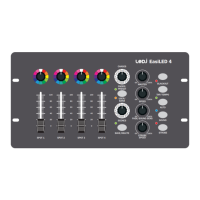
TheEasiLED4hasthreemainmodesofoperation:Manual,AutoorSoundcontrol.UsetheAuto,
MusicorFader/Preset&User/Bankbuttonstoswitchbetweeneachusermode.TheLEDindicatorswill
illuminatenexttoeachofthebuttonstoconrmtheusermodeselected.TheManualmodeisindicated
bythefader/presetgreenLED.
Afterpoweron,thecontrollerwillrestartinthelastusedmodeassumingthelastusedmodewasactive
for10secondsormore.
Pleasenote:Inallmodes,theblackoutbuttonmaybepressedtoturnoffthelightoutput.TheredLED
nexttoblackoutbuttonwillashtoindicateblackoutisactive.Blackoutwilloperateregardlessofthe
xture/groupselection.
Manual mode:
ManualModecanbeusedforselectionofcolourseitherforadhocscenesorforcreatingscenesbefore
recordingintosavedscenesorchases.SwitchthecontrollertoManualMode(indicatedbyGreenLED
bytheFader/Presetbutton)andfollowthestepslistedbelow:
-Setthecoloursofthextures/groupsusingtherotaryselectors
-Adjusttheintensity(brightness)ofthextures/groupsusingFaders1-4ensuringthe
masterdimmerisalsoactive.
-Turnthefadetimecontrolanti-clockwiseto“0”forinstantcolourchangesorrotateclockwisetoin
creasethefadetimebetweencolours.
Saving scenes:
AftersettingthesceneaspertheManualModeinstructionsyoucansavethesceneandatthesame
timesavethesceneasasinglestepintheselectedchase(1to12).SelecttheChaseandScenethen
pressthe“Save/Delete”button,thegreenLEDwillashquicklythreetimestoconrm.
Deleting scenes:
AftersettingthesceneaspertheManualMode.SelecttheChaseandScenethenpressandholdthe
“Save/Delete”button,alloftheLEDsonthecontrollerwillashtoconrm.
Scene playback:
PresstheFader/PresetbuttontoilluminatetheorangeLEDconrmingthecontrollerisnowinUser/
Bankmode.Selectthechaseandthenscenerequired.Sceneplaybackmaybemanuallyadvancedby
selectingscenesindividuallyusingtherotarySceneselector,ortheymaybeadvancedbyeitherSound
orAutomodes.
Operating instructions


 To Next Page
 Loading...