6
Operating instructions
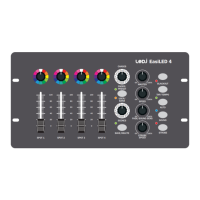
01) Rotary colour selectors:
Twelve,presetcoloursselectableusingsimplerotarycontrolswhenthecontrollerisusedinManual
Mode.
02) Fixture dimmer controls:
Fourdimmerfaders,eachforcontrollingtheintensityforaxture/group.
03) Chase selector (12 settings):
Thecontrollercanstoreupto12chases,eachchasemaybebuiltusingupto12scenesperchase.
Usetherotaryselectortochoosetherequiredchase.
04) Preset/User bank selector:
UsethisbuttontoswitchbetweenManual/FadermodeandUser/Bankmodes.
05) Scene selector (12 settings):
Thecontrollercanstoreupto12chases,eachchasemaybebuiltusingupto12scenesperchase.
Usetherotaryselectortochoosetherequiredsceneafterselectingthechase.
06) Save/Delete button:
WhenthecontrollerisinManualmode,aquickpresswillsaveaselectedscene,conrmedbythree
greenashesoftheLED.Pressandholdtodeleteaselectedscene,allLEDsonthecontrollerwillash
toconrmscenedeletion.
07) Master dimmer:
Activeinallmodes,themasterdimmercontrolcanbeusedtoadjusttheintensityofallxtures
connectedtothecontroller.
08) Speed control:
ThespeedcontrolcanbeusedtoadjustthechasespeedwhenthecontrollerisinAutomode.
Turnclockwisetoincreasethechasespeed.
09) Fade time control:
Activeinallmodes,theFadeTimecontrolcanbeusedtoadjustfadetimebetweenallfunctionsonthe
controllerincludingmanualcolourselections.Forinstantchangesthefadetimemustbeturnedfullyto
theleft(anti-clockwise).
10) Strobe speed control:
TheStrobeSpeedControlcanbepreselectedaheadofStrobeModeactivation.Turnclockwiseto
increasethestrobefrequency.
11) Blackout button:
PresstheBlackoutbuttontoactivateblackoutforallxturescontrolledbytheEasiLED4controller.
Whileactivated,BlackoutmodewillbeconrmedbyaredLEDashingnexttothebutton.
12) TAP/Tempo button:
TheTAP/Tempocontrolallowstheusertoselecttheplaybackspeedforchasesintime.WhileinAuto
mode,presstheTAP/Tempobuttonaminimumofthreetimestosetthedesiredplaybackspeed.


 To Next Page
 Loading...