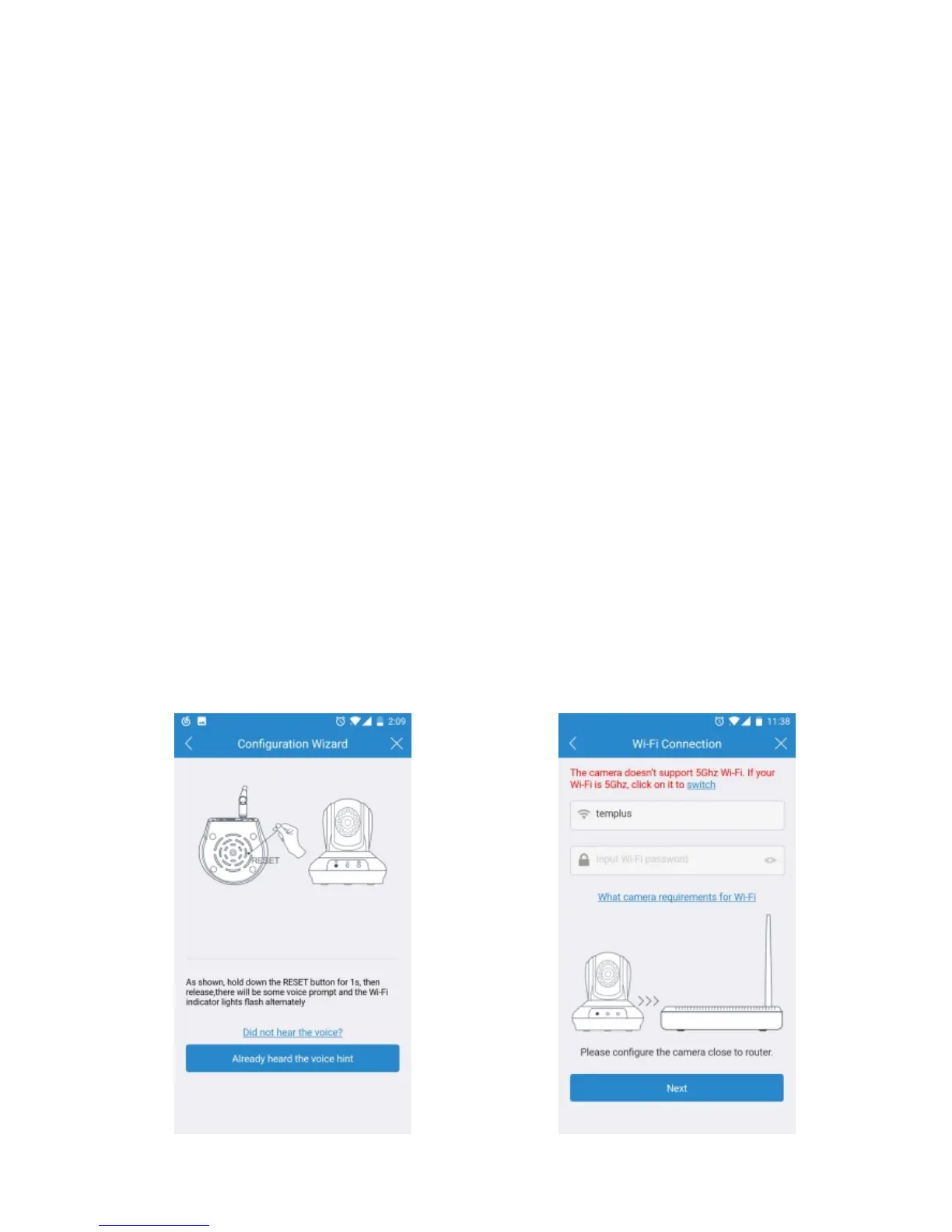
8. It will direct you the connection interface (Figure-09). Please
keep your phone closer to the mic of the camera (the max
distance is 6ft).If you fail to connect Wi-Fi, please press the
RESET button 10 seconds to restore factory settings (After
pressing the reset button 10s, you would hear the voice
prompts RESTORE TO FACTORY SETTINGS
SUCCESSFULLY). Then, wait for 60s to let the camera get
ready (A tick sound will turn up after it is ready), unplug the
power adapter and follow step2-step11 to add it again.
9. After the Wi-Fi connection succeeded, you should be asked to
modify your camera password (Figure-10). Please input your
new camera password and click Apply.
7. Then the Wi-Fi name will automatically display. Please input
your Wi-Fi password and tap the Next (Figure-08). In order
to make the camera connect your home network successfully,
please confirm your phone has connected 2.4G Wi-Fi network
that you would like the camera to connect.
Figure-07 Figure-08
12


 To Next Page