SYSTEM OVERVIEWPage 6
F196
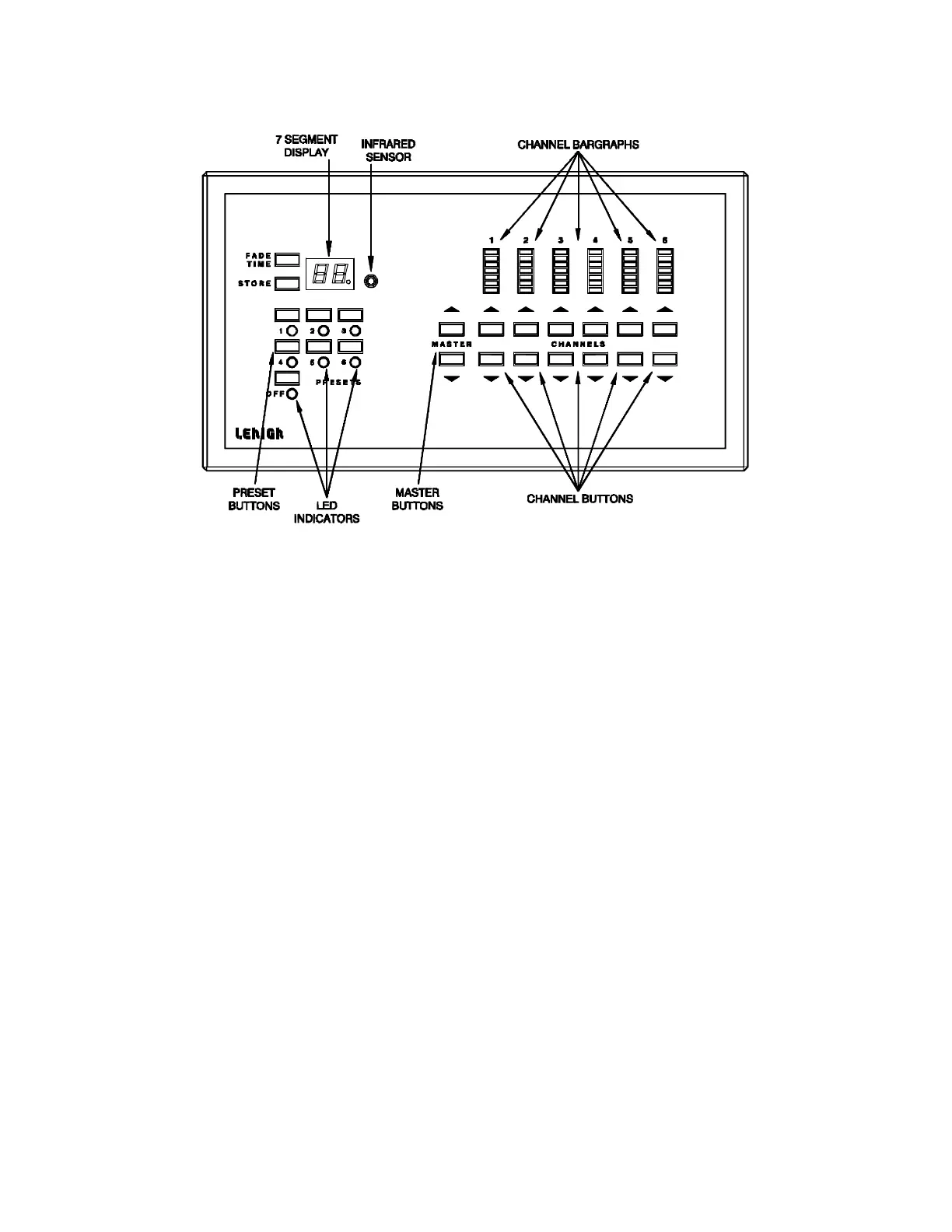
FIGURE 5 - Solitaire Station Front Panel
DISPLAYS
7 Segment Displays: show fade time remaining, error conditions and also show
configuration information.
Channel Bargraphs: show the present lighting level for each channel and also show
configuration information.
LED's: show which Preset (1 thru 6) is active. The LED's will not light for Presets 7
thru 18, which will only be indicated at the remote preset station.
BUTTONS
Presets: activate the numbered preset (1 thru 6).
Off: fades all the lights to the “Lowest Level Settings” (see page 9) over a
preassigned fade time of 10 seconds. The Off Preset levels or its fade time
cannot be modified, when active.
Fade Time: starts "Change Fade Time Mode", where the fade time can be assigned
for each preset.
Store: saves the data to memory. In Preset Mode, it saves the channel levels on
the lights. In "Change Fade Time Mode", it saves the new fade time.
Infrared Sensor: receives infrared control signal to activate Presets 1 thru 6, OFF,
MASTER UP & DOWN from an optional Lehigh Electric hand held
infrared controller.
Master Up & Down: change all active channel levels at one time. The channel
levels will increase or decrease as long as the appropriate
master button is held down.
Channel Up & Down: individually changes the level of a channel. The channel level
will increase or decrease as long as the appropriate channel
button is held down.


 To Next Page