EasyManua.ls Logo

Leica M3 - The Finder Frame Preselector; Holding the Camera

Leica M3
29 pages
Print Icon
To Next Page IconTo Next Page
To Previous Page IconTo Previous Page
Loading...
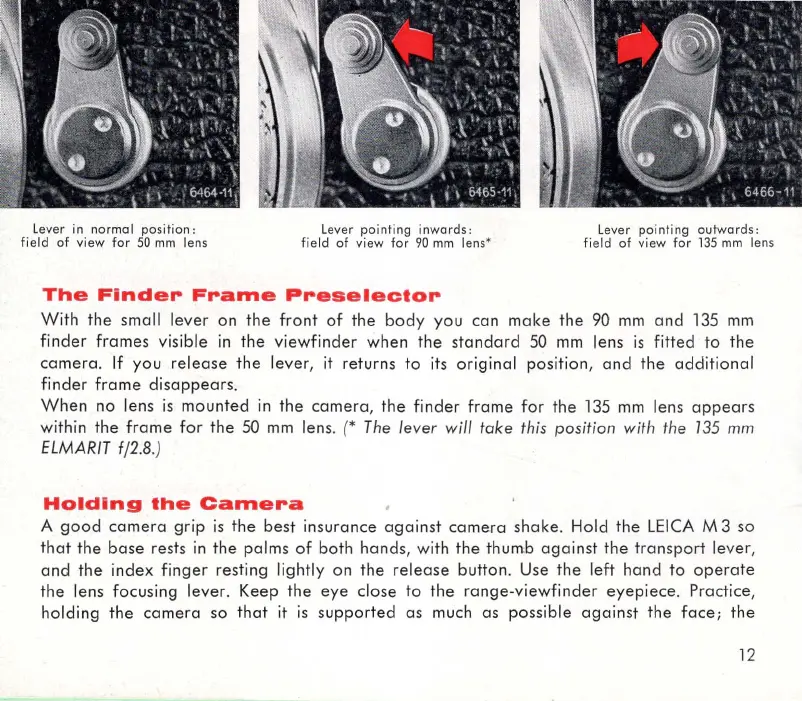
Lever in normal p
os
iti
on
:
fie
ld of vi
ew
fo
r 50 mm lens
l
eve
r pointing inwa rds :
fi
eld of
vi
ew
f
or
90 mm lens'
The
Finder
Frame
Preselector
l
eve
r p
oin
ting
out
w
ard
s :
fi
eld of
vi
ew
f
or
1
35
mm
l
ens
W ith
the
small
lever
on
the
front
of
the
body
you
can
make
the
90
mm
and
135
mm
finder
frames
visible
in
the
viewfinder
when
the
standard
50
mm
lens
is
fitted
to
the
camera
.
If
you
release
the
lever
,
it
returns
to
its
original
position,
and
the
additional
finder
frame
disappears
.
When
no
lens
is
mounted
in
the
camera
,
the
finder
frame
for
the
135
mm
lens a
ppear
s
within
the
frame
for
the
50
mm
lens. (* The lever wi
ll
take
this
po
sition with the 135 mm
ELMARIT
fj2.B
.)
Holding
the
Camera
A
good
camera
grip
is
the
best
insurance
against
camera
shake
. Hold
the
LEICA
M 3 so
that
the
base
rests in
the
palms
of
both
hands,
with
the
thumb
against
the
tran
s
port
lev
er
,
an
d
the
inde
x
finger
resting lightly on
the
release
button
. Use
the
left
han
d
to
operate
the
lens focusing
lever
.
Keep
the
eye
close
to
the
range-v
i
ewfinder
eyepiece
. Practice,
holding
the
camera
so
that
it
is
supported
as much
as
possible
against
the
face
;
the
12