EasyManua.ls Logo

Leica M3 - To Set the Film-Type Indicator; Unloading the Film

Leica M3
29 pages
Print Icon
To Next Page IconTo Next Page
To Previous Page IconTo Previous Page
Loading...
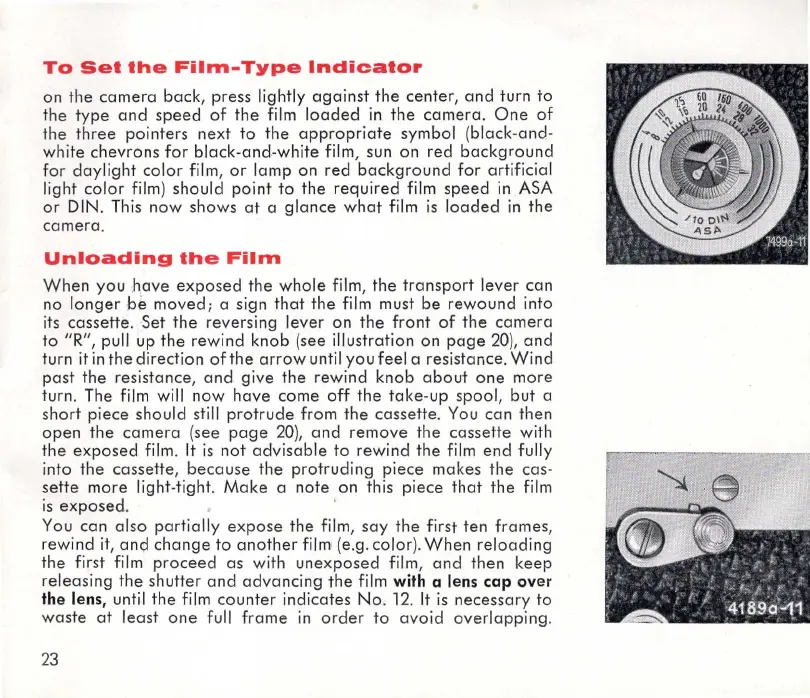
To
Set
the
Film-Type
Indicator
on
the
camera
back,
press
lightly
against
the
center,
and
turn
to
the
type
and
speed
of
the
film
loaded
in
the
camera.
One
of
the
three
pointers
next
to
the
appropriate
symbol
(
black-and
-
white
chevrons
for
black-and-white
film, sun
on
red
background
fo
r
daylight
color
film,
or
lamp
on
red
background
for
artificial
light
color
film )
should
point
to
the
required
film
speed
in
.ASA
or
DIN. This
now
shows
at
a
glance
what
film is
loaded
in
the
ca
mera
.
Unloading
the
Film
When
you
have
expo
s
ed
the
whole
film,
the
transport
leve
r
can
no
longer
be
moved;
a sign
that
the
film must
be
rewound
into
its
cassette
.
Set
the
reversing
lever
on
the
front
of
the
camera
to
"R", pull up
the
rew
ind
knob
(
see
illustration
on
page
20),
and
turn it
in
the
direction
ofthe
arrow
until
you
feel a
resistance
.
Wind
past
the
resistance
,
and
gi
ve
the
rewind
knob
about
one
more
turn. The film will
now
have
come
off
the
take
-up
spool,
but
a
short
piece
should
still
protrude
fr
om
the
cassette
. You
can
then
open
the
camera
(
see
page
20
),
and
remove
the
cassette
with
t
he
exposed
film .
It
is
not
advisable
to
rewind
the
film
end
fully
into
the
cassette
,
because
the
protruding
piece
mak
es
the
cas
-
sette
more
light-
tight
.
Make
a
note
on
this pi
ece
that
t
he
fi
lm
is
exposed
. '
You
can
also
partially
ex
pose
the
film,
say
the
first
ten
frames
,
rewind
it,
and
change
to
another
film:
(e.g.
color
).
When
reloading
the
first film
proceed
as
with
une
x
posed
fi
lm
,
an
d
then
keep
releasing
the
shutter
and
advancing
the
film with a lens
cap
over
the lens, until
the
film
counter
indicates
No
. 12.
It
is
necessary
to
waste
at
least
one
full
frame
in
order
to
avo
id
overlapping
.
23

Related product manuals