EasyManua.ls Logo

Leica M3 - Changing Lenses

Leica M3
29 pages
Print Icon
To Next Page IconTo Next Page
To Previous Page IconTo Previous Page
Loading...
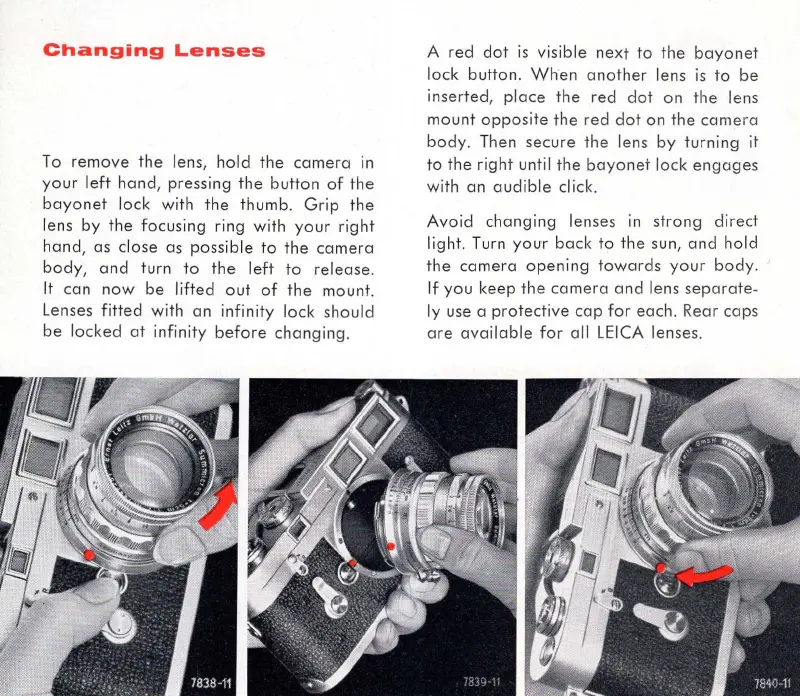
Changing
Lenses
To
remove
the
lens,
hold
the
camera
in
your
left
hand, pressing
the
button
of
the
bayonet
lock
with
the
thumb
.
Grip
the
lens
by
the
focusing
ring
with
your
right
hand,
as
close
as
possible
to
the
camera
body,
and
turn
to
the
left
to
release.
It
can
now
be
lifted
out
of
the
mount
.
Lenses
fitted
with
an
infinity
lock
should
be
locked
at
inf
i
nity
before
changing
.
A red
dot
is
visible
next
to
the
bayonet
lock
button
.
When
another
lens is
to
be
inserted,
place
the
red
dot
on
the
lens
mount
opposite
the
red
dot
on
the
came
ra
body
. Then secure
the
lens
by
turning
it
to
the
right
until
the
bayonet
lo
ck
engages
with
an
audible
click.
Avoid
changing
lenses
In
stro
ng
direct
light
. Turn
your
back
to
the
sun,
and
hold
the
camera
opening
towards
your
body
.
If
you
keep
the
camera
and
lens
separate-
ly
use
a
protective
cap
for
each. Rear caps
are
available
for
all
LEICA lenses.