CAMERA OPERATION ▸ CONTROL ELEMENTS
22
CAMERA OPERATION
CONTROL ELEMENTS
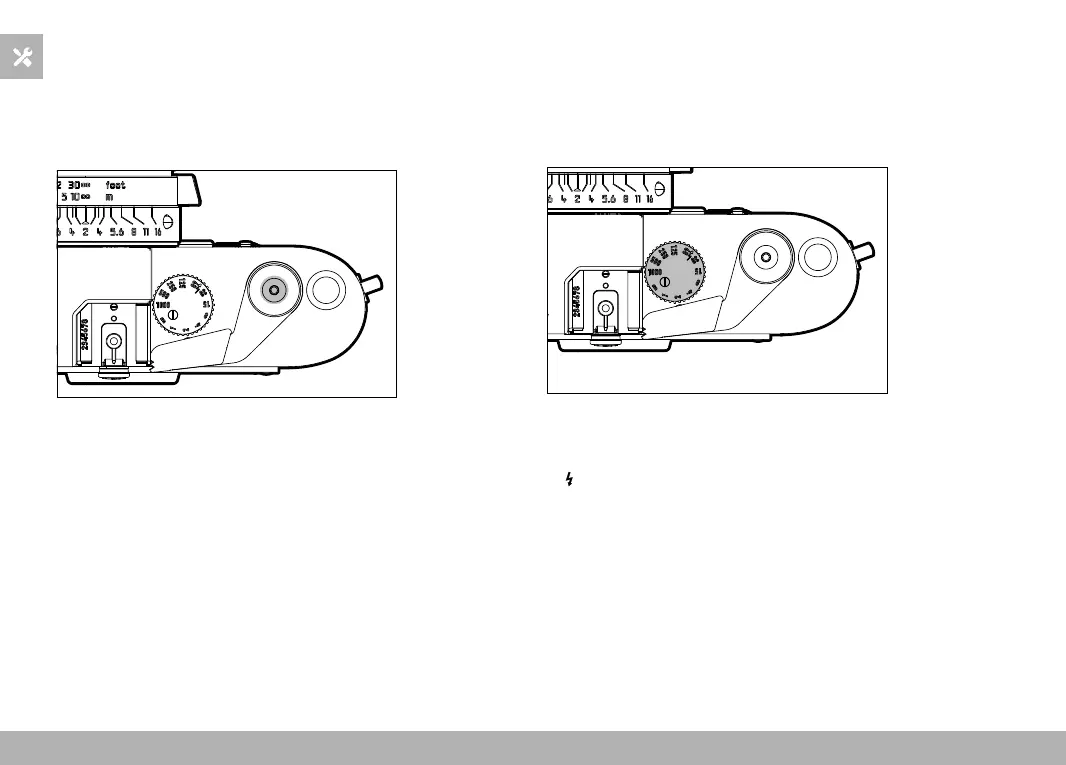
SHUTTER BUTTON
The shutter button works in two stages.
1. Tapping (= Pressing the shutter button to the 1st pressure point)
– Activating exposure metering
2. Press down fully
– Shutter release
Notes
• Press down the shutter button in a smooth motion until you hear
the click of the shutter to prevent camera shake.
• The shutter button remains locked until the shutter is cocked.
• The shutter comes equipped with a standard thread for a wired
release button.
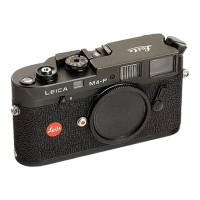
SHUTTER-SPEED DIAL
The shutter-speed dial features a stop between the positions 1000
and B. It clicks into place at each of the engraved positions. Interme-
diate positions outside the click positions must not be used. Please
read the section “Exposure” (see p. 34) for details about exposure
settings.
– 1000 – 1: Fixed shutter speeds of 1⁄1000 s to 1 s
– B: Long-term exposure (bulb), Deactivation of exposure metering
(= Off position)
–
: The shortest possible sync speed (1⁄50 s) for flash mode
Note
• When transporting the camera in a carry bag if it will not be used
for an extended period of time, the shutter-speed dial should be
set to
B. Accidental activation of the exposure metering will be
avoided and battery life is extended.



 To Next Page