17
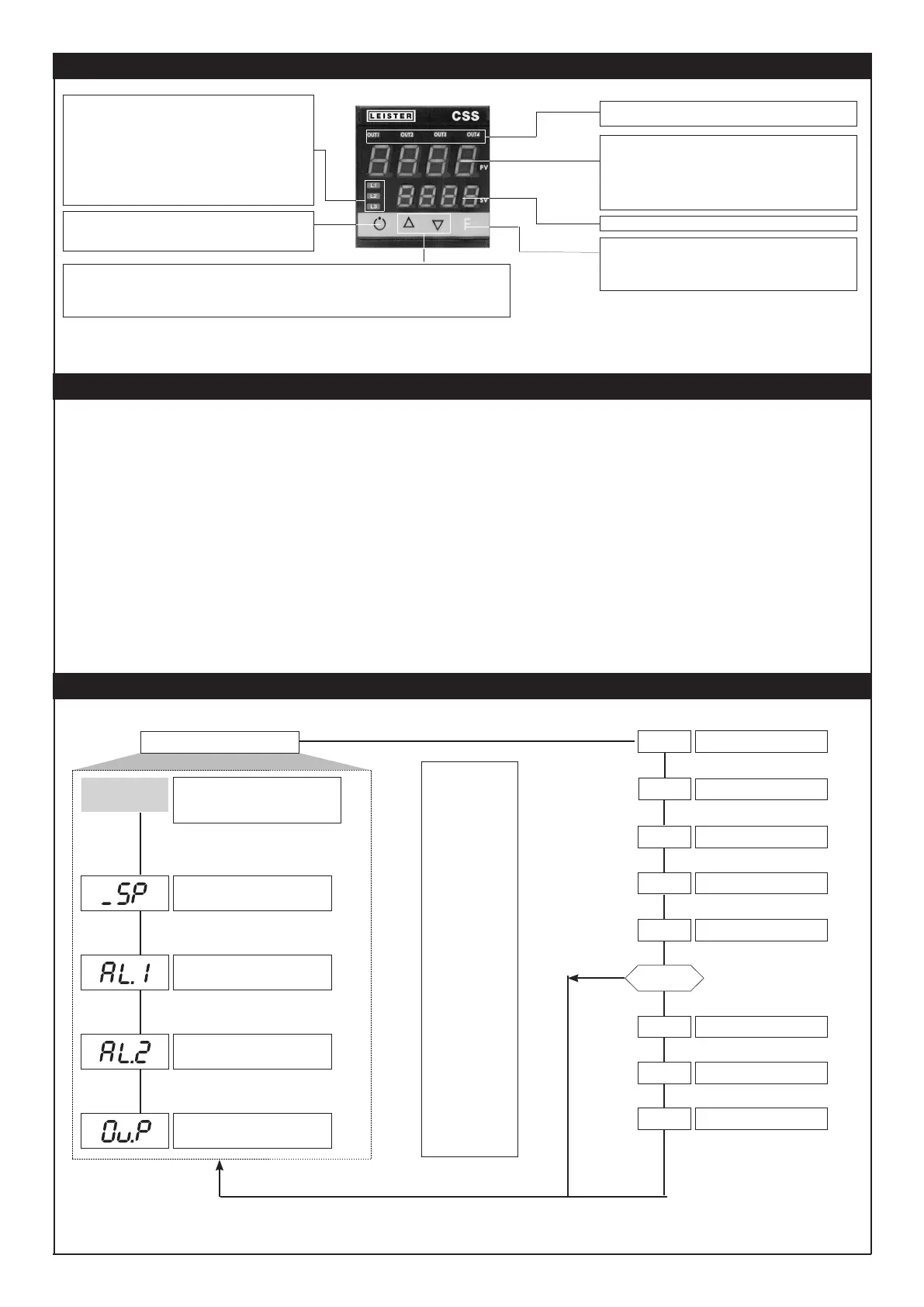
DESCRIPTION OF FACEPLATE
“Auto/Man” key
Automatic/Manual adjustment selection
Active only when PV display visualises the process variable
Function indicator
Indicates modes of operation
L1 MAN/AUTO = OFF (automatic control)
ON (manual control)
L2 SET SETPONT1/2 = OFF (IN1 = OFF - local Setpoint 1) ON
(IN1 = ON - local Setpoint 2)
L3 SELFTUNING = ON (enabled Self)
OFF (disabled Self)
“Inc” and “Dec” key
Press to increment (decrement) any numerical parameter •• Increment (decrement) speed is proportional to time key stays pressed
•• The operation is not cyclic: once the maximum (minimum) value of a field is reached, the value will not change even if the key
remains pressed.
PV Display: Indication of process variable
Error Indication: LO, HI, Sbr, Err
LO = the value of process variable is < di LO_S
HI = the value of process variable is > di HI_S
Sbr = faulty sensor or input values higher than max. limits
Err = PT100 third wire opened for PT100, PTC or input values lower than min.
limits (i.e.: TC wrong connection)
Function key
F
Gives access to the various configuration phases •• Confirms change of
set parameters and browses next or previous parameter (if Auto/Man key
is pressed)
SV display: Indication of setpoint
Indication of output states
OUT 1 (AL 1); OUT 2 (Main); OUT 3 (AL 2); OUT 4
PROGRAMMING and CONFIGURATION
P.V. / S.V.
P.V. / S.V.
Process variable (PV display)
Work Setpoint (SV display) or control output value
with controller in manual
Control output value (in %)
Nominal value
LEVEL 1 MENU
N.B.: Once a particular configuration is entered, all unnecessary parameters are no longer displayed
INF
InP
Out
PAS = 99
Pro
Input settings
Output settings
Hardware configuration
NO
Release the F key to
select the displayed
menu
Hold the F key down to
exit the menu.
Keep the F key pressed
to scroll the menus
Press the Auto/Man and
F key to go back in the
menu.
Keep F + Auto/Man keys
pressed for 2 sec. on any
menu to go immediately
to level 1 display
Pressing the Auto/Man
+ F keys on any menu
immediately returns
you to the previous
parameter.
PAS
Hrd
U.CA
Custom menu
Password
User calibration
Protection code
Information display
CFG
Alarm value 1
Alarm value≤ 2
Default: 650
Default: 650
SOFTWARE ADJUSTMENT
The temperature regulator is supplied by Leister Technologies AG with pre-programmed default settings.
These settings can be adjusted by the user if required (temperature input, control behaviour, etc.).
The values of the default settings are noted under the relevant menu item and apply to all CSS EASY and CSS.
KSR-DIGITAL have type-specific settings that can be requested from Leister Technologies AG.
17


 To Next Page