UP+SET
—
SET+UP+DOWN
Self
diagnosis
Enter into the self-diagnosis by pressing the combined
keys in the period of startup countdown
No press
The system will return to the main interface if there is
no operation on the keys in 30 s and no faults found
—
DOWN
Decr.
In setting interface,a short press makes the value decreased
progressively 1 by 1 and a long press it rapidly diminished
SET+DOWN
Enter into the self-diagnosis by pressing the combined
keys in the period of startup countdown.
—
6.2 Display guidance
The 3 Nixie tubes on the control panel indicates the present indoor temperature,within a
range from-20℃~99.9℃
Use condition
Display
Countdown of
electrification
The 3 Nixie tubes of a range from 999 to 000 count down by 10s to
reveal the unit is being electrified, then it enters into the display of
current "Cabinet inside temperature"; if the remote control points are
short circuited, it will show the unit is closing down.
Setting
In the setting interface, the 1st Nixie tube displays the setting
codes, the next 2 digits of tubes display the current values to set.
Fault
The fault interface pops up and displays the first fault code.
6.3 Parameter setting
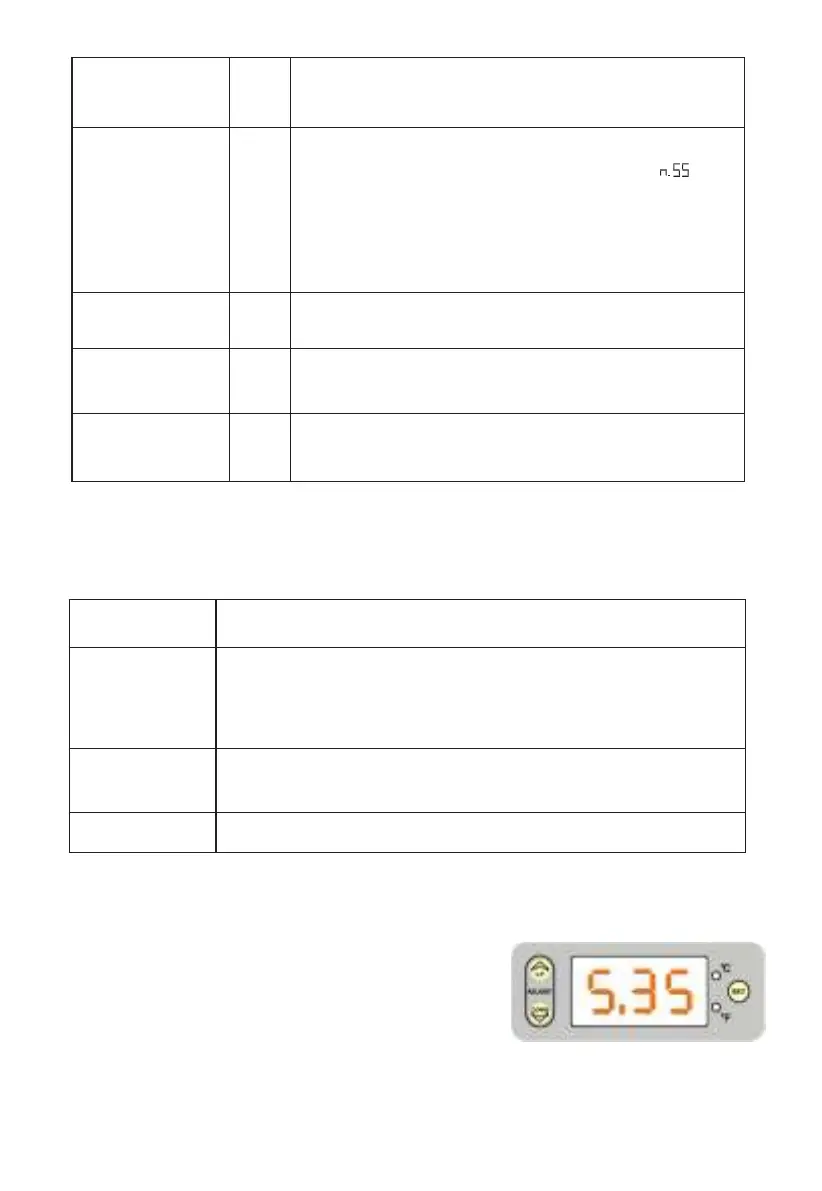
1. In the temperature readout interface, press "SET"
toget the cooling temperature setting option as right
picture shows, the default value is 35, repress
once "SET", the first letter flickers to denote the
setting is available, then adjust the value (ranging
from 28 to 40) through the key “UP” or “DOWN”;
press “ SET” another time to quit the value
adjustment.
A lookup of default: press the combined keys once to look up
the fault; if there is no fault, the interface displays" "; if
the malfunction occurs, the Nixie tubes read the 1st code; in
case of many defaults,press "UP" orderly to check all the
breakdowns ; then press "UP+SET" to quit the and turn to the
main interface.
HTTP://WWW.LEIZIG.COM 16


 To Next Page