Connecting to a power source
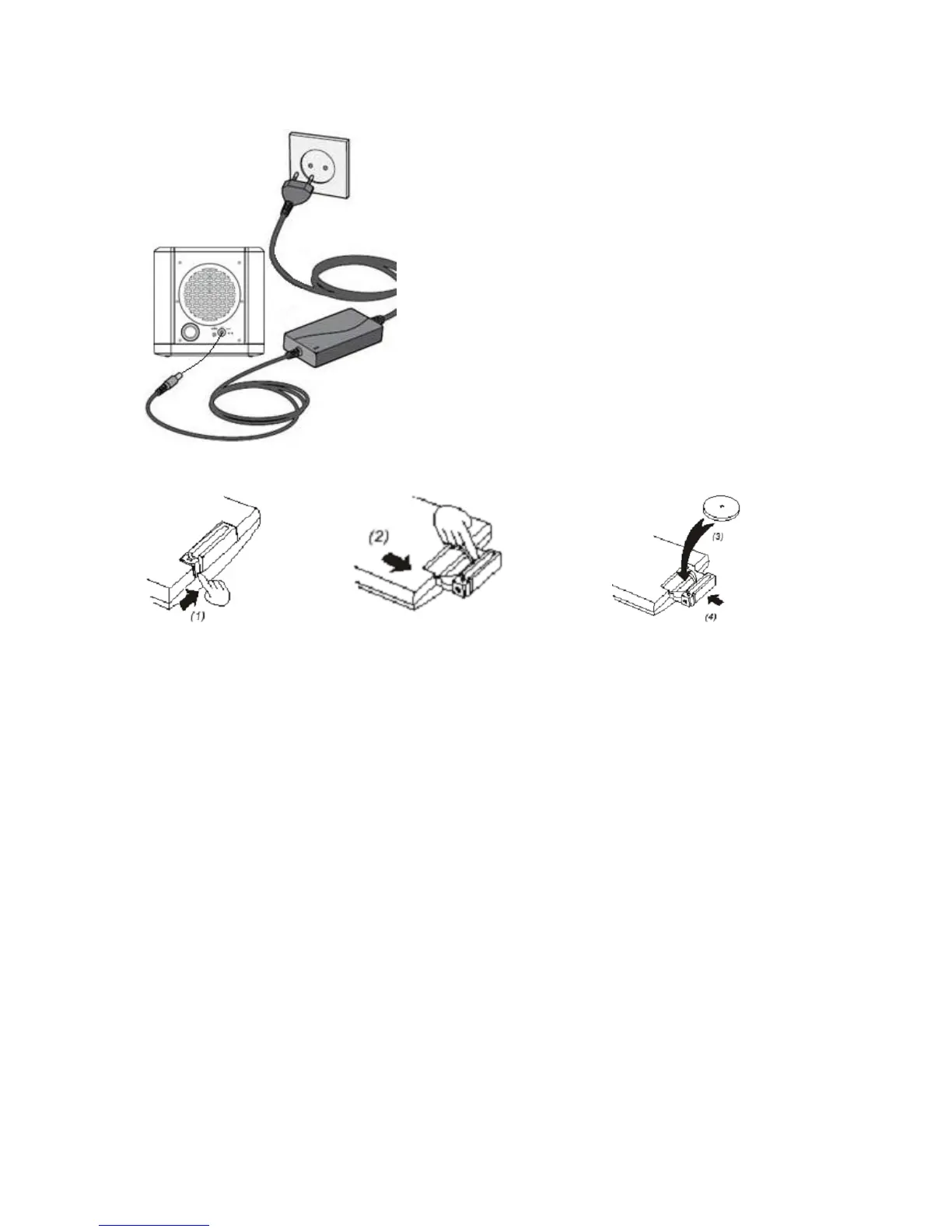
Connect the flat side of the AC adaptor to the AC
wall outlet and connect the round side of the AC
adaptor to the DC in jack.
Install the battery in the remote control
1. Press the locking tab in the direction of the arrow.
2. Pull out the battery tray.
3. Place the battery in the tray with the + side facing up
4. Push pack the tray until it clicks back.
Battery maintenance
To maximize the battery and remote control lifetime, please follow these instructions:
Use the remote control of the product at least once a week.
Remove the battery from the remote control if it is not used longer than a week.
Always keep the tablet away from a heat source.
Lenco recommends the use of A-brand batteries.
Establish a Bluetooth® connection
Bluetooth® LED indicator information:
The Bluetooth® LED will burn continuously if the device is searching for a Bluetooth® device.
The Bluetooth® LED will blink if it is paired with a Bluetooth® device.
The Bluetooth® information of this product is:
Name: Lenco
Password / PIN: 0000


 To Next Page