11
Displaying DAB Station Information
There are several types of information provided by the radio station. To display the information, press the INFO /
MENU repeatedly.
DAB SlideShow
When receiving the station with slideshow (if available), the picture will be shown on the left hand side of the display.
Press the ENTER button will enlarge the picture to fully fit the screen. Press the ENTER button again will quit and back
to the normal operation.
OTHER DAB MENU OPERATION
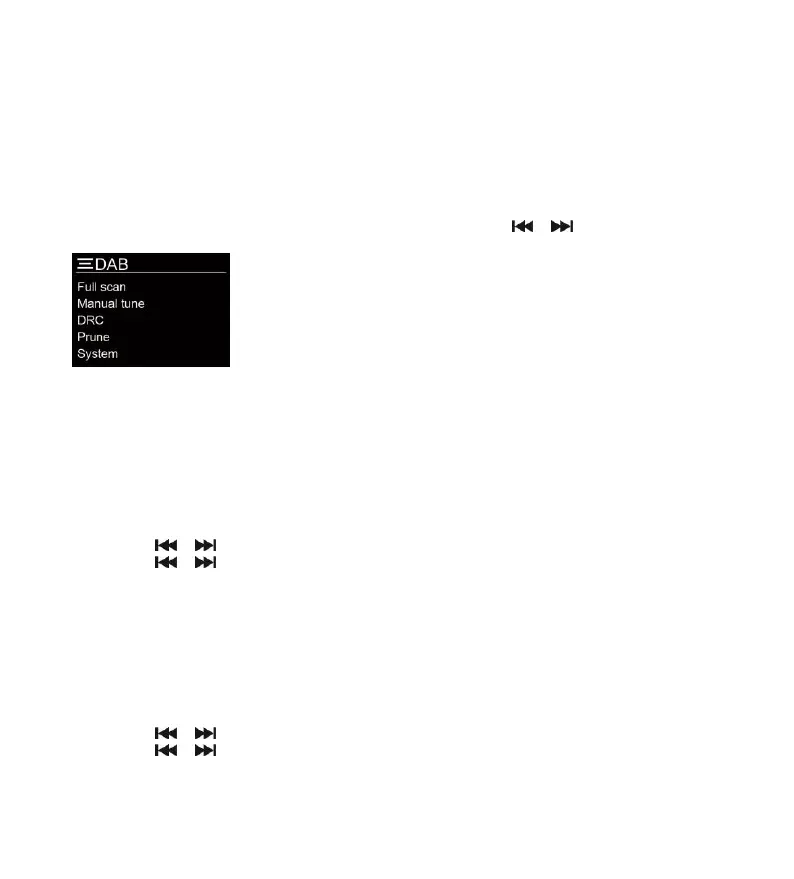
Press and hold the MENU button to access the menu control. Then press the or button for different options as
described below.
Dynamic Range Control (DRC)
DRC can make quieter sounds easier to hear when the unit is used in a noisy environment. The DRC level of a broadcast
is set by the broadcaster and transmitted with the service. Changing the DRC value on your unit enables you to apply a
scaling factor to this level.
There are three levels of compression:
DRC off: No compression
DRC low: Set to 1/2 that of the sent transmitted service
DRC high: Maximum compression as sent with the transmitted service
1. Press and hold the MENU button to access the menu control.
2. Press the or button until “DRC” is highlighted and then press the ENTER button.
3. Press the or button to select the DRC value and then press the ENTER to confirm.
4. Press the MENU button repeatedly to exit the menu control.
Note:
- Not all DAB broadcasts are able to use DRC function. If the broadcast does not support DRC then the DRC setting
in the unit will have no effect.
- After you have adjusted the DRC level the sound may be louder.
Prune
This function removes invalid stations.
1. Press and hold the MENU button to access the menu control.
2. Press the or button until “Prune” is highlighted and then press the ENTER button.
3. Press the or button to select “Yes” and then press the ENTER button to prune the unit.
4. Press the MENU button repeatedly to exit the menu control.



 To Next Page