8
Using Your Digital Picture Frame
Make sure you have at least one image, video or music file on your memory
cards or USB flash drive or the frame’s internal memory.
⒈Switch on the frame and insert memory cards into the unit, it will
automatically start slideshow.
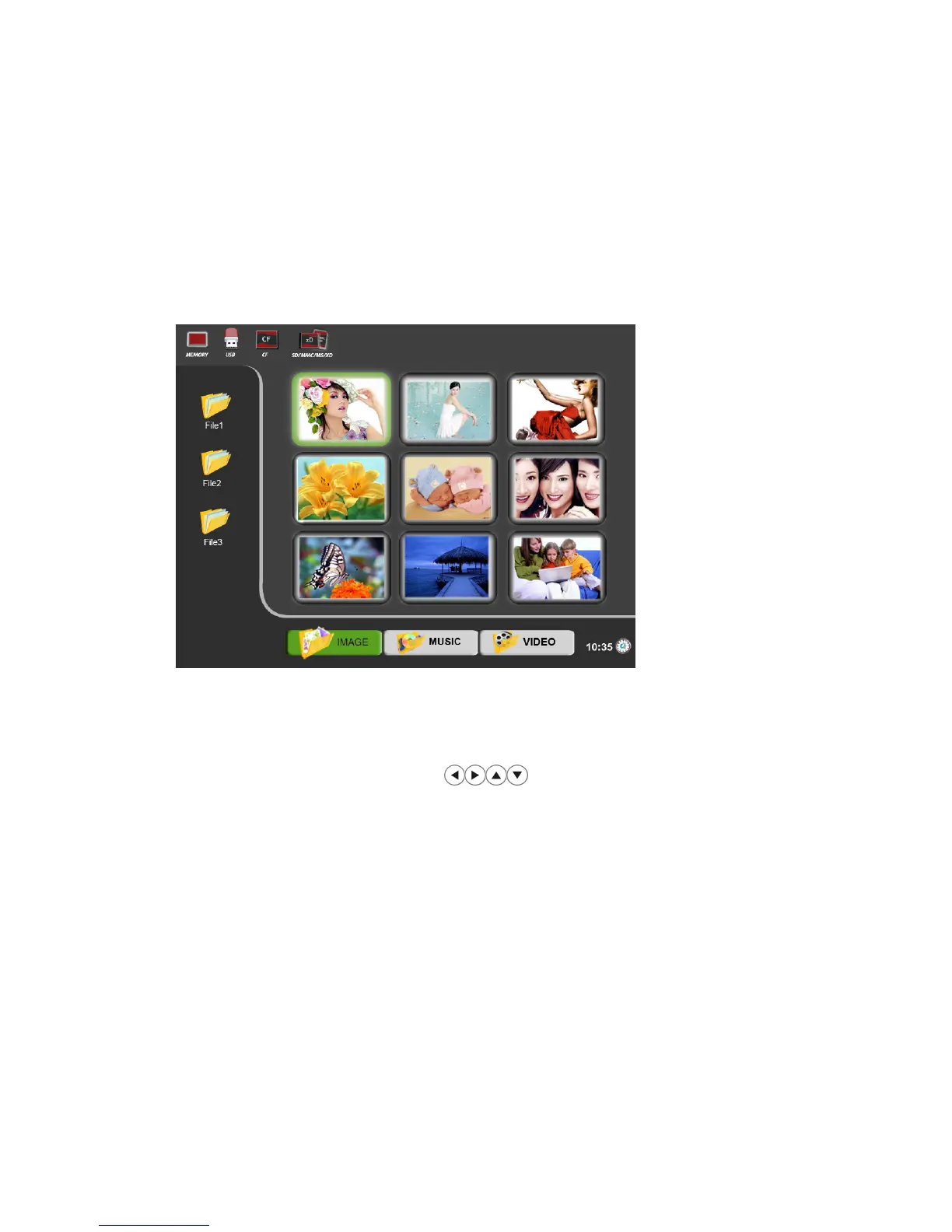
⒉Press “Back” button on the remote control, it will display the main
menu.
⒊Press “Back” button repeatedly, cursor position will move to File –
Image - Flash device orderly
⒋Use the directional arrows on the remote control, highlight
the desired FILE or PHOTO / MUSIC / VIDEO / CLOCK or flash device
(USB, CF, SD, MMC, MS, XD or internal memory), press “Enter” button
or wait for 3 seconds, it will enter into the corresponding PHOTO /
MUSIC / VIDEO / CLOCK interface automatically.
NOTE:.icons of above Media (Memory/USB/CF/SD/MMC/MS/xD) shall
appear automatically on MENU screen when certain memory card is
inserted. Icons shall disappear when corresponding card is removed
from card slot.
Browsing photos
Make sure you have at least one image file on your memory cards or USB
flash drive or the frame’s internal memory.
◆Press “Back’’ button repeatedly to have the cursor position moving to File –
Image - Flash device orderly.


 To Next Page