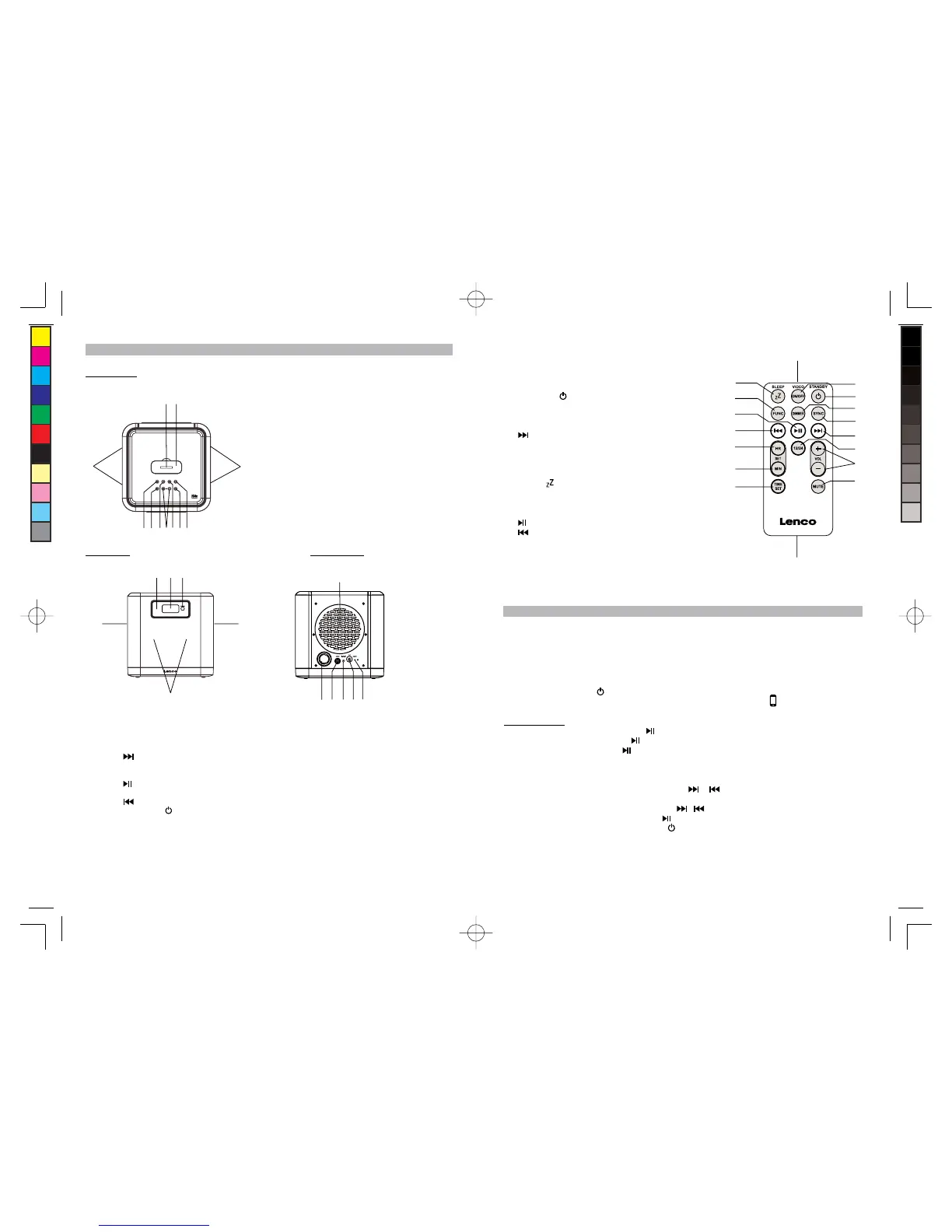
4. DIMMER button ----- Turn the LCD Display
backlight bright/dim.
5. SYNC button ---- Synchronize iPod/iPhone clock.
6. button ----- In iPhone mode: Skip tracks
Forward; perform high-speed search.
7. 12/24 button ----- Set 12/24 hour format.
8. VOL +/- button ----- Adjust volume level up or down
9. MUTE button ----- Mute the volume.
10. SLEEP button ----- Select the time duration of
the sleep timer.
11. FUNC (Function) button ---- Select iPhone / AUX-In
modes.
12. button ----- iPod/iPhone Play/Pause function
13. button ----- In iPhone mode: Skip tracks
Backward; perform high-speed search.
14. HR button ----- Set clock hour.
15. MIN button ----- Set clock minute.
16. TIME SET button ----- Set clock.
17. Battery compartment
Listening to iPod / iPhone
This model adopts different iPod/iPhone models. Following steps guide you listening to iPod
music.
1. Insert your iPod/iPhone into the docking port by placing the connector on the bottom of the
iPod/iPhone onto connector in the docking bay.
Caution: Please be careful when seating the iPod/iPhone into the docking to avoid damaging
the 30-pin connector on the iPod/iPhone or in the docking system.
2. Press the STANDBY button to turn on the unit.
3. Press the FUNC button to select iPhone mode, the iPhone indicator displays.
In iPhone mode:
- To start playback music, press the button once.
- To pause the music, press the button.
- To resume music, press the button again.
- You may press the VOL +/- button to adjust the volume to a desired level.
Note: The volume level cannot be adjusted using the volume control on your iPod / iPhone after
being docked.
- When a song playback, press and hold the button to perform high speed search
forward / backward.
- To skip to next or previous song, press the button.
- To turn off the iPod / iPhone, press the button around 3 seconds.
- To turn off the unit, press the STANDBY button.
- When the unit is powered by AC-DC power adaptor and once the iPod/iPhone connected to
the docking station, the unit recharges the iPod/iPhone battery.
1
2
3
4
5
6
7
8
9
10
11
13
12
14
15
16
17
/
/
IPD4303 5L IB.indd7 26 - 467 2012-1-4 16:56
size:105x146mm,80gms book paper,BK+BK



 To Next Page