14
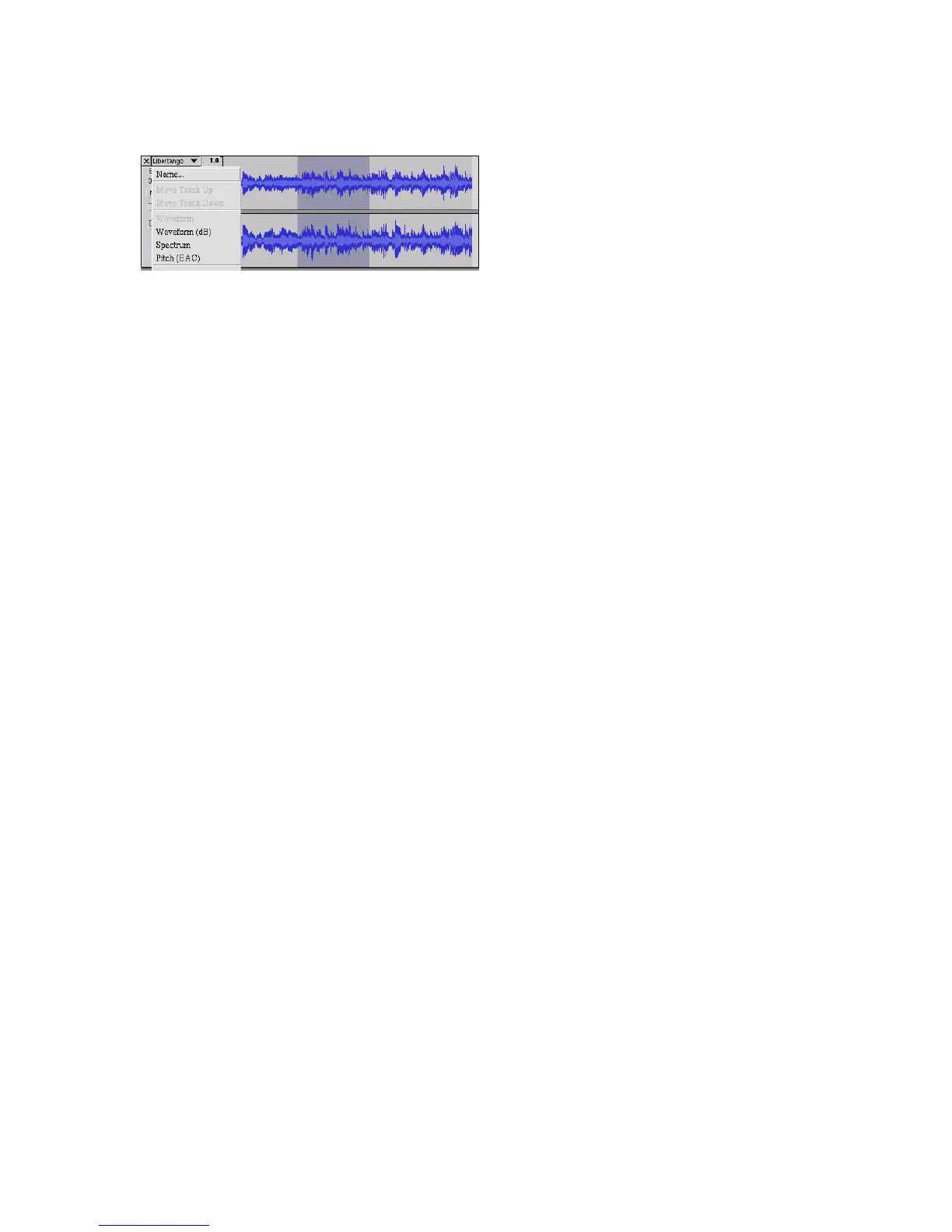
Track Pop-Down Menu
The Track Pop-Down Menu appears when you click in a track's title. This
lets you access a few special commands that apply to individual tracks.
Name... - lets you change the name of the track.
Move Track Up - exchange places with the track above this one.
Move Track Down - exchange places with the track below this one.
Waveform - sets the display to Waveform - this is the default way of
visualizing audio.
Waveform (dB) - similar to Waveform, but on a logarithmic scale,
measured in decibels (dB).
Spectrum - display the track as a spectrogram, showing the amount of
energy in different frequency bands.
Pitch (EAC) - highlights the contour of the fundamental frequency (musical
pitch) of the audio, using the Enhanced Autocorrelation (EAC) algorithm.
Mono - makes this track a mono track, meaning it is played out of just one
speaker, or played out of the left and right speakers equally.
Left Channel - makes this track come out of only the left speaker.
Right Channel - makes this track come out of only the right speaker.
Make Stereo Track - if there is another track below this one, joins them to
make a single stereo track, with the top track representing the left speaker,
and the bottom track representing the right speaker. When tracks are
joined into a stereo pair, all edits automatically apply to both the left and
right channel.


 To Next Page