9
6.4 WIFI con
nection
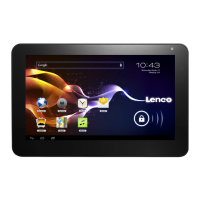
You can connect tablet to Wi-Fi network, operation for connection:
1. In the application interface, click the menu button, then popup
settings menu.
2. Click settings.
3. Click wireless and network.
4. Click Wi-Fi, then start Wi-Fi
5.
Click Wi - Fi Settings, tablet will automatically scan available
Wi - Fi wireless networks.
6. Choose the Fi network which you want to connect. If it has add
password, it will popup a
input password window, then input relevant password.
7. Click on the link



 To Next Page