2
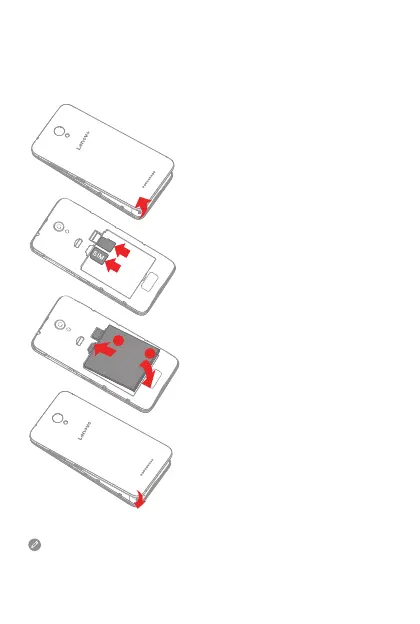
Step 1. Open the back cover.
Step 2. Insert the Micro-SIM card
and the microSD card.
Step 3. Install the battery.
a. Align the battery connectors
on the battery with the pins
in the battery compartment.
b. Push the battery down into
place.
Step 4. Install the back cover.
Always turn off your smartphone first before you insert or remove
a Micro-SIM card. Insert or remove a Micro-SIM card with your
smartphone on may damage your Micro-SIM card or smartphone
permanently.
Preparing your smartphone
You must insert the Micro-SIM card provided by your carrier to use
cellular services. Set up your smartphone as shown.
microSD
b
a


 To Next Page