Chapter 1. Meet your computer
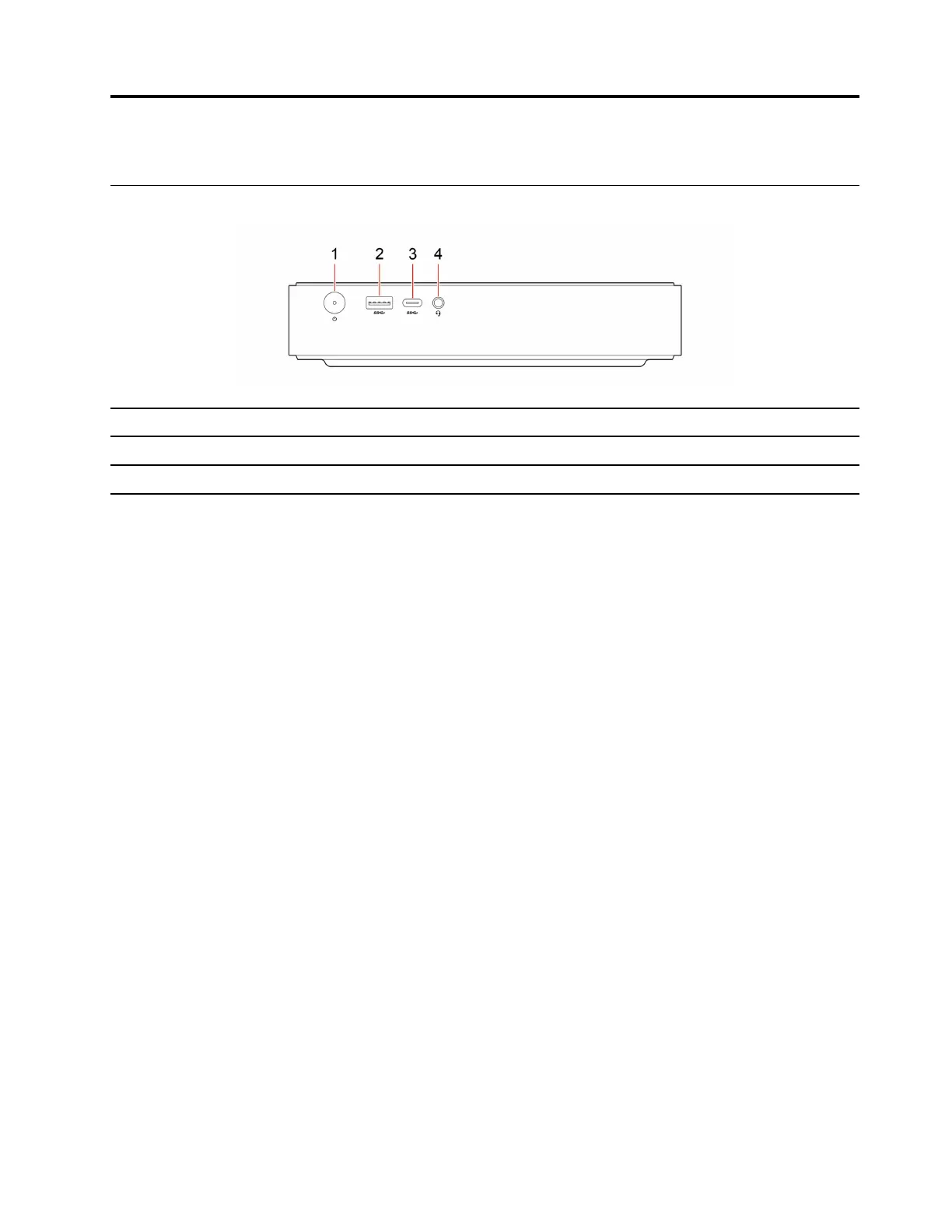
Front
Item
Description
Item
Description
1 Power button 2
Always On USB-A 3.2 Gen 2 connector
3
USB-C
®
(3.2 Gen 2) connector
4 Headset connector
Power indicator
Show the system status of your computer.
• On: The computer is on.
• Off: The computer is off or in hibernation mode.
• Blinking: The computer is in standby mode.
Headset connector
The headset connector is compatible with:
• Headsets with a 3.5mm (0.14 inch), CTIA-compliant TRRS (4-pole) plug.
Note: This headset connector does not support standalone external microphones with a TRS (3-pole) plug
or headsets with an OMTP-compliant TRRS (4-pole) plug.
Always On USB-A 3.2 Gen 2 connector
With the Always On USB feature enabled, the Always On USB 3.2 connector Gen 2 can charge a USB-
compatible device when the computer is on, off, in sleep mode, or in hibernation mode.
Related topics
• “USB specifications” on page 3.
© Copyright Lenovo 2023, 2024 1











 To Next Page