Lenovo Digital Pen
Selected models are equipped with Lenovo Digital Pen. The pen is not waterproof. Keep the pen away from
water and excessive moisture. To purchase Lenovo Digital Pen, go to
https://www.lenovo.com/accessories.
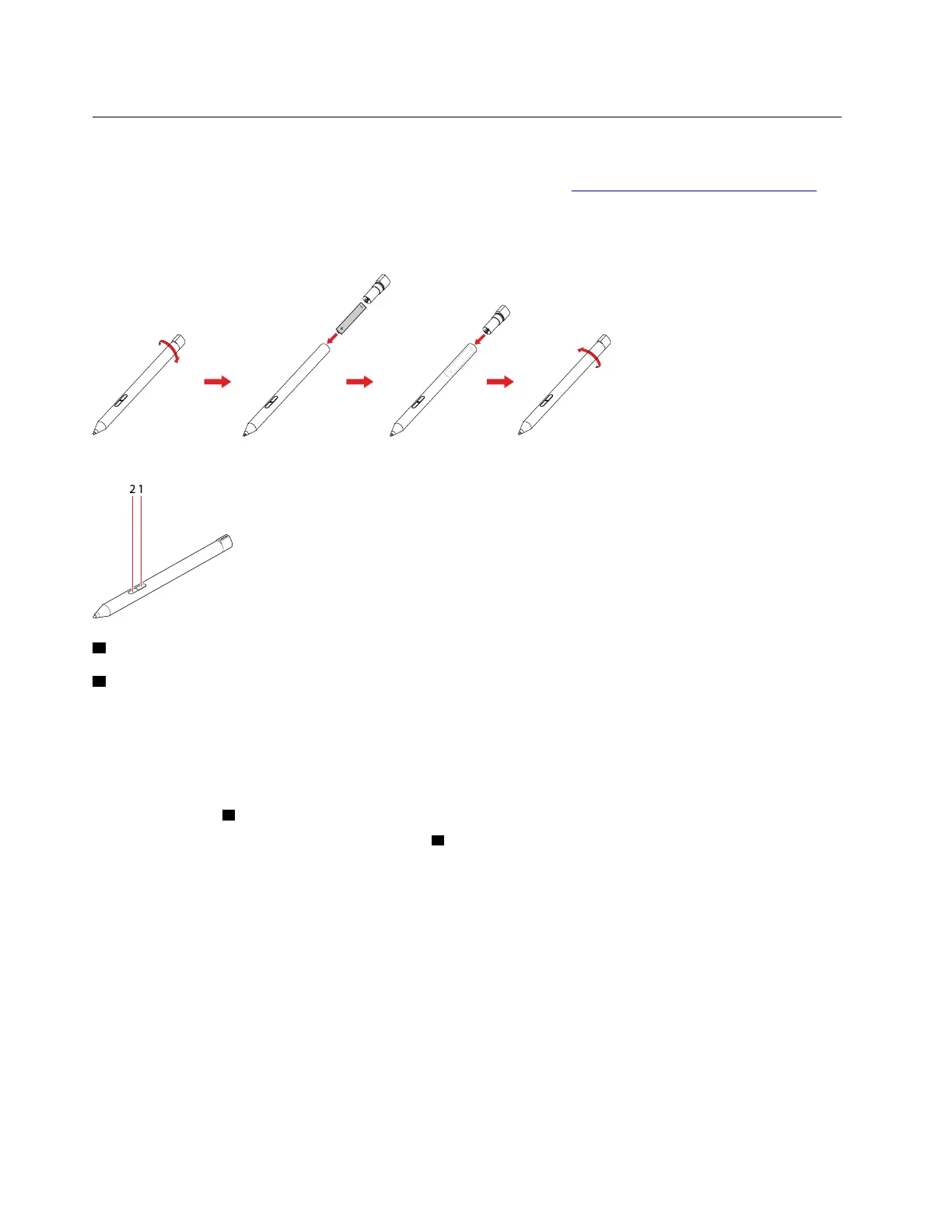
Install the AAAA battery
Lenovo Digital Pen uses AAAA battery. The AAAA battery is provided in some countries or regions.
Use Lenovo Digital Pen
1 Eraser button
2 Click button
You can perform the following operations with the Lenovo Digital Pen:
• To click or make a selection, tap the display once.
• To double-click, tap twice without pausing.
• To right-click, tap the display and hold the pen there for one second. Alternatively, you can press and hold
the click button
2 and tap the display.
• To erase ink, press and hold the eraser button
1 , tap the display, and drag the pen across the ink you
want to erase.
16
Lenovo IdeaPad FLEX-14APIUser Guide





 To Next Page