Installingthesoftware
ItisrecommendedthatyouinstalltheLenovoMouseSuitesoftwaretocustomizeadvancedsettingsbefore
youusetheLenovoLaserWirelessMouse.
Notes:
•ItisrecommendedthatyouuninstallanypreviouslyinstalledmousesoftwarebeforeinstallingtheLenovo
MouseSuitesoftware.
•TheLenovoLaserWirelessMousedoesnotsupporttheautomaticinstallationoftheLenovoMouse
Suitesoftware.
ToinstalltheLenovoMouseSuitesoftware,dothefollowing:
1.Gotohttp://support.lenovo.com/mousesuite.
2.LocateanddownloadtheinstallationfileoftheLenovoMouseSuitesoftware.
3.Double-clicktheinstallationfile,andthenfollowtheinstructionsonthescreentocompletethe
installation.
Note:IntheHardwareInterfaceSelectionwindow,selectUSB(UniversalSerialBus)Interface.
Installingthemouse
Thistopicprovidesinformationonhowtoinstallthemouse.
Toinstallthemouse,dothefollowing:
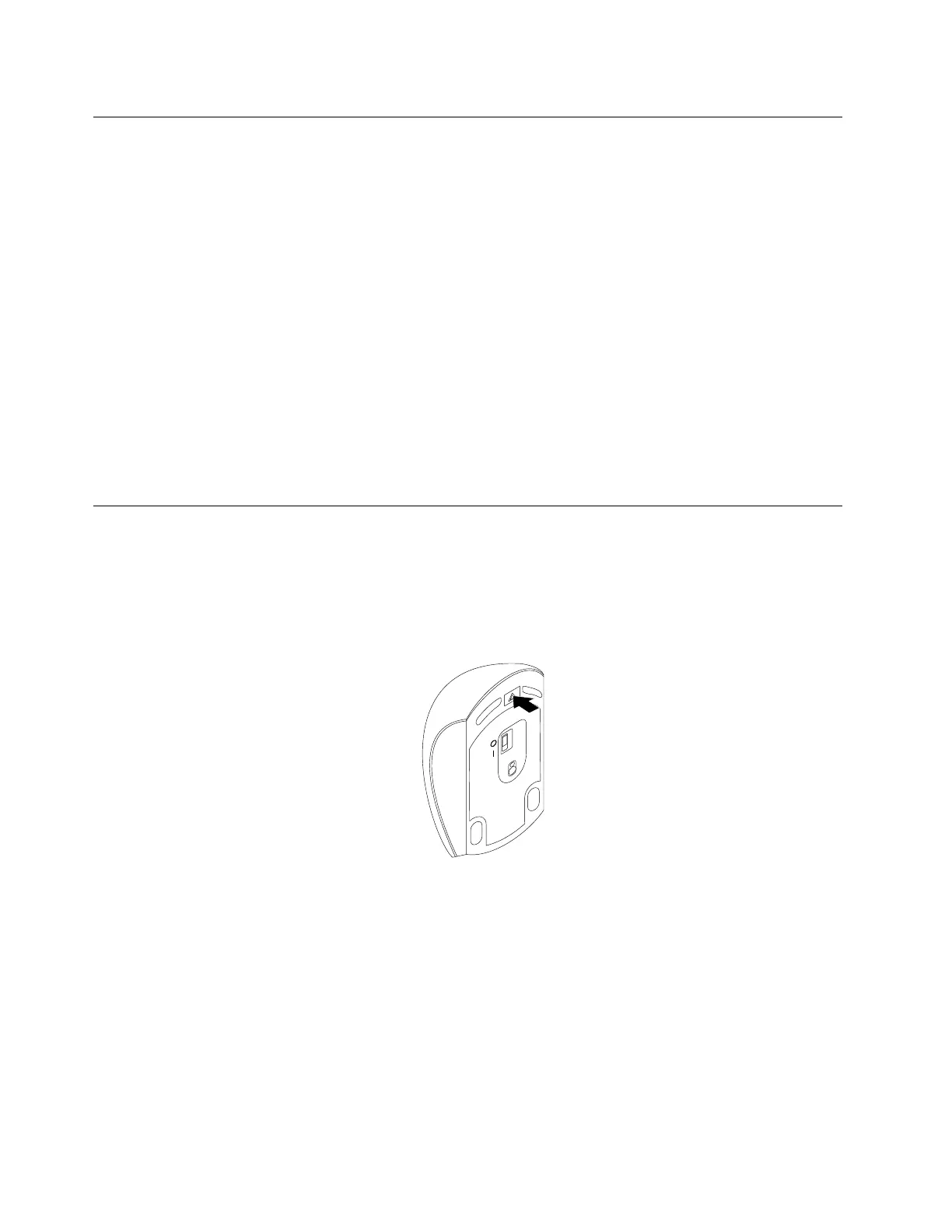
1.Pressthebatterycompartmentreleasebuttontoopenthebatterycompartmentcover.
Figure3.Openingthebatterycompartmentcover
14LenovoCombinedMouseUserGuide






 To Next Page