2
Nano-SIM1
Nano-SIM2
microSD
Nano-SIM
microSD
Preparing your device
Use a microSD card (sold separately) for extra storage.
*To access cellular networks with your device (model number
Lenovo TB-7504X), insert a Nano-SIM card provided by your carrier
into the slot as shown below.
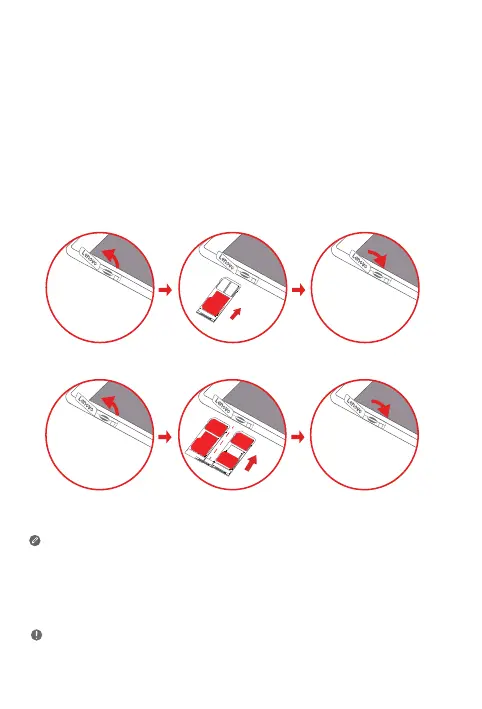
Step 1. Open the card slot cover.
Step 2. Insert the *Nano-SIM and microSD cards as shown.
Step 3. Replace the card slot cover.
1
Front camera
2
Speaker/Receiver
3
Indicator
4
Touch screen
5
Power button
6
Volume buttons
7
Rear camera
8
Micro USB connector
9
Headset connector
10
Card tray
11
Microphone
Only Nano-SIM cards work with your device.
4G/3G/2G services of SIM cards require carrier support. Your phone’s dual-card
slot supports 4G/3G/2G services. When two cards are inserted, the system
supports only one card’s registered 4G/3G service. Your phone supports a smart
card switching function. If you need to change the card slot for the registered
4G/3G service, please go to Settings > SIM cards.
Do not insert or remove the Nano-SIM card while your device is powered on.
Doing so may cause permanent damage to your Nano-SIM card or device.
Figure 1: WLAN
Figure 2: WLAN + LTE


 To Next Page