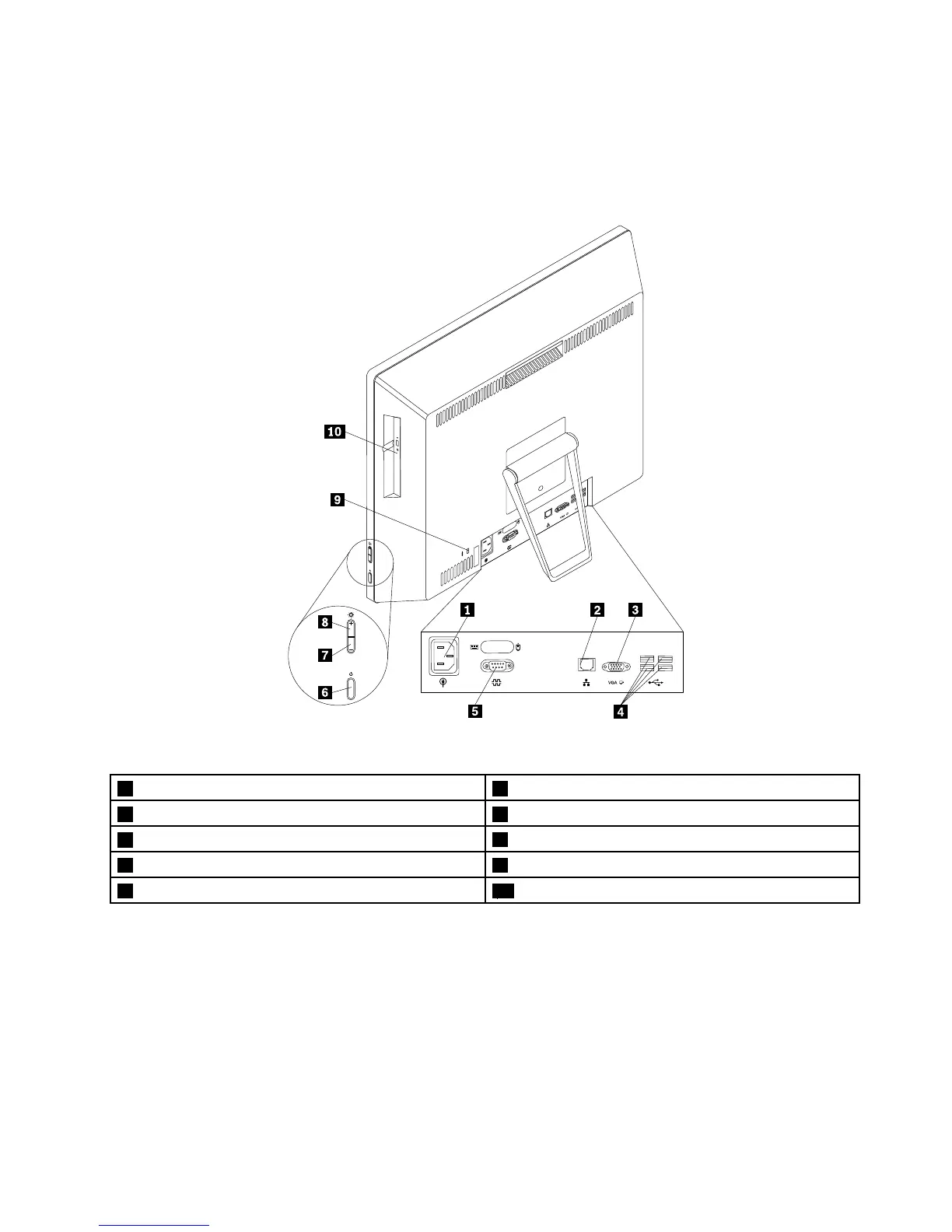
Locatingconnectorsontherearofyourcomputer
Figure2“Rearconnectorlocations”onpage9showsthelocationsoftheconnectorsontherearofyour
computer.Someconnectorsontherearofyourcomputerarecolor-codedtohelpyoudeterminewhereto
connectthecablesonyourcomputer.
Figure2.Rearconnectorlocations
1Powercordconnector2Ethernetconnector
3VGA-outconnector4USB2.0connectors(USBconnectors3to6)
5Serialconnector(availableinsomemodels)
6Powerbutton
7Brightness-downcontrol8Brightness-upcontrol
9Security-lockslot10Opticaldrive
ConnectorDescription
Ethernetconnector
UsedtoattachanEthernetcableforalocalareanetwork(LAN).
Note:TooperatethecomputerwithinFCCClassBlimits,useaCategory5Ethernet
cable.
Serialconnector
Usedtoattachanexternalmodem,aserialprinter,orotherdevicesthatusea
9-pinserialconnector.
USB2.0connectorUsedtoattachadevicethatrequiresaUSB2.0connection,suchasakeyboard,a
mouse,ascanner,aprinter,orapersonaldigitalassistant(PDA).
VGA-inconnectorUsedtoattachaVideoGraphicsArray(VGA)monitororotherdevicesthatuse
aVGA-inmonitorconnector.
Chapter1.Productoverview9












 To Next Page