Overview 5
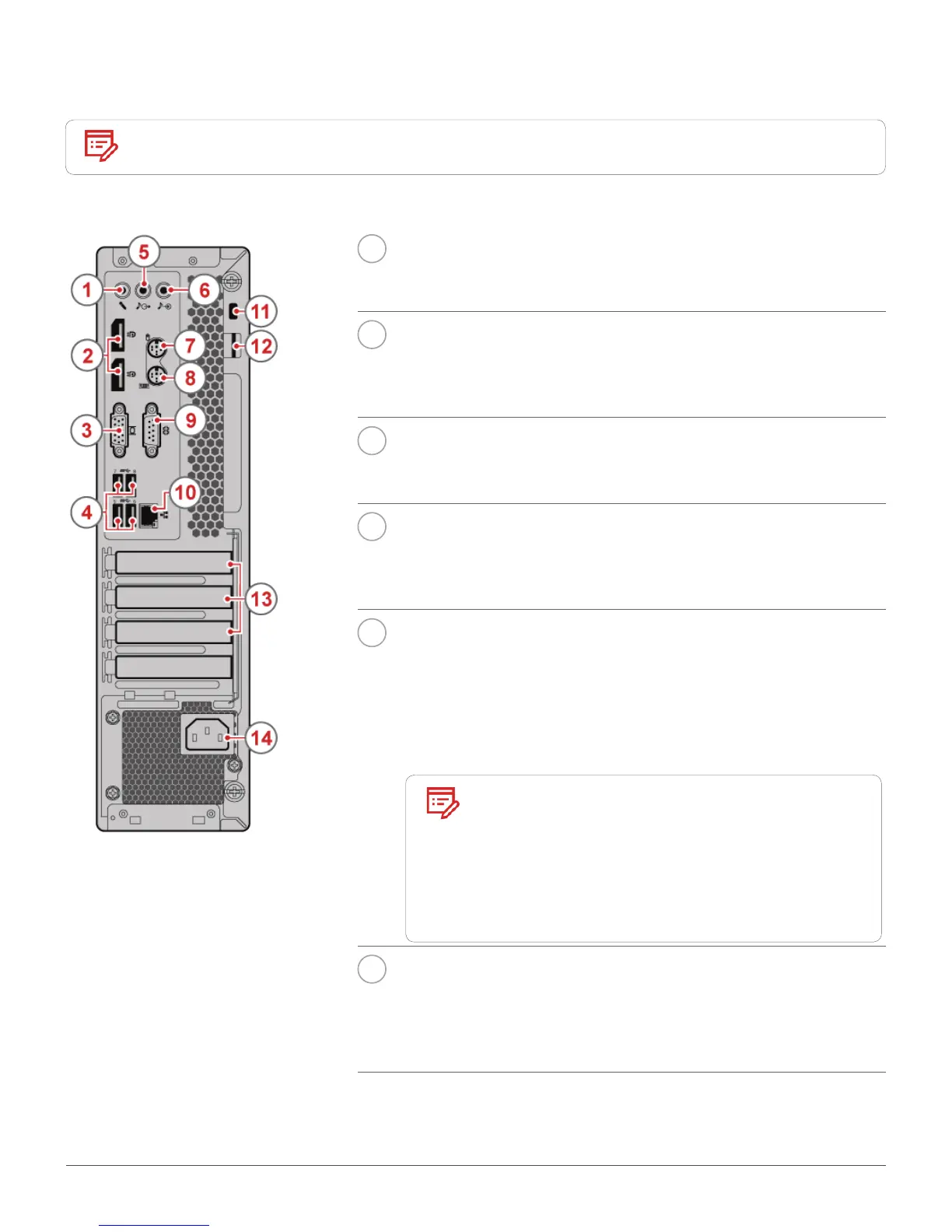
Rear view
Note
Your computer model might look slightly different from the illustration.
1
Microphone connector
Used to connect a microphone to your computer when you want
to record sound or use speech recognition software.
2
DisplayPort®-out connectors (2)
Used to send audio and video signals from the computer to
another audio or video device, such as a high-performance
monitor.
3
VGA-out connector
Used to send video signals from the computer to another video
device, such as a monitor.
4
USB 3.0 connectors (4)
Used to connect a USB-compatible device. For optimal data
transfer, connect a USB 3.0 device to a USB 3.1 or USB 3.0
connector instead of a USB 2.0 connector.
5
Audio line-out connector
Used to send audio signals from the computer to external
devices, such as powered stereo speakers, headphones, or
multimedia keyboards. To connect a stereo system or other
external recording device, connect a cable between the audio line-
in connector of the device and the audio line-out connector of the
computer.
Note
If your computer has both an audio
line-out connector and a headset or
headphone connector, always use
the headset connector or headphone
connector for earphones, headphones,
or a headset. The headphone connector
does not support headset microphones.
6
Audio line-in connector
Used to receive audio signals from an external audio device, such
as a stereo system. To attach an external audio device, connect a
cable between the audio line-out connector of the device and the
audio line-in connector of the computer.





 To Next Page