Notes:
1.UseanydocumentationthatcomeswiththeiKVMkeyandfollowthoseinstructionsinadditionto
theinstructionsinthistopic.
2.IfyouremovetheiKVMkey,theremotemanagementfunctionforserverremotemanagementis
unavailable.
ToremovetheiKVMkey,dothefollowing:
1.Removeallmediafromthedrivesandturnoffallattacheddevicesandtheserver.Then,disconnectall
powercordsfromelectricaloutletsanddisconnectallcablesthatareconnectedtotheserver.
2.Removetheservercover.See“Removingtheservercover”onpage87.
3.Laytheserveronitssideforeasieroperation.
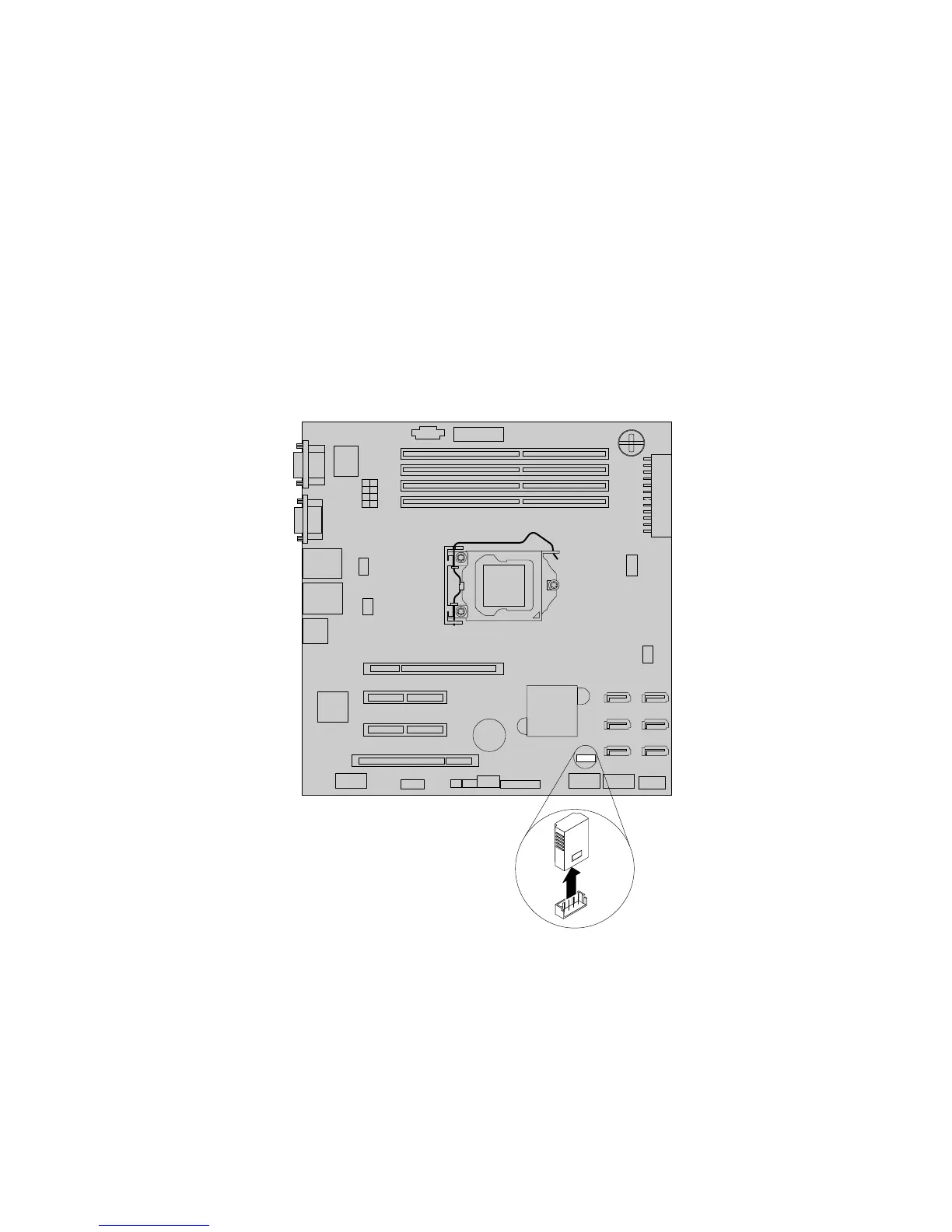
4.LocatetheiKVMkeyonthesystemboardandthenlifttheiKVMkeystraightuptoremoveitfromthe
iKVMkeyconnector.
Figure56.RemovingtheiKVMkey
5.IfyouareinstructedtoreturntheoldiKVMkey,followallpackaginginstructionsanduseanypackaging
materialsthataresuppliedtoyouforshipping.
Whattodonext:
•Toworkwithanotherpieceofhardware,gototheappropriatesection.
•Tocompletetheremovalprocedure,goto“Completingthepartsreplacement”onpage170
.
116ThinkServerTS430UserGuide













 To Next Page