•Forharddiskdriveswithdifferentcapacities,installtheharddiskdrivewiththelowestcapacityrst.
Beforeyoubegin,printalltherelatedinstructionsorensurethatyoucanviewthePDFversiononanother
computerforreference.
Notes:
•Dependingonthemodel,yourservermightlookslightlydifferentfromtheillustrationsinthistopic.
•Useanydocumentationthatcomeswiththeharddiskdriveandfollowthoseinstructionsinadditionto
theinstructionsinthistopic.
Toinstallanon-hot-swapharddiskdrive,dothefollowing:
1.Removeallmediafromthedrivesandturnoffallattacheddevicesandtheserver.Then,disconnectall
powercordsfromelectricaloutletsanddisconnectallcablesthatareconnectedtotheserver.
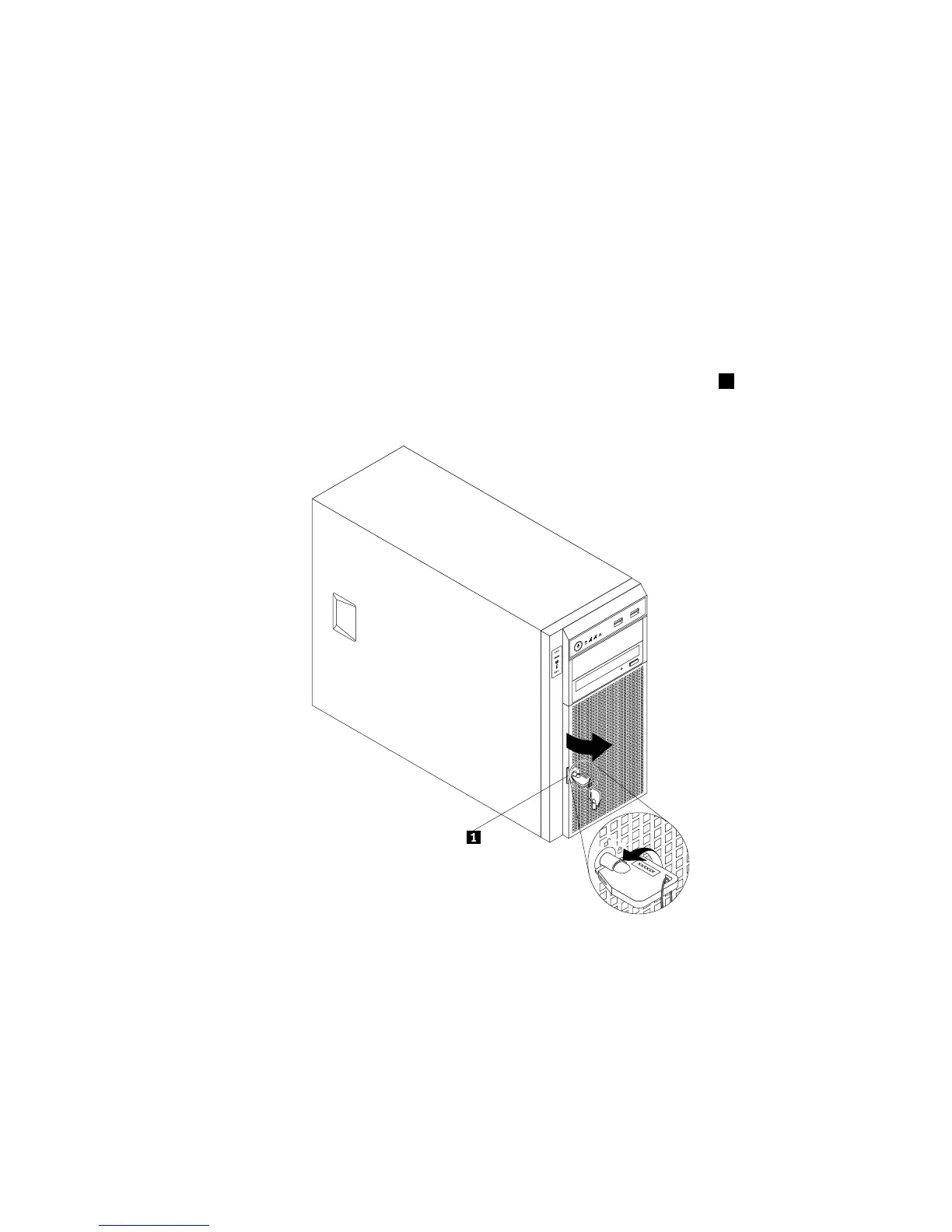
2.Usethefrontdoorkeytounlockthefrontdoorandthenusethefrontdoorhandle1topivotthe
frontdoortotheopenposition.
Figure74.Openingthefrontdooroftheserver
Chapter6.Installing,removing,orreplacinghardware137













 To Next Page