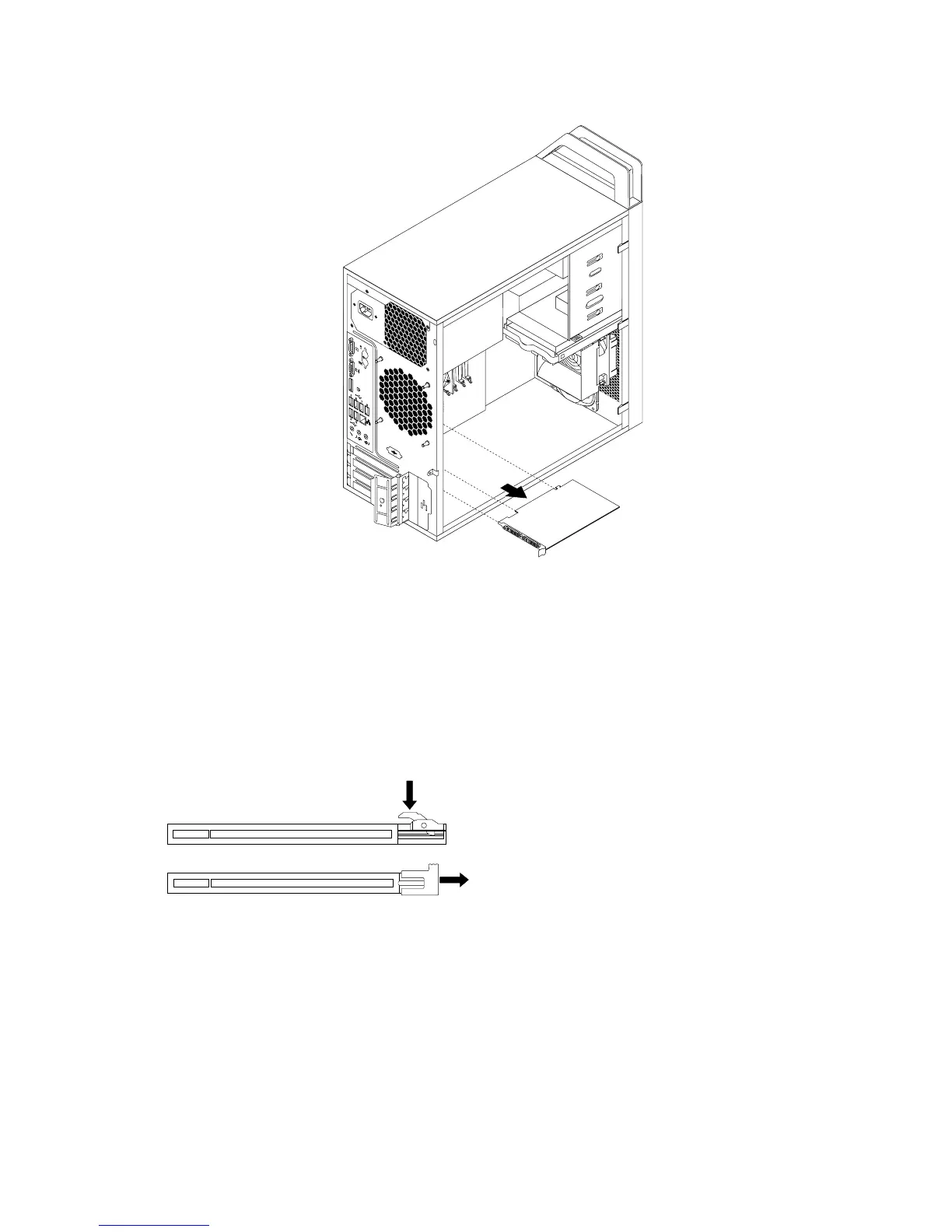
Figura12.RemoverumaplacaPCI
Notas:
a.Aplacaencaixarmementenaranhuradeplaca.Senecessário,alterneomovimentodecada
extremidadedaplacademodoaremovê-lagradualmentedaranhuradeplaca.
b.Seaplacaestiverxaporumtrincodexação,liberteotrincodexaçãodaplacanumdoslados
ilustrados,dependendodotrincodexaçãonaranhuraparaplacaPCI.Peguenaplacae,em
seguida,retire-acuidadosamentedaranhura.
Figura13.Soltarotrincodexaçãodaplaca
5.RemovaanovaplacaPCIdarespectivaembalagemdeprotecçãocontraelectricidadeestática.
6.Instaleanovaplacanaranhuraapropriadanaplacadesistema.Consulteasecção“Localizaçãode
componentesnaplacadesistema”napágina11.
Nota:SeestiverainstalarumaplacagrácaPCIExpressx16,certique-sedequeaspatilhasde
retençãodaranhuraparamemóriaestãofechadasantesdeinstalaraplacagráca.
30ManualdoUtilizadordoThinkStation














 To Next Page