8
Chapter 1. Getting to know your computer
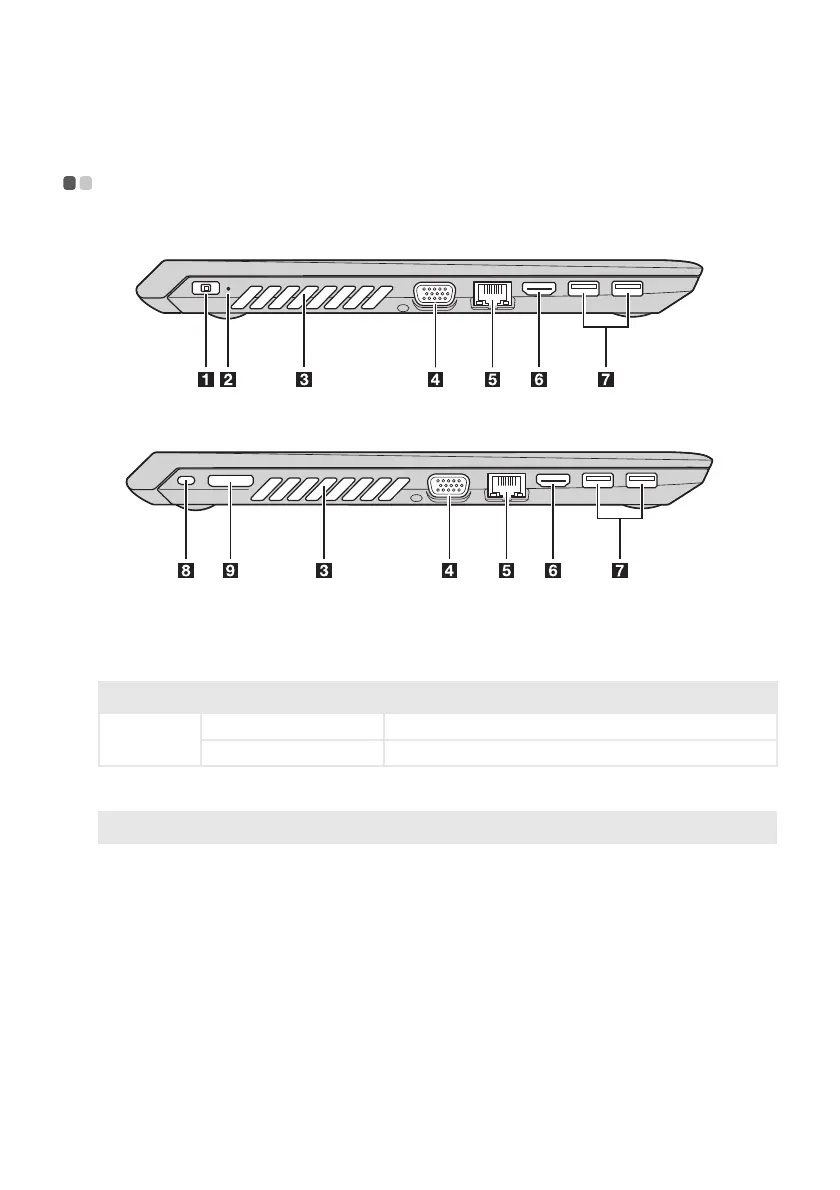
Left-side view - - - - - - - - - - - - - - - - - - - - - - - - - - - - - - - - - - - - - - - - - - - - - - - - - - - - - - - - - - - - - - - - - - - - - - - - - - - - - - - -
Lenovo V310-14ISK
Lenovo V310-15ISK
a
AC power adapter jack
Connect the AC power adapter here.
b
Power status indicator
Indicator Indicator status Meaning
Power status
indicator
On (green) Connect the AC power adapter to the computer.
Off Disconnect the AC power adapter from the computer.
c
Ventilation slots
Dissipate internal heat.
Note: Make sure that the ventilation slots are not blocked or else the computer may overheat.
d
VGA port
Connects to external display devices.
e
RJ-45 port
Connects the computer to an Ethernet network.
f
HDMI port
Connects to devices with HDMI input such as a TV or an external
display.





 To Next Page