32
Appendix A. CRU instructions
Customer Replaceable Units (CRUs) are parts that can be upgraded or replaced by the customer.
If a CRU is determined to be defective during the warranty period, a replacement CRU will be
provided to the customer. Customers are responsible for installing the self-service CRUs for this
product. Customers also can install optional-service CRUs, which might require some technical
skills or tools, or request that a technician install the optional-service CRU under the terms of the
applicable warranty service type for your country or region.
Notes:
• The illustrations in this manual might differ from the a
ctual product. Please refer to the actual product.
• The CRU service is
only applicable to certain countries.
Replacing the removable module (on select models) - - - - - - - - - - - - - - - - - - - -
Note: For example purposes, this section describes the replacement of the optical disk drive module.
Supplied with an optical disk drive and a removable battery
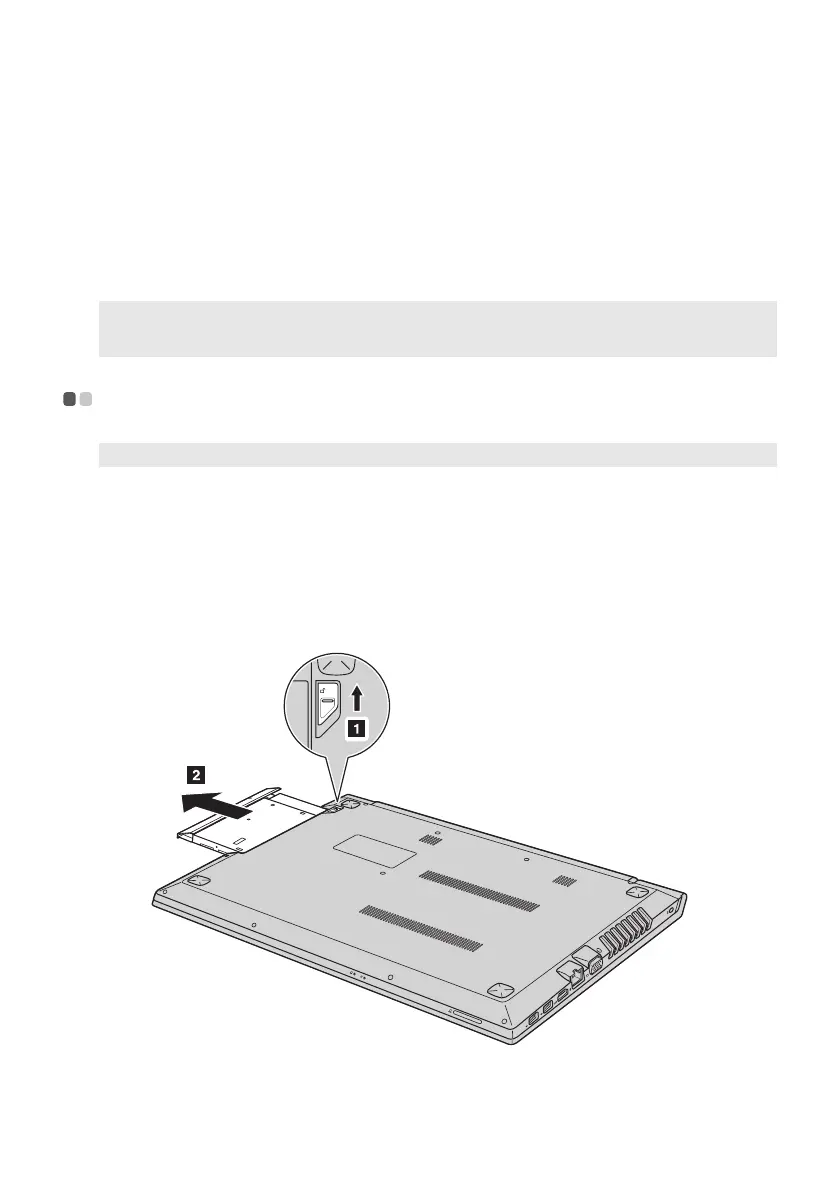
To remove the removable module, do the following:
1 Turn off the computer. Disconnect the AC power adapter and all cables from the computer.
2 Close the computer display, and then turn the computer over.
3 Hold the spring-loaded latch in the unlocked position
.
4 Gently pull the removable module out
b
.





 To Next Page