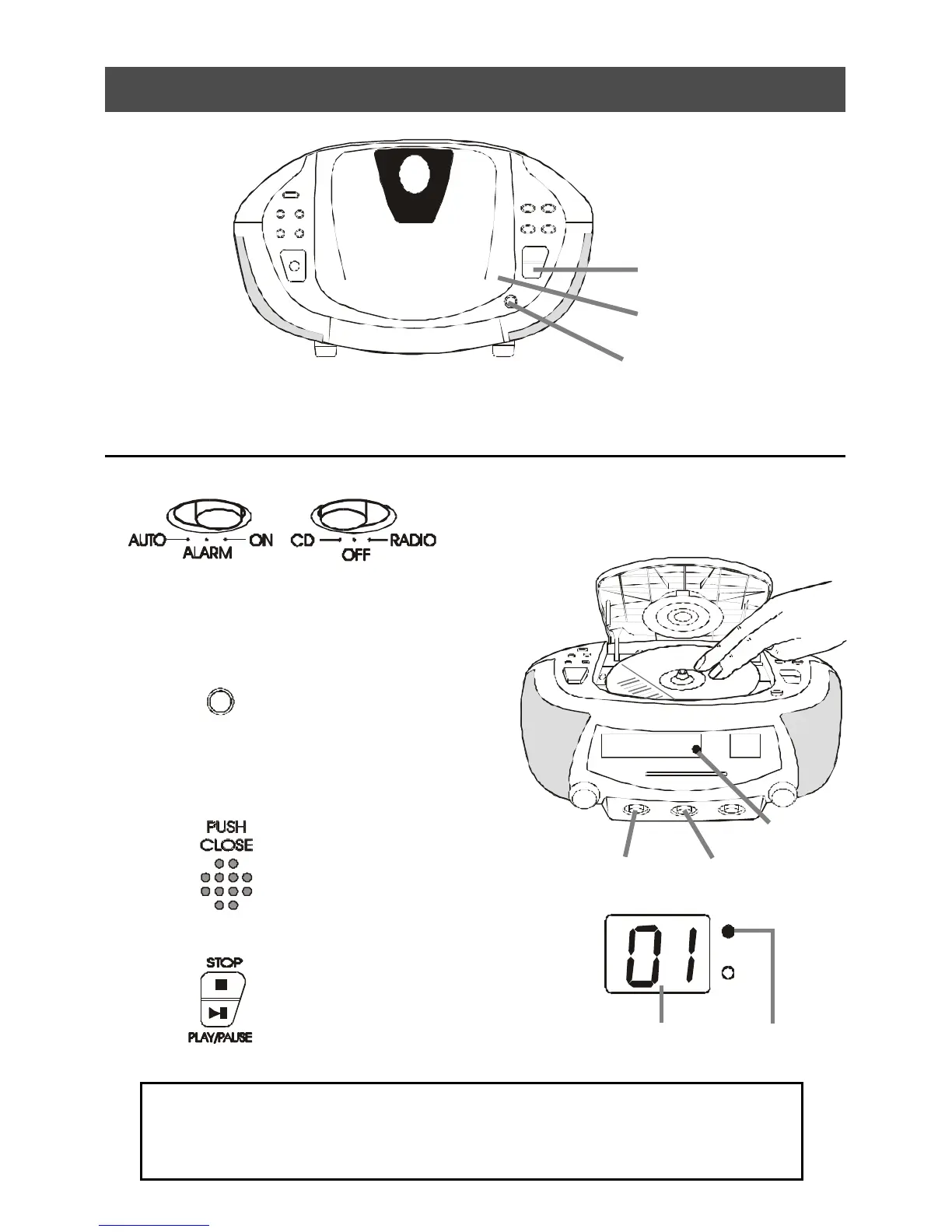
2. Playing a CD
1
Slide the Function
Switch to CD position,
and the Mode Switch to
ON position.
3
Close the CD Door by
pushing it down at the
position marked PUSH
CLOSE.
4
PUSH
OPEN
Press the CD Door Open
Button to open the CD Door
and place the CD in the CD
compartment.
The label side of the CD
should face upward.
2
Press the CD Play
Button. The player plays
all the tracks once.
Connect the AC power cord (see Setting the Clock).
CD Track
number
Play/Prog.
Lamp ON
CD Door
Open Button
Play Button
PUSH
CLOSE
Mode Switch Function Switch
Remember to switch the Mode Switch to ALARM or AUTO position after
listening, and the Auto Lamp will turn on, so that the buzzer alarm or CD
music will wake you up at your preset time. Make sure the volume control
is adjusted loud enough to wake you up.
Auto Lamp



 To Next Page