8
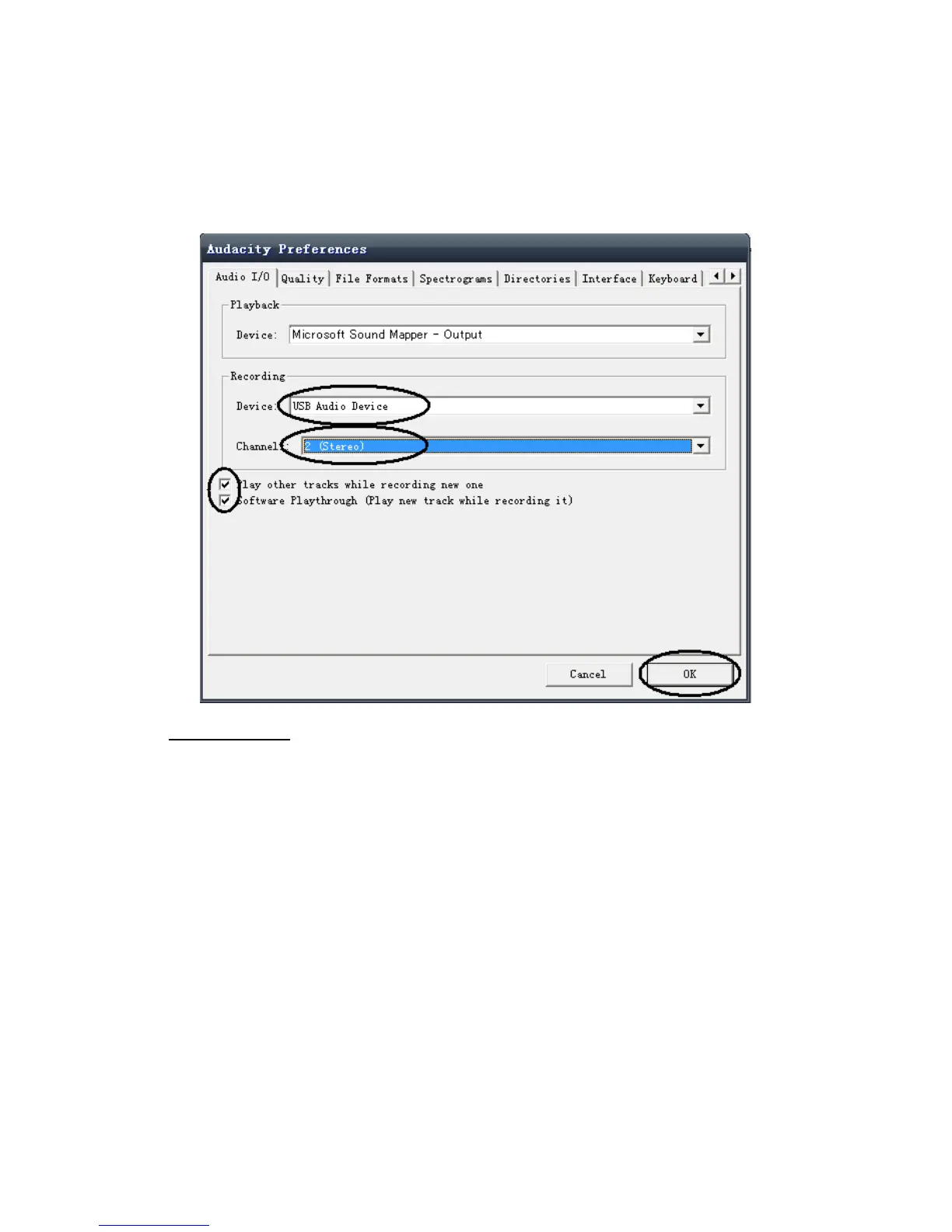
●The lower box enables the number of recording channels to be set, 1 is Mono and 2 is
Stereo, select the Stereo option.
●Click ‘OK’ once the options have been selected:
Playing a record
●This unit operates from USB DC 5V power.
●Switch on the unit by pressing the power switch on the front
●Raise the dust cover and push it back far enough until it stays upright.
●Release the Security latch from the tone arm by moving it to the right.
●Place the record to be played on the turntable.
●Select the correct playing speed for the record (33, 45 or 78 rpm) using the
●Speed control switch on the top right hand side of the unit.
●Push the cue lever back to raise the tone arm.
●Moving the arm from its rest will start the turntable rotating.
●At the desired point on the record, pull the cue lever forward to lower the arm.
●At the end of the record the Turntable will automatically stop rotating.


 To Next Page