5
LP Playing
When in LP playback mode,
Put the LP onto the platter and move the tone arm across to begin playback.
To record from the LP, insert a USB STICK/SD Card then press
key to begin
recording and press
key again to stop recording.
USB host link to PC for playing & recording
Through the USB cable and Software CD (Included), you can
convert music files from USB /SD, FM radio or LP to computer.
CHARGING
Charge the battery with the included USB lead through connecting the USB lead to the
port into the rear of the unit and into a computer or power adaptor. When charging, the
LED light is red. When finish charging, the LED light is green.
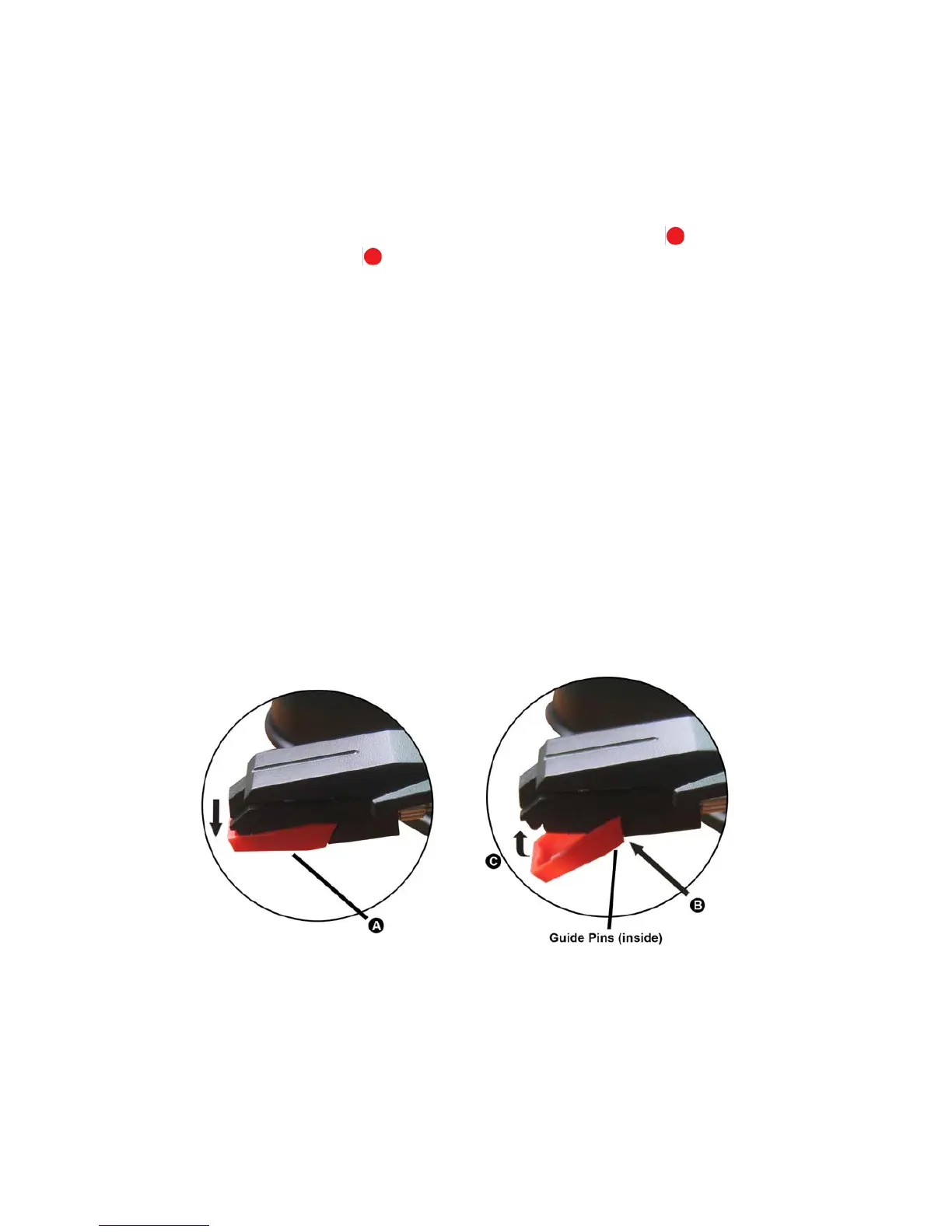
HOW TO REPLACE THE NEEDLE
To replace the needle, please refer to the instructions below.
Removing the needle form the cartridge
1. Place a screwdriver at the tip of the needle heads hell and push downwards in the
direction shown in sketch “A”
2. Remove the needle head shell by pulling it forwards and pushing downwards.
Inserting the needle
1. Hold the tip of the needle head shell and insert it by pressing in the direction
illustrated by “B”
2. Push the needle head shell upwards in the direction illustrated by “C” until the needle
locks into the tip position.


 To Next Page