14 15
ADD AUDIO RECORD MODIFY AUTO-FEEDING SETTING
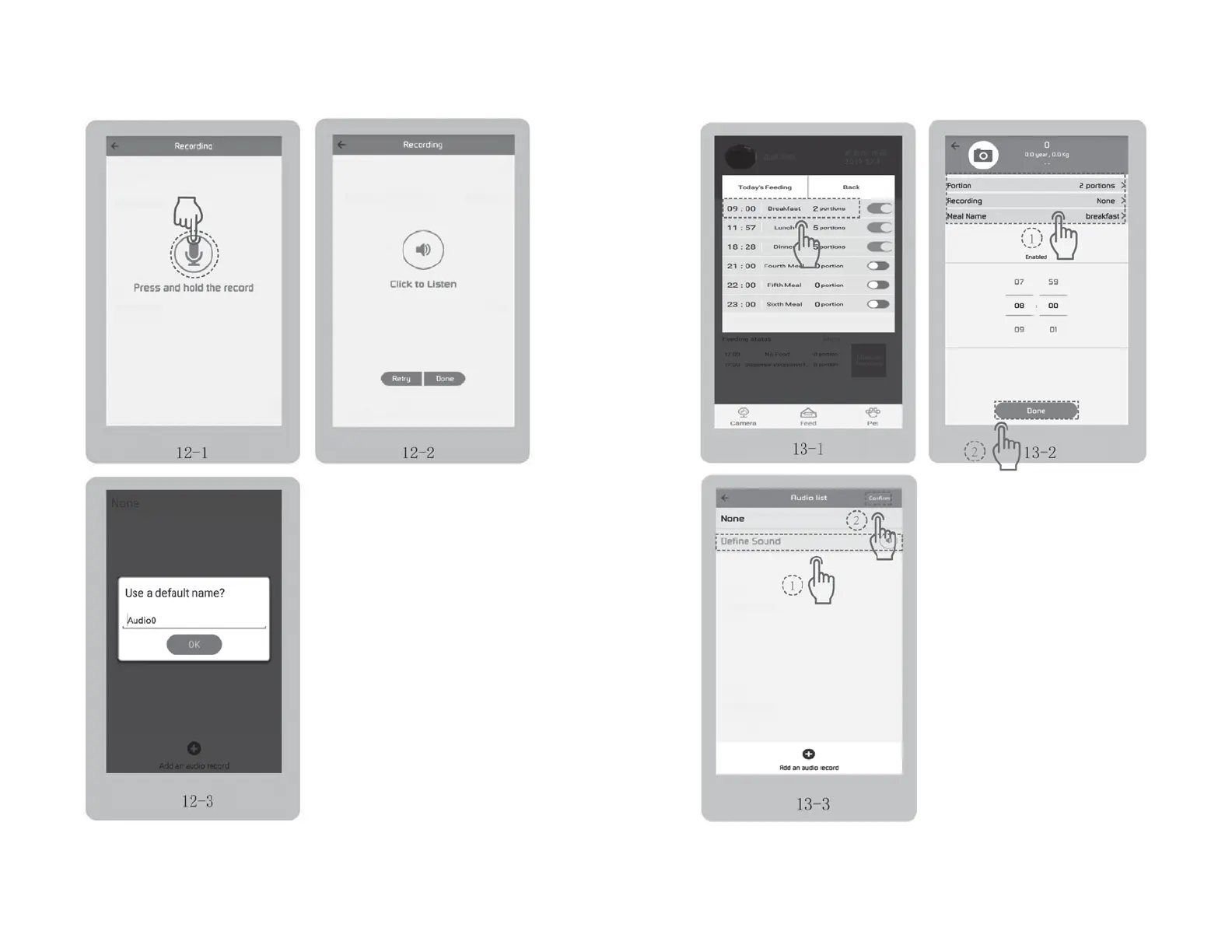
• You could record 1-10 seconds by pressing
the button. Fig 12-1
• Release your finger, you could choose “Click to
Listen”, “Retry” or “Done” button as needed.
Fig 12-2
• Press the “Done” button (Fig 12-2), then goes to
the next interface (Fig 12-3) where you can change
the default record name “Audio0” or keep it.
Then tap “OK”. Tap top left arrow in Fig 9-3 to go
back to Fig 7-1 interface.
• Tap "Modify"(Fig 10-1) to enter the auto-feeding
setting page. Fig 13-1
• Tap the meal name (for example, tap
“Breakfast”) to set Feeding Portion,
Recording, Meal Name and Feeding time.
Fig 13-2 → Fig 13-3


 To Next Page