6 7
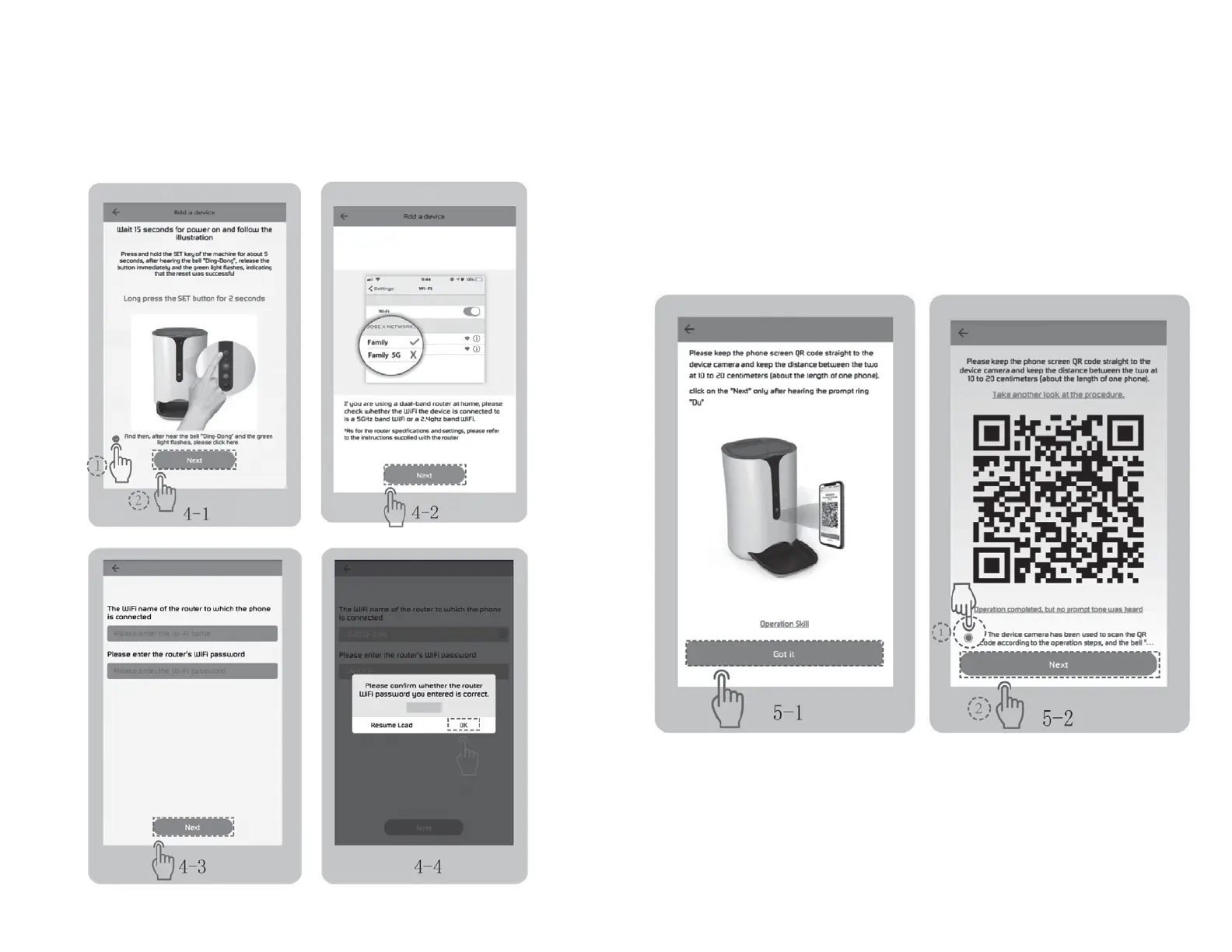
CONNECT TO NETWORK
• Press the “SET” button on the Feeder for about 5 seconds, you will hear a “ding dong” sound, and
the green indicator light will flicker. Tap “Next”. Fig 4-1.
• Type in your home WiFi account and password to connect your 2.4GHz WiFi network
(NOTE 5.0GHz is NOT supported), tap “Next”, then tap “OK”. Fig 4-2 → Fig 4-3 → Fig 4-4.
PAIRING - The indicator light is green and flickers slowly:
Tap “Got it” on interface (Fig 5-1), point the QR code on your phone to the camera of the feeder,
you could move your phone back and forth and keep 10-20cm distance.
When you hear the beep sound, tap “Next”. Fig 5-2.
CONNECTING


 To Next Page