4 Studio Frame
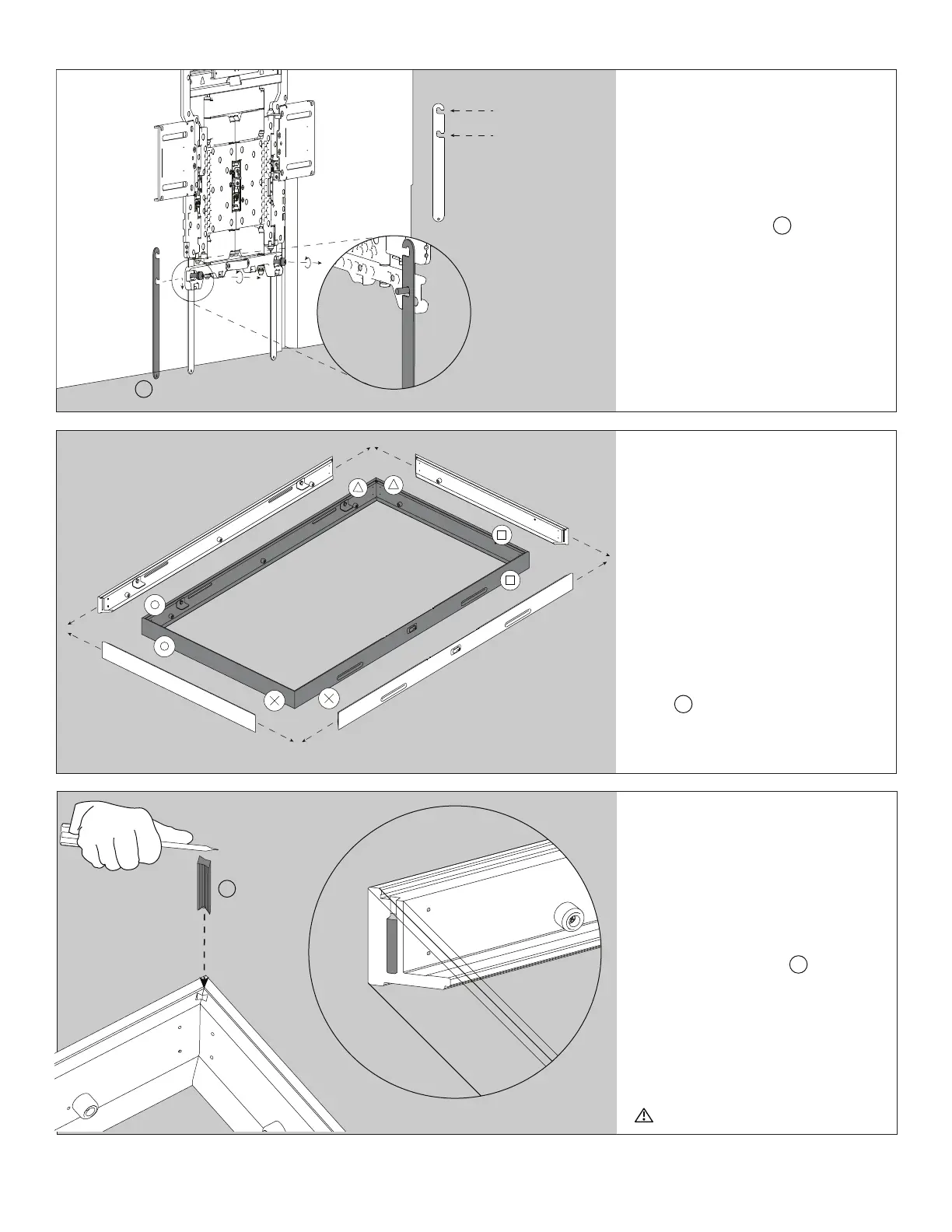
Step 5
Lay Out Frame
On your clean & level surface, begin
frame assembly by lining up all 4
sides of the moulding face down.
Match corners using the symbols.
Lightly press the tip of a dovetail
joiner E into each pre-milled pocket
paying close attention to front seam
alignment of frame. Do not fully insert
dovetail joiners yet.
Step 6
Install Dovetail Joiners
NOTE: Make sure all corners are square
before installing dovetail joiners.
Drive one dovetail joiner E to the
bottom of the pre-milled pocket in
one of the 4 corners of the frame with
the tip of a flathead screwdriver. Move
to the diagonal corner and drive the
second dovetail joiner to the bottom of
the pocket. Repeat this step until all 4
corners are complete.
Caution when using screwdriver
Step 4
Attach Hem Bars to
Display
Install VESA Hem Bars J to reinforce
the bottom of the frame. Loosen the two
M6 screws from the back of the SU-
WL855 bracket (provided with bracket).
This creates clearance between the back
of the display and the front of the wall
mount to hook your VESA Hem Bars
onto the M6 screws as shown. Use the
top notch with XR-75X93L display and
bottom notch for XR-65X93L display.
Retighten M6 screws.
XR-65X93L
XR-75X93L
J
E


 To Next Page
 Loading...