EasyManua.ls Logo

Leon Studio Frame - User Manual

Leon Studio Frame
8 pages
Print Icon
To Next Page IconTo Next Page
Loading...
Leon Studio Frame
for Sony BRAVIA XR
Installation Instructions
Question and Answer IconNeed help?

Do you have a question about the Leon Studio Frame and is the answer not in the manual?

Summary

Before Installation

Installation Steps

Prepare Working Area & Unbox Frame

Designate a clean, level, non-abrasive surface for frame assembly and unbox with care.

Attach Frame Mount Brackets to TV

Attach frame mount brackets to the top threaded holes on the display backside using M5 screws.

Install Wall Mount Bracket & Mount TV

Install the wall mount bracket and mount the TV to the wall as per bracket instructions.

Attach Hem Bars to Display

Install VESA Hem Bars to reinforce the bottom of the frame using M6 screws.

Lay Out Frame

Line up frame sides, match corners, and lightly press dovetail joiners into pre-milled pockets.

Install Dovetail Joiners

Drive dovetail joiners into the pre-milled pockets of the frame corners, ensuring alignment.

Install Corner Braces

Fasten corner braces to frame corners using #6 x 1/2" screws after installing dovetail joiners.

Attach Display Clamps to Top of Frame

Attach display clamps to the top moulding using M5 thumb screws for later adjustment.

Connect Sensor USB Cable

Connect the micro USB end of the sensor cable to the sensor input in the bottom frame.

Place Frame onto Display

Hook display clamps over the display top and fasten frame mount brackets to the sides.

Fasten VESA Hem Bars to Central Cover

Align VESA Hem Bars with central cover holes and secure with a #4-1/2" screw.

Connect USB Cable & App Installation

Route sensor USB cable and plug the App Installation USB into the display's USB port.

Limited Warranty

Warranty Coverage

Covers manufacturing defects in wood housing/frame for one year; excludes misuse and unauthorized repairs.

Exclusions and Restrictions

Details warranty exclusions, limitations on remedies, and disclaims implied warranties.

Warranty Period & Service

Warranty begins at purchase; outlines obtaining authorized service and return procedures.

Questions and Support

Overview

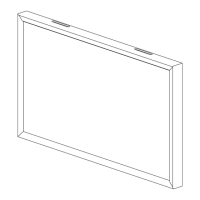
The Leon Studio Frame for Sony BRAVIA XR is a specialized accessory designed to enhance the aesthetic integration of Sony BRAVIA XR televisions into a living space, giving the TV the appearance of a framed piece of art. This product is essentially a decorative frame that mounts around the television, along with an app that provides an "Art Frame Gallery" experience.

Function Description:

The primary function of the Leon Studio Frame is to provide a custom-fit, aesthetically pleasing frame for Sony BRAVIA XR televisions. It transforms the television from a standalone electronic device into a more integrated design element, mimicking a framed artwork when the TV is not actively displaying video content. The frame is designed to be installed by the user, with clear instructions provided for assembly and attachment to the TV and wall. An accompanying app, the Sony Art Frame Gallery, extends the functionality by allowing the display of art, further enhancing the "art frame" illusion. The frame also incorporates an IR repeater to ensure full functionality of the Sony remote control, which is important for seamless user experience given the potential for the frame to obstruct the TV's built-in IR receiver.

Important Technical Specifications (Derived from components and instructions):

  • Compatibility: Specifically designed for Sony BRAVIA XR televisions. The instructions mention XR-75X93L and XR-65X93L models, indicating model-specific fitment.
  • Frame Construction: Composed of multiple moulding pieces that are assembled using dovetail joiners and corner braces.
  • Mounting System: Utilizes Frame Mount Brackets that attach to the TV's backside, and VESA Hem Bars for reinforcement, particularly at the bottom of the frame. It is designed to work in conjunction with a wall mount bracket (SU-WL855 recommended, but not provided by Leon).
  • Connectivity: Includes a Sensor USB Cable (micro USB) for connection to the frame's sensor input and then to a USB port on the TV. An App Installation USB is also provided for installing the Sony Art Frame Gallery app.
  • IR Repeater: An IR repeater is integrated or required to ensure the Sony remote control's full functionality, suggesting the frame might otherwise interfere with the TV's IR receiver.

Usage Features:

  • Aesthetic Enhancement: Transforms the TV into a framed art piece, blending it more seamlessly with home decor.
  • Custom Fit: Designed to precisely fit specific Sony BRAVIA XR models, ensuring a clean and integrated look.
  • Art Frame Gallery App: Provides a dedicated application to display artwork on the TV, complementing the physical frame.
  • Remote Control Functionality: The inclusion of an IR repeater ensures that the TV's remote control remains fully functional despite the presence of the frame.
  • Modular Assembly: The frame is assembled from individual moulding pieces, allowing for easier handling and installation.
  • Adjustable Mounting: Frame Mount Brackets and Display Clamps are initially left loose for adjustment, allowing for a tight and precise fit to the display.

Maintenance Features:

  • Installation/Uninstallation: The frame is designed to be installed and uninstalled by two or more people, indicating it can be removed for maintenance or TV servicing.
  • Careful Handling: Instructions emphasize careful handling due to potentially sharp mitered corners and the need to avoid applying force to the TV screen.
  • Pre-installation Checks: Recommends choosing an installation location free of obstructions and performing electrical safety checks (turning off circuits, using a non-contact voltage tester) before drilling or cutting.
  • PPE Recommendation: Advises the use of personal protective equipment (PPE) during installation, including vision, hearing, and respiratory protection, highlighting potential hazards associated with tool use.
  • Warranty: Leon provides a limited warranty on the wood housing/frame for one year against manufacturing defects, with provisions for repair or replacement. The warranty is void if the product is inaccessible for inspection or repair, or if damage is due to improper use, installation, or unauthorized modifications.
  • Cleaning: While not explicitly detailed, the nature of a decorative frame suggests standard cleaning practices for framed art or furniture would apply, avoiding harsh chemicals that could damage the finish.
  • Troubleshooting: The manual provides contact information for customer service for assistance, indicating support is available for installation or operational issues. The note about the IR repeater addresses a common potential issue with framed TVs.

Leon Studio Frame Specifications

General IconGeneral
BrandLeon
ModelStudio Frame
CategoryRacks & Stands
LanguageEnglish