5 Studio Frame
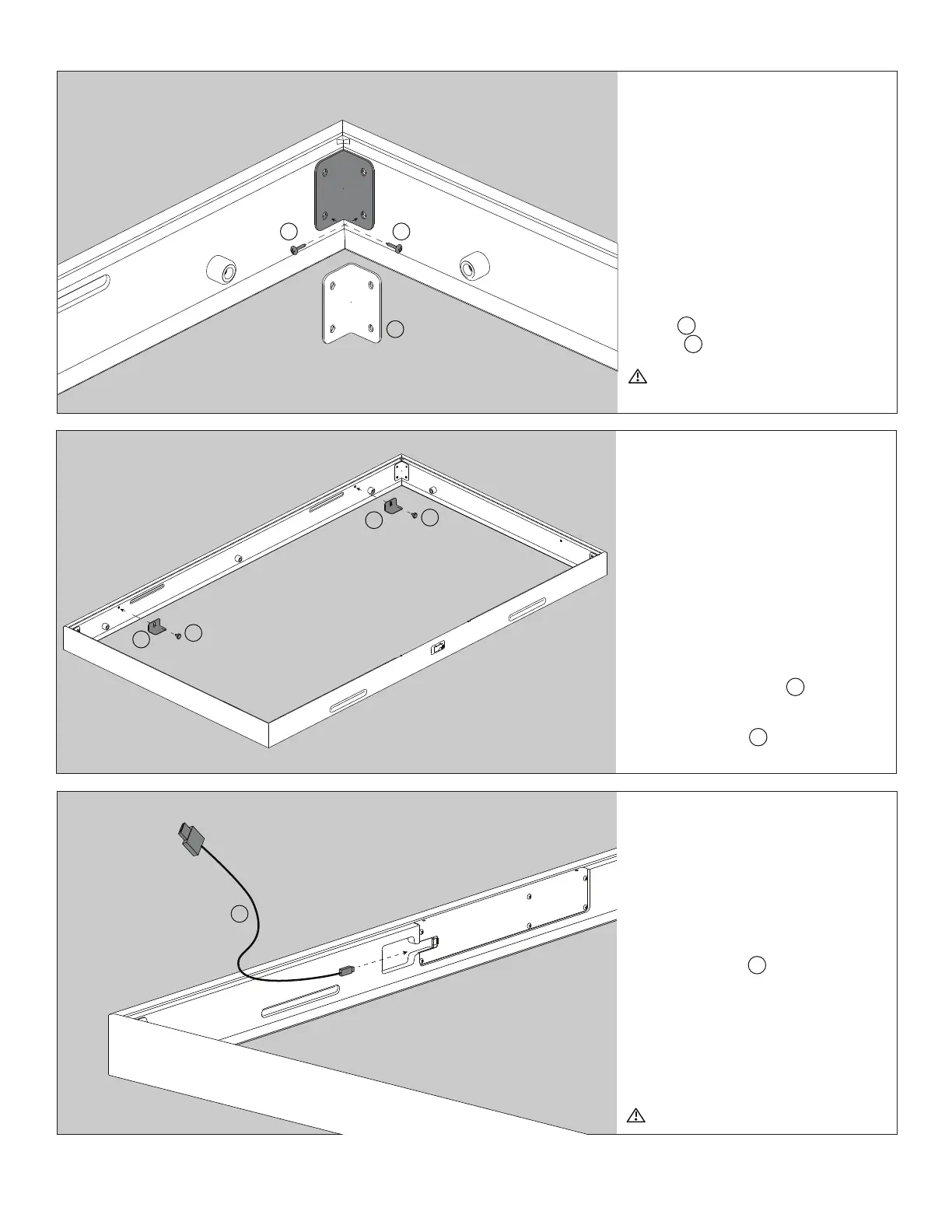
Step 9
Connect Sensor USB
Cable
Connect the micro USB end of the
Sensor USB cable H to the sensor
input in the bottom frame. Leave this
cable loose until your frame is attached
to your TV.
NOTE: USB symbol should be facing up
when connecting to sensor input.
Gently insert micro-USB
Step 7
Install Corner Braces
Once dovetail joiners are installed
into all 4 corners, make any final
adjustments to the corners to ensure
proper alignment. Then, while holding
the corners together, fasten a Corner
Brace B with the provided #6 x ½”
screws A into each of the 4 corners.
Manual Screwdriver only. Avoid power
tools
Step 8
Attach Display Clamps to
Top of Frame
Attach 2 Display Clamps C to the top
moulding which can be identified by its
3 rubber bumpers. using the provided
M5 Thumb screws G . Leave loose for
adjustment later.
B
AA
C
C
G
G
H


 To Next Page