5
1) TIME SETTING: Time Delay
TEST: Help to quickly adjust and test the fixture. FOR TESTING ONLY.
When the motion sensor detects you, the light will turn on for 6 seconds at any time (day/night).
1 MIN: the light(s) will remain on for 1 min after motion detection at night.
5 MIN: the light(s) will remain on for 5 min after motion detection at night.
10 MIN: the light(s) will remain on for 10 min after motion detection at night.
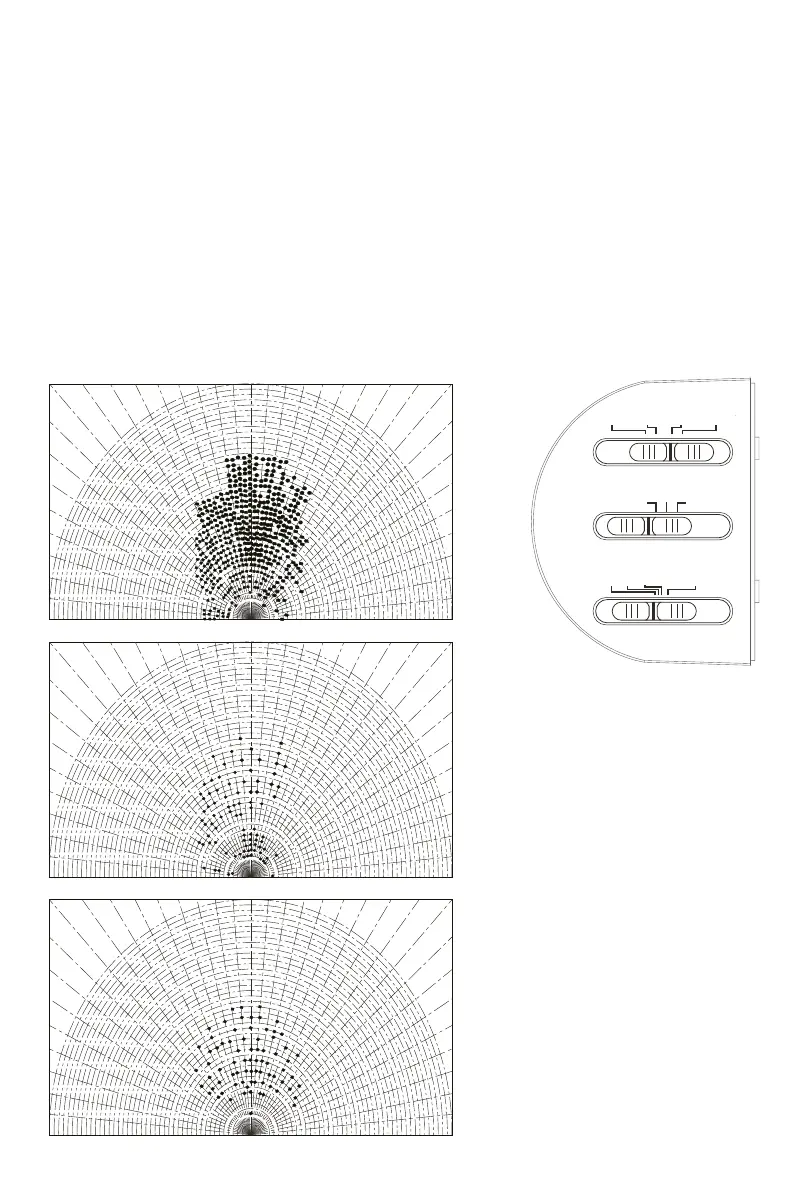
2) SENSITIVITY SETTING: Maximum detection distance
H: High sensitivity, up to 49 FT (max detection distance for this light)
M: Medium sensitivity, up to 36 FT
L: Low sensitivity, up to 26 FT
NOTE: At an ambient temperature of 77 degrees Fahrenheit, the detection distance is at its max. As the temperature increases or
decreases, the detection distance is affected.
OPERATING INSTRUCTIONS:
There are many changeable settings. Please set the settings that meet your needs.
TEST
AUTO 3H 6H
TIME
L H
SENS
M
1MIN
5MIN 10MIN
DUSK TO DAWN
H
3.3
9.8
15.1
21.2
26.2
30.4
36.1
42.7
49.2
55.8
62.3
68.9
M
3.3
9.8
15.1
21.2
26.2
30.4
36.1
42.7
49.2
55.8
62.3
68.9
L
3.3
9.8
15.1
21.2
26.2
30.4
36.1
42.7
49.2
55.8
62.3
68.9
Motion Sensor Sensitivity Diagram
When 2 infrared rays (dots in the diagram) are triggered, the sensor will be triggered.



 To Next Page