Sliding Gate Motor – User’s Installation Manual
Letron Auto Gate (Australia) Pty. Ltd. Page 8 of 14
1. Installing the Gate Motor and Racks
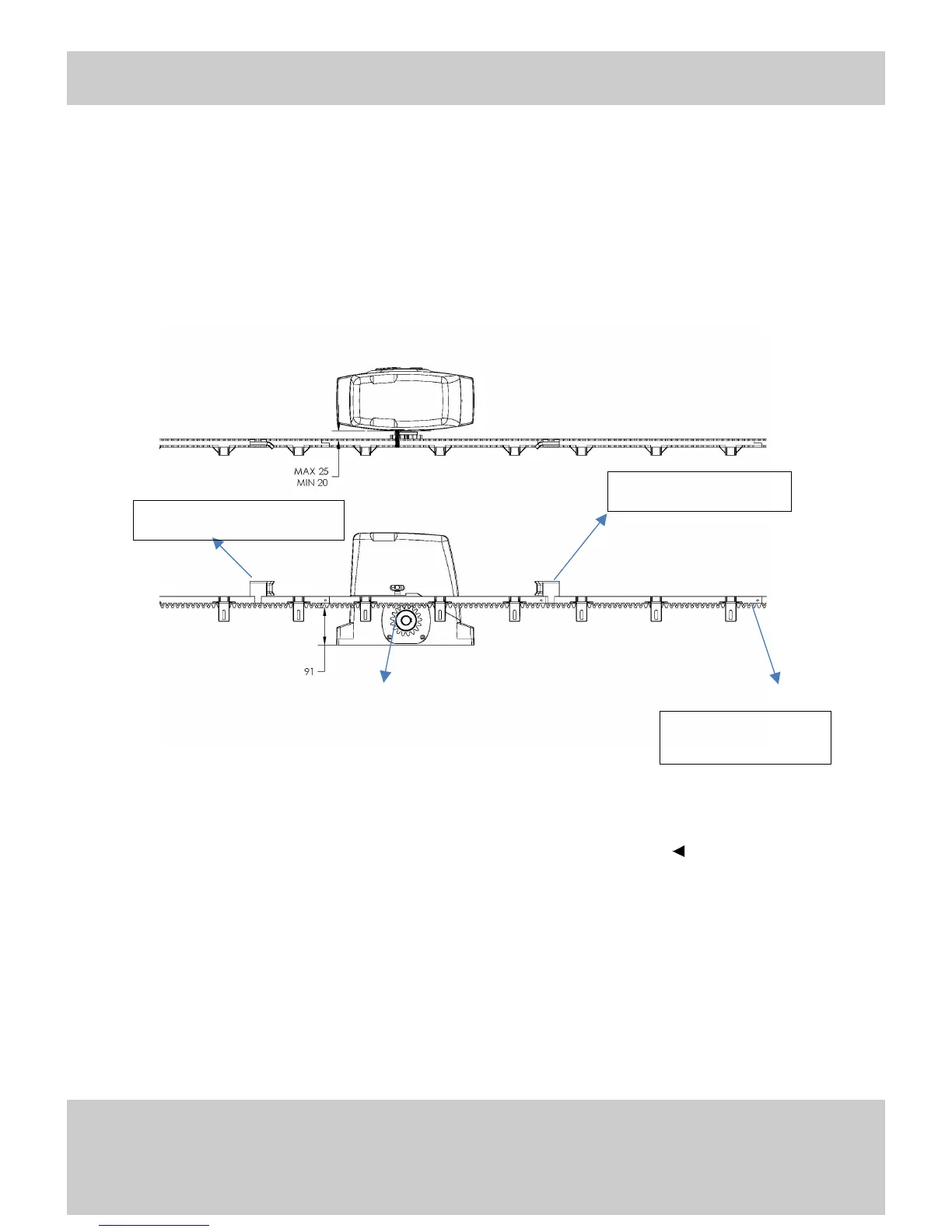
(1) Safely secure the Drive Motor onto a stable concrete slab/ground.
(2) Mount the required lengths of the Racks to the gate.
(3) Adjust the position of the racks so that the racks can be engaged correctly with the Pinion
gear. Ensure that the Racks do not rest on the pinion gear and that it leaves an allowance
of 2mm between the racks and pinion gear.
2. Installing the Limit Switch Stopper
The Limit Switch Stopper is used to control the positions of the gates.
(1) Screw the open and close Limit Switch Stoppers onto the gear racks. When the
stoppers are secured, use the keys provided to release the gear clutch and push the
sliding gates manually to predetermine the open and close positions. Then engage the
gear clutch secure the gate positions. (Refer to QUICK MANUAL RELEASE
OPERATION)
(2) Switch on the power and start the motor to see whether the gates slide smoothly.
(3) Adjust the position of the stoppers until the desired opening and closing positions of
are met.


 To Next Page