Please charge your tracker for at least 10 minutes
to have it activated before initial use.
- 2 -
Setting up Your Tracker
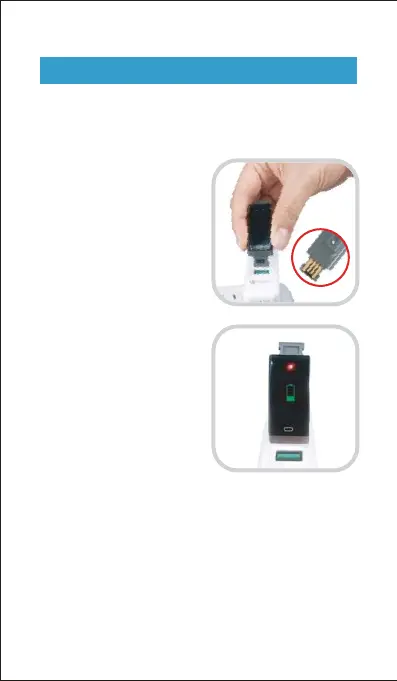
1. Charging your tracker
Insert the built-in USB plug
of the tracker into the USB
port for charging. Please
ensure that the metal strips
align with the USB strips.
When the tracker shows a
low battery indication,
connect the tracker to a USB
charging adaptor or a port
with 5V-500mA. If the tracker
is installed correctly, the
tracker will vibrate.
If the tracker does not vibrate, remove the tracker, flip it
upside-down and reinsert it into the charging port.
Remove the tracker from the power supply once fully
charged.
USB charger requirement: DC USB port (5V-500mA)
Charging time: 1-2hr(s)


 To Next Page